Using HTTPS services that require TLS 1.2

Hi Everyone!
We have been receiving reports of connectivity issues related to SSL-secured (HTTPS) services. When trying to add a service connection to an HTTPS-secured service, you get a Connection Failed message in Essentials Manager, even though you can see the service just fine in a web browser. For example, we've had issues connecting to the services at https://hazards.fema.gov/gis/nfhl/rest/services/public :
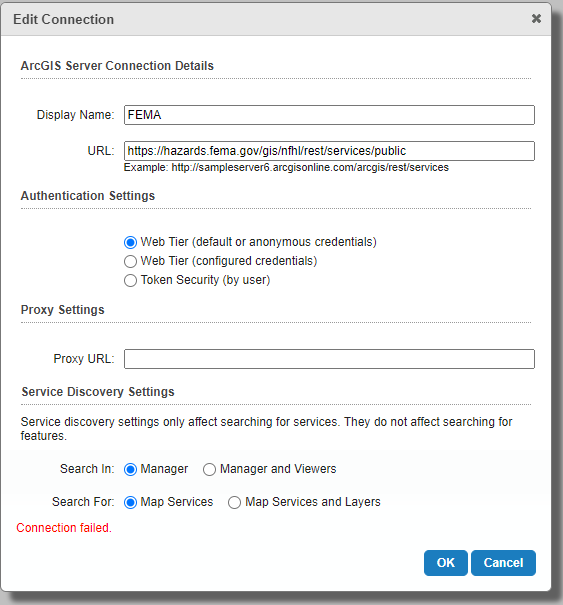
In this case, we got the error because the server requires TLS 1.2, the most current protocol for HTTPS. You can use an online testing site or the browser developer tools to determine the protocol version used:
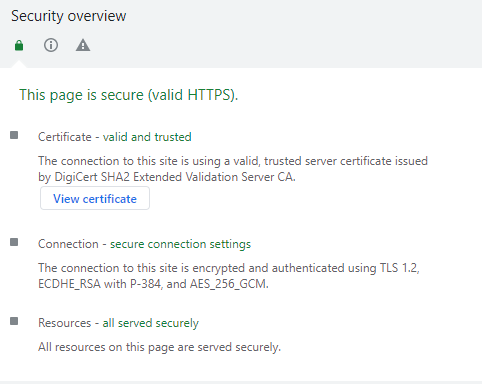
Geocortex Essentials is built to be compatible with Microsoft .NET 4.0, which may attempt to negotiate an HTTPS connection using SSLv3. A server that does not support SSLv3 will reject the connection attempt and there's no chance to renegotiate with another supported protocol.
To avoid issues connecting to services and to keep your server safe we recommend configuring your environment to use strong cryptography - TLS 1.0 or later. We have two articles that specifically address HTTPS (SSL/TLS) issues you may encounter.
For more information about configuring Essentials to use strong cryptography when connecting to external services, refer to the article Connecting to external services with TLS 1.2 at https://support.vertigis.com/hc/en-us/articles/11461109620754-Connecting-to-external-services-with-TLS-1-2 .
For information about configuring your own server and determining what protocols Essentials accepts, refer to the article Configure your Essentials Server to use TLS 1.2 at https://support.vertigis.com/hc/en-us/articles/11461060137490-Configure-your-Essentials-Server-to-use-TLS-1-2
We will update these articles as new information is available - please check them out to keep your systems safe and secure!
Regards,
-Malcolm
Du måste logga in om du vill lämna en kommentar.
Kommentarer
0 kommentarer