WMS layer isn’t appearing in a print output.

We have several WMS services (and other types of external services) that does not appear in a print output. However a few other WMS services is possible to print.
We use VertiGIS Studio Web with VertiGIS Studio Printing.
Examples of services that does not appear in a print output:
https://api.dataforsyningen.dk/topo_skaermkort_daempet_DAF (WMTS)
https://geoserver.plandata.dk/geoserver/wms(WMS)
https://arealeditering-dist-geo.miljoeportal.dk/geoserver/wms(WMS)
https://data.geus.dk/arcgis/rest/services/Denmark/DK_Morfologi_kort/MapServer(Tile Layer)
Examples of service that do appear:
http://geocloud.vd.dk/CVF/wms (WMS)
https://miljoegis.mim.dk/wms?servicename=grundvand_wms(WMS)
-
Martin Lauenborg have you heard of this issue?
0 -

Hi Lea,
Even though WMS is an open and widely recognized standard, we’ve seen — across several products (WebOffice, Studio Printing, Studio Web) — that the structure and supported functionality of WMS services can vary significantly.
Sometimes this is due to configuration differences, but often it simply depends on which tool or product is serving the WMS.We will definitely investigate the issues you’re seeing with the listed WMS services.
Please open a support case with VertiGIS.
For best results, please include either:- your Studio Web app configuration or
- a web map definition
This will help us test in an environment comparable to yours.
Additionally, we will need a few more details about your environment:
- Are you using Printing Gen1 (Chromium-based, possibly via our SaaS instance), or are you using the more likely on-premises Printing Gen2 engine (based on
.pagxlayouts and the ArcPy printing toolbox, deployed as a geoprocessing service)? - Are there any problems when printing the same WMS in ArcMap, ArcGIS Pro, or using the Esri Map Viewer?
- Are these WMS services publicly accessible, or will we need credentials?
- Could you please provide a copy of the printing request (for Gen2: the "Export Web Map Task")?
- Do you see the same issues when the print request is sent to Esri’s standard PrintingTools service (Utilities/PrintingTools) instead of the VertiGIS Printing Engine (VertiGIS_Utilities/VertiGIS_Printing_Tools)?
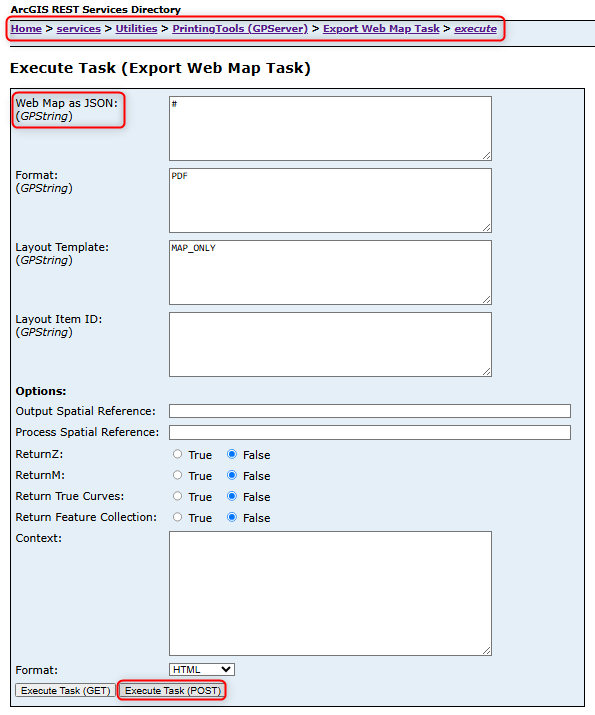
Thank you in advance — once we have this information, we can move forward with reproducing and analyzing the issue.
Best regards,
Jakob0 -

Did you find a solution for this?
I'm seing the same issue with a WMS from GeoServer when using jpeg as output format .
For better performance, I have set a custom layer parameter for the WMS, and this works great except for printing.
"customLayerParameters": {
"format": "image/jpeg"
}"customLayerParameters": {
"format": "image/png"
}0 -
Jacob Fougstrup Nicolajsen
Printing issues with WMS services often depend on the specific service configuration. Problems with WMS layers published via GeoServer are not uncommon.To help us analyze your case, please follow the instructions provided above. In particular:
- Are you experiencing the same issue when printing the WMS using ArcMap, ArcGIS Pro, or the Esri Map Viewer?
Please note that we are constrained by the capabilities of Esri’s standard
PrintingTools.If the issue persists, feel free to contact me or reach out to VertiGIS Support with detailed information about the service in question.
0 -
Thanks for your responce @Jakob Furrer. We ended up taking to Geoinfo in Denmark.
Jacob Fougstrup Nicolajsen Often the solution is adding the custom parameter "format": "image/png".
At first, we tried "format": "image/jpeg" but this gave an empty print.
For services with a token, we also use the custom parameter token instead of adding the token to the url.
1
Vous devez vous connecter pour laisser un commentaire.
Commentaires
5 commentaires