Tool behaviour: pixel tolerance setting

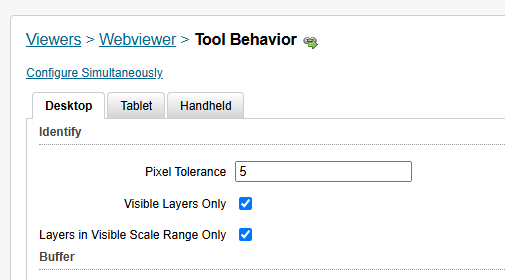
Hi, does anyone know where these Geocortex HTML5 settings have gone in Studio Web Designer ?
I have searched the docs but couldn't locate these anymore. Is there a default setting and what is it?
-

See the documentation below for the default settings.
You can configure this via the arguments of the Identify command.
See
https://developers.vertigisstudio.com/docs/web/api-commands-operations/#operation-tasks.identifyhttps://developers.vertigisstudio.com/docs/web/api-argument-definitions/#definition-IdentifyArgs
pointTolerance
number
A tolerance value to use for point identify operations. All features falling within a buffer of this many logical pixels around the point will be returned by the identify operation. The default is 10. Not supported in VertiGIS Studio Mobile.polyTolerance
number
A tolerance value to use for polyline and polygon identify operations. All features falling within a buffer of this many logical pixels around the geometry will be returned by the identify operation. The default is 2. Not supported in VertiGIS Studio Mobile.
You should modify the Identify command to something like the example below
(from the example here https://support.vertigis.com/hc/en-us/community/posts/19971014408082-Buffer-results-is-selecting-features-outside-of-buffer?page=1#community_comment_20759503460626){ "name": "tasks.identify", "arguments": { "pointTolerance": 5 } },0 -
Ah many thanks Nico, was just looking for this! As a recommendation, it would be great if the default value can be changed in the designer interface without the need for creating and modifying the identify command but for now this works for me!
1 -
Create an Idea for it here https://support.vertigis.com/hc/en-us/community/topics/11497311339794-Ideas-VertiGIS-Studio-Web
0
Vous devez vous connecter pour laisser un commentaire.
Commentaires
3 commentaires