Tools shall remain active after completing the operation

When a tool such as "Identify" or "Rectangle Selection" is used, it should remain active after the operation/selection has been executed. The tool should only be deactivated when the user clicks the corresponding button again.
The behavior shall be configurable in the backend on a per-tool basis. A configuration option shall determine whether the tool remains active after execution ("sticky tool") or is automatically deactivated after a single operation.
The user interface shall clearly indicate when a tool is active.
-

Is the Repeat Action command useful in your case?
Added a powerful new pattern that allows tools to run either until canceled or for a specific number of repetitions. This functionality is enabled through the new system.repeat-action command, offering enhanced flexibility for tasks requiring iterative actions. For instance, you can configure a tool to capture geometry for a set number of points, performing subsequent actions. Alternatively, you can set up a tool to repeatedly capture geometry from clicks on the map, identify features, and add them incrementally to a results list.
1 -
I'm new to VertiGIS Studio Web so I'm not sure whether this is the correct command for the Identify tool. Currently, we are running it through a workflow that repeatedly reactivates the tool. However, when I switch from point selection to rectangle selection, an error message is displayed:
"Identify failed because no valid geometry was provided."
Workflow looks like:
[
{
"name": "workflow.run",
"arguments": {
"icon": "identify-map-point",
"title": "language-designer-gen-2ae2e325-6193-4c65-a4c3-1941e553ded8-menuitemtitle-tl3qor",
"id": "442a0a1b-0e4f-49dd-a253-9a551ccdea15",
"portalItem": "https://xxxxxxxx/portal/sharing/rest/content/items/e1c0fd6aacf748da9f9139068c05687e",
"commandArgumentInput": "context",
"inputs": {}
}
}
]
Shouldn't there be an option to configure, via a toggle button, whether a tool is used only once or remains active until it is explicitly deactivated by the user?
0 -

Markus,
I think you can make the change you want to the identify tool in your workflow or in the main settings of the tool in the Command section (see screenshot)
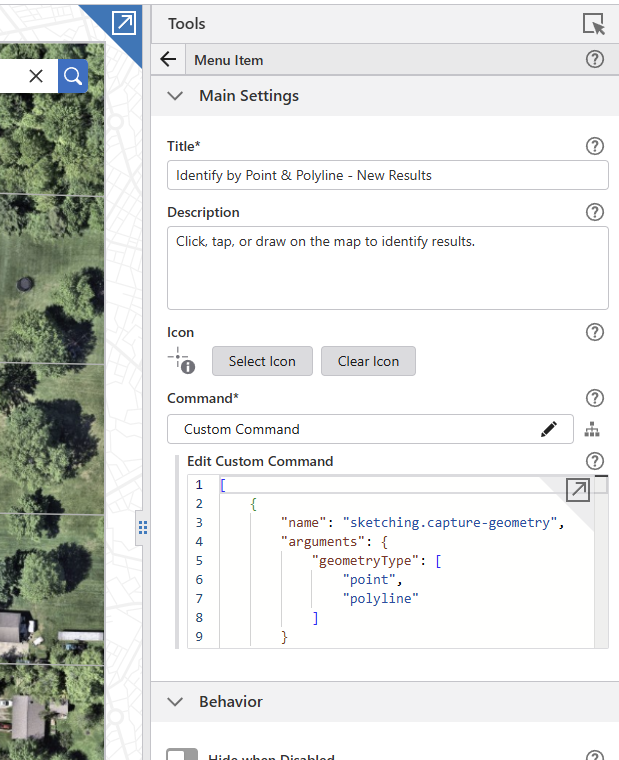
While I don't have the repeat action enabled for identify I do have it for my measure length tool:
[
{
"name": "system.repeat-action",
"arguments": {
"action": [
{
"name": "measurement.capture-geometry",
"arguments": {
"geometryType": [
"polyline",
"polygon"
],
"pluginSettings": {
"snapping": true
}
}
},
"measurement.create-graphics",
"map.add-markup"
]
}
}
]
This automatically adds a banner on the map notifying the user has a repeat action tool activated and they will need to manually turn off the tool.
I also have an independent identify tool to add to results:
[{
"name": "sketching.capture-geometry",
"arguments": {
"geometryType": [
"polyline"
]
}
},
{
"name": "tasks.identify",
"arguments": {
"layersWithPopupEnabledOnly": false
}
},
"results.activate-display-components",
"results.add",
"charts.display",
"kpi.display"
]
Hopefully some of this will help you out.
FYI - On Thursday 11/12/2026 VertiGIS has a GIS day presentation that will include customers talking about their applications and how they're set up, there may be some good inspiration to be found there.0
Please sign in to leave a comment.
Comments
3 comments