Now Available: Experience Builder Widgets 3.0

This release adds support for Workflow 5.53 and Experience Builder 1.21 and includes a number of bug fixes and support for ArcGIS Enterprise 12.1.
The widgets are now updated to use React 19. This means the widgets will not work with older versions of Experience Builder. To figure out which version of the widget works for you, see this chart.
For more information on the Workflow changes see the release notes here.
To use these widgets with ArcGIS Enterprise, follow these steps to register a widget with Portal.
Use these URLs to register your widgets:
Workflow: https://static.vertigis.com/exb-widgets/workflow/3.0.0/manifest.json
Printing: https://static.vertigis.com/exb-widgets/printing/3.0.0/manifest.json
To use these widgets with Developer Edition, follow these steps.
For Developer Edition users upgrading from 2.x versions please note the installation steps have changed.
-

Is anyone else seeing the Workflow widget 3.0 go blank when moving from one Display Form to the next?
I can reproduce it with the VertiGIS sample workflow “Display Form Items”. The first form renders fine, but when I select an item (e.g. Check Group or Text Area) and click Submit, the widget panel goes blank. The debug log shows the next
DisplayFormactivity (e.g.$textAreaForm) starting, so the engine keeps running, but nothing is rendered. There are no errors in the console.It happens with both the VertiGIS-hosted widget and a self-hosted widget built from the Developer Edition.
0 -

Martin, we have the issue you described logged internally as BUG 385121. It will have a fix in the next widget update.
In the meantime, this seems to work around the issue:
- In the second Display Form, add a load event to one of the form elements
- In the load event, add a Delay activity, and configure it with a short duration value, eg.100 milliseconds
- Below the Delay activity, add and connect a Show Form Element activity (no need to configure its inputs)
0 -
Thanks, Amanda. The workaround is working well for us.
0 -

I may have found a bug in the Workflow widget 3.0 and wanted to check whether others experience it too.
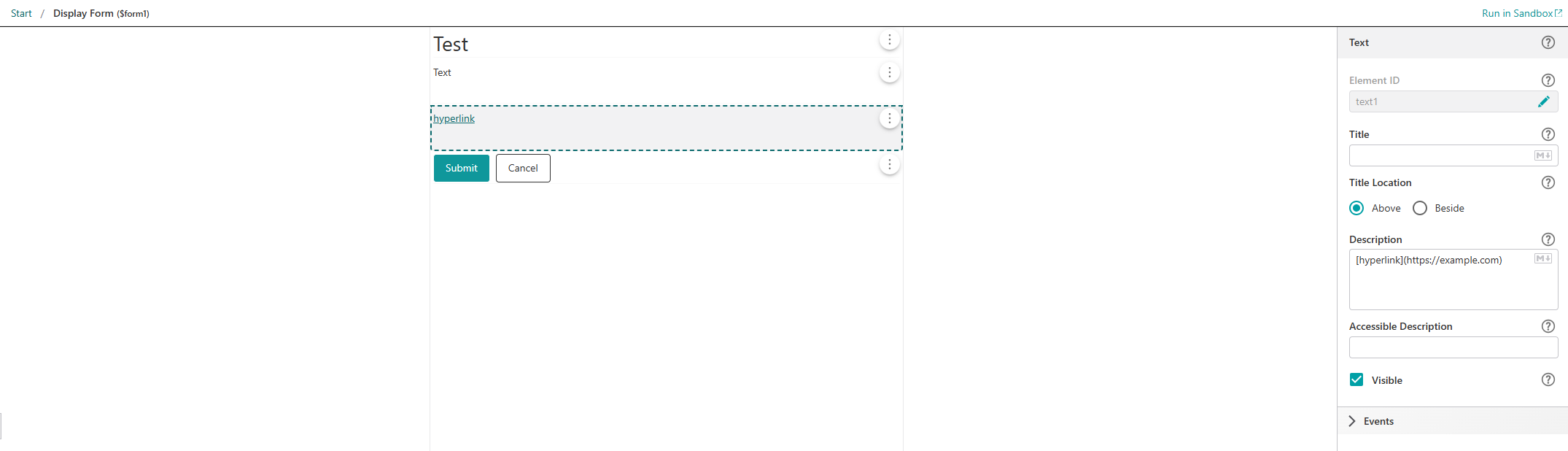
In a Display Form, I added a Text element and configured the Description property using Markdown syntax for a hyperlink, e.g.:
[hyperlink](https://example.com)
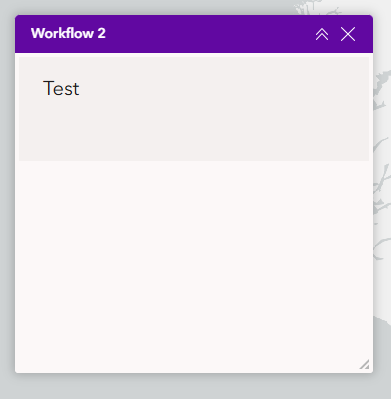
When I run the workflow in the sandbox, the hyperlink is displayed correctly. However, when the same workflow is executed through the widget in Experience Builder, the content is not rendered at all except for the header.
Has anyone else experienced this issue? It worked with previous versions of the widget.
Thanks in advance for any feedback.
Configuration of the display form:
Result in the widget:
 0
-
I gave it a quick test Cassandra, but I'm not seeing the same problem. If you want to compare and see if using the exact same workflow gets a different result on your end, you can open a copy of mine by using the File > Open by URL option in workflow designer, and pasting https://www.arcgis.com/home/item.html?id=f28a3e29ebf2470aa16947a09dbd0a9b
On my end using Experience Builder from Portal 12.1 and the 3.0 workflow widget, this is the result:
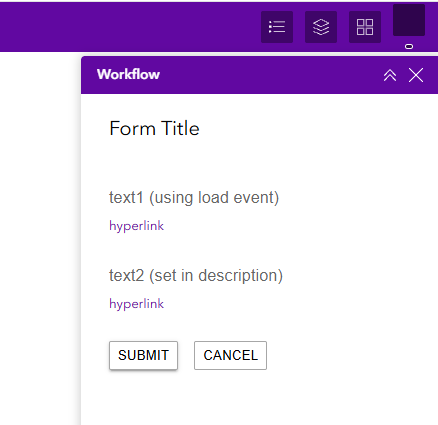
layout notes: I used the “foldable" theme to build my app, and put the workflow widget inside the existing widget controller in the top header area.
0
Please sign in to leave a comment.
Comments
5 comments