Location Note - Ability to move it once created

It's great that we can edit the text/font/etc a location note once it has been created, but sometimes we need to move it once we have the text showing on the map. Essentials markup tools were easy and intuitive to work with in this regard. Please allow for moving locations notes.
-

Hi Brian,
We use an extra custom tool to achieve this:
[
    {
        "name": "sketching.capture-geometry",
        "arguments": {
            "geometryType": [
                "point",
                "extent"
            ]
        }
    },
    {
        "name": "geometry.buffer",
        "arguments": {
            "bufferDistance": 10
        }
    },
    {
        "name": "map.get-markup",
        "arguments": {
            "collection": "vgs-map-notes"
        }
    },
    {
        "name": "sketching.edit-geometry",
        "arguments": {
            "options": {
                "enableDelete": false,
                "enableScaling": false,
                "enableVertexEditing": false,
                "enableRotation": false
            }
        }
    }
]
Regards
Holger
1 -
Holger,
Thank you for sharing! I do hope VertiGIS makes this out-of-box functionality though. It just seems like the process of how customers work with markups/text wasn't fully researched. Remove and replace, after having move abilities in Geocortex, just falls short.
0 -

There's an out-of-the-box option that runs a command chain similar to Holger's:
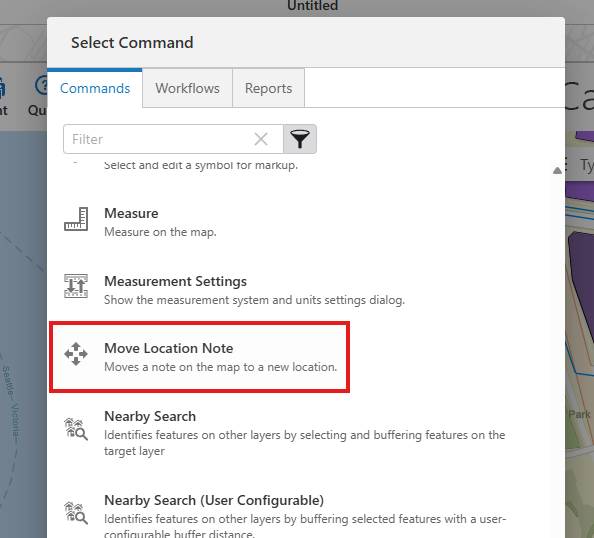
I think it just ends up being a bit confusing that “edit” and “move” are 2 separate functions. Folks sometimes find one without finding the other.
0 -
Thanks Amanda,
We build our solution with VSWeb 5.36, I guess it wasn't available then. Nice it's out-of-the-box now.
0
Please sign in to leave a comment.
Comments
4 comments