Change request: Fixed initial map view

When configuring a web application in the Designer, there is currently no option to define a fixed initial map view (start extent). Instead, the application always uses the map extent that was last saved in the web map.
This leads to the following issue:
- Every time a new layer is added, the map extent can shift or change automatically
- Before saving, you have to manually remember to reset the extent to the desired starting view — e.g. by using a bookmark
- This is an error-prone, manual workaround rather than a reliable configuration option
I would like to have a dedicated setting — either in the Web Designer or directly in the Web Map configuration — that allows users to:
- Define a fixed initial map extent that is always used when the application is launched, regardless of how the web map was last saved
- Set boundary limits (max extent / navigation boundaries) to restrict how far users can pan or zoom out
This functionality already exists in WebOffice and has proven to be very useful in practice.
-

Hello Melanie Köhring
There is a separate forum for change requests for VS Web, I think it's better to put this request there.
https://support.vertigis.com/hc/en-us/community/topics/11497311339794-Ideas-VertiGIS-Studio-Web
I agree it would be nice if the initial extent (also) could be set from the Web designer. An extent modification in the webmap is now directly reflected in the app.
By the way, an alternative to open your app at a specific extent is the addition of scale and center parameters to the app URL.
You can set navigation boundaries by setting a minimum and maximum scale on the Map component.
See https://docs.vertigisstudio.com/webviewer/latest/admin-help/settings-map.html
1 -

Yes. that would be a nice addition. Here is another idea:
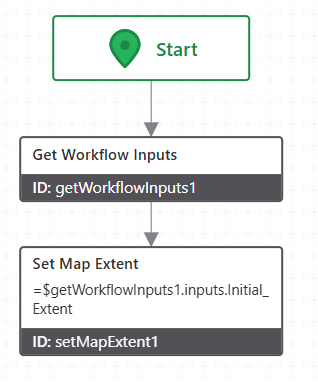
1) Create a workflow that has a “get workflow inputs” activity, and a “set map extent” activity, passing in a pre-defined map extent:
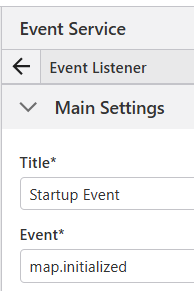
2) In the viewer, add an Event listener, for the map.initialized event
3) Configure that event listener to use the workflow you created, and defining the initial map extent as the workflow inputs:
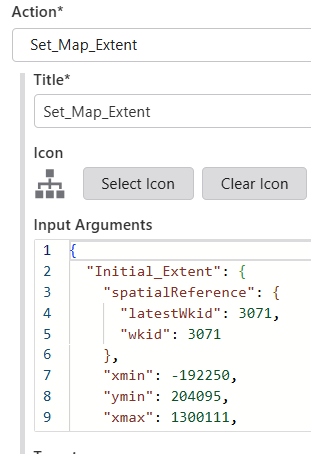
{
  "Initial_Extent": {
    "spatialReference": {
      "latestWkid": 3071,
      "wkid": 3071
    },
    "xmin": -192250,
    "ymin": 204095,
    "xmax": 1300111,
    "ymax": 737696
  }
}
1 -
Hi Mike,
thank you for your suggestion about the workflow activity “set map extent”. The problem with that is, that it can only run after the map is already initialized, leading to a “flying zoom” animation to the defined extent. However, what I need is a static initial map view.
0 -
Perhaps run in the APP-→ Initialized event or Layout-→ Initializing event. I think they run before anything shown to the user. Among other things, we load custom CSS at that time.
0 -
Also, if you want to get fancy, you can store that initial extent json in a file on the webserver (on-prem install) and access it via a server workflow: one configured extent for all viewers.
0 -
Hmm, unfortunately, running the workflow at any other time but after the app/map is initialized leads to an error or the app is frozen. I think we need the initialized map for the activity to work, and that leads to the animation. Anyways thanks, now I know where to implement custom CSS! Haven't done that before.
Do you mean using the “set extent” activity in a server workflow? It does not exist there. Or could you explain, please?
0 -
The sequence would be:
1) Viewer launches client workflow
2) Client workflow calls server workflow
3) server workflow reads in JSON file, parses it, pulls out Initial extent, sends results back to client workflow
4) client workflow reads the results, then applies the extent.
I'd experiment with the various events and what happens and when. As an example, the Point of Contact on startup, determines which layout to use (desktop vs mobile), applies css, queries a database, and saves temporary results to the local memory of the user's browser.
0
Please sign in to leave a comment.
Comments
7 comments