Default layer visibility within layer presets

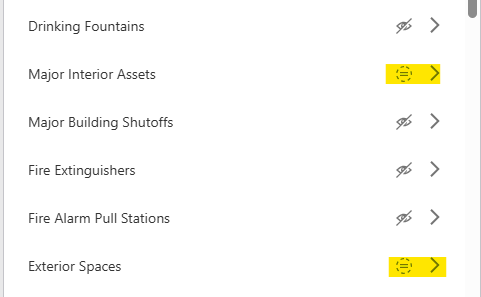
When new layers are added to a web map, their visibility within Layer Presets is set to “No Change” by default. I'd like the ability to set all new layers' default visibility in layer presets to Hidden.
We have many (45 to be exact) layer presets configured, so it's cumbersome and time-consuming to manually disable a newly added layer's visibility in each layer preset.
-
It is also worth noting that 11 of our 45 layer presets are duplicates from another layer preset tab containing additional presets with confidential data, since we cannot configure Visibility Filters on each individual preset. Visibility filters for individual layer presets – VertiGIS Support
0 -

We have also discovered that if you have to update layers in your web map that the app loses it configuration for those layers. As well if update your basemap that is set as default in preset the preset loses the connection to the basemap in the preset configuration. Can you please have the app remeber configuration if layers or basemaps are updated. This can be very time consuming to fix anytime web map updates happen.
1
Please sign in to leave a comment.
Comments
2 comments