Customize result list feature actions button

In my Web application, the results of a search are returned in a results list. The three buttons for all of the results list feature actions are very small and not easy to see. As a result, it is not very intuitive to the user that they need to click the buttons to see actions they can run on the results.
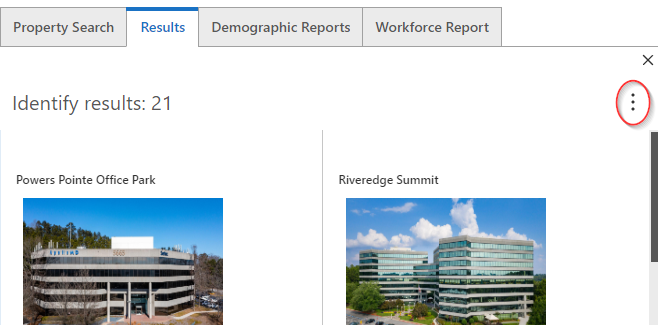
Would be great there was an option to be able to customize the feature action button size, be able to use a custom icon for the button, and potentially be able to add some text to provide the user more context and make it clearer to them that there is additional option/actions available for the results.
-
Found a solution for this issue from a similar idea I had to customize the back arrow in a panel by using CSS - https://support.vertigis.com/hc/en-us/community/posts/18796867990162-Customize-back-arrow-on-panel-in-Web
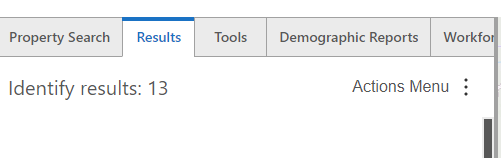
I ended up injecting CSS into a startup workflow to add text to the feature actions menu in the results list:
/*Add text to the results list feature actions button*/
button.MuiButtonBase-root.MuiIconButton-root.MuiIconButton-sizeSmall.gcx-menu-button.gxw-ltr-1668nnj::before {
content: "Actions Menu";
font-size: medium;
font-style: normal;
color: #555555;
position: relative;
padding: 5px;
}
Thanks again to Kylie Day for the idea and the CSS to do this!
0
Please sign in to leave a comment.
Comments
1 comment