Geocortex Web Street View Support
Not planned
Our Geocortex Essentials users really love the street view integration. I was hoping it could be brought to VertiGIS Studio Web - maybe you already have it?
https://www.geocortex.com/ @ 1:41
-
Official comment

Hi Jake,
We have something similar here: https://vertigis-web-samples.netlify.app/embedded-map Does that meet your needs?
-

This would be a very useful integration. Upvoted!
0 -
Great Idea. Hope they make it happen!
0 -

Can't get the image on the lower half to draw to see if that makes sense.
0 -
With a little arcade, you can achieve getting to StreetView based on a point layer.
0 -

Thanks Ted. I imagine this could be done with a workflow? (i.e. get coordinates from a user map click and open streeview at that location)
https://gis.harvard.edu/faq/how-link-google-street-view-images-points-arcgis-online
0 -
Yup. That is a good link. Good stuff.
0 -

Will this be a native widget for Web?
1 -

Has there any progress on this?
2 -

Still hoping for some progress on this. VertiGIS, are you going to add this functionality to Geocortex Web? Thank you.
0 -

Is there any update on this? According to the old WebOffice WebGIS Feature Transition doc, support for linked Google Street View is apparently supported in VertiGIS Studio. However, I can't find anything on it anywhere, other than Connor's netlify link at the top of this thread.
So how can there be a “Not Planned” tag next to the title of this thread, if the doc I shared says it's supposed to be supported?
0 -

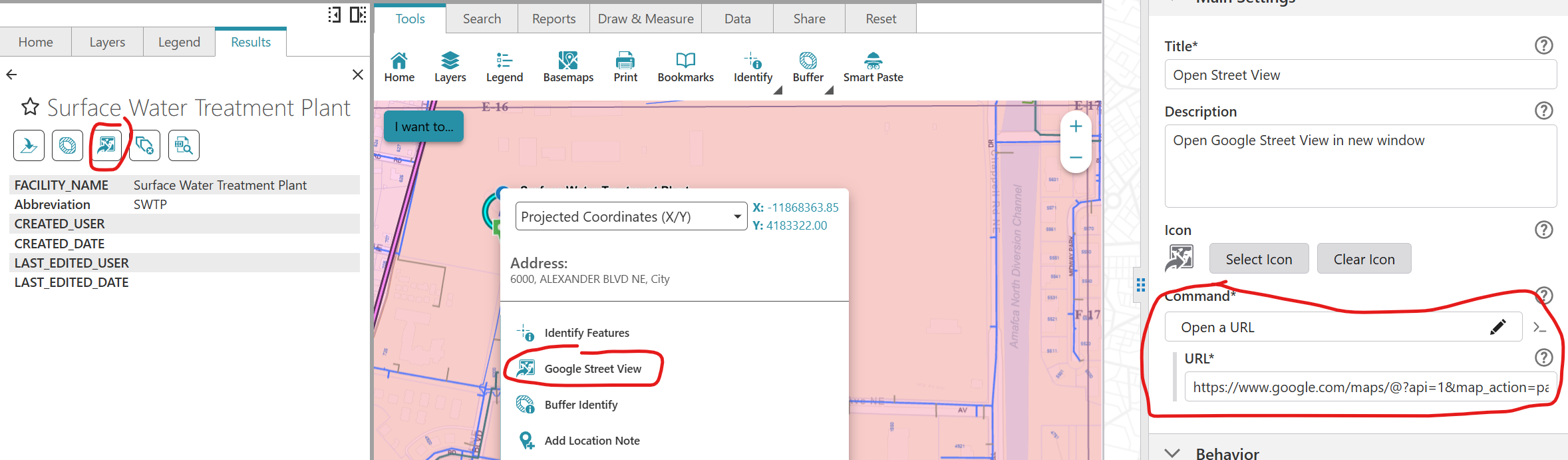
Jack Charde get you a Google API Key then add a button configured with the Open a URL command, and set the URL to open Google Streetview. The URL looks like this-
I have the button in my Results Details Feature Actions and the Map Context Menu. My users are happy with this setup.
 0
0 -
Hey Jessica Ridout,
I did consider doing that! I'm glad your users are happy with that approach.
Where are you getting Location.Feature.Latitude/Longitude from? Is there any documentation to show these attributes I can access?
I was hoping for Google Street View integrated into the apps like it was with sites in Geocortex. However, it seems it must be custom coded via the SDK.
0 -
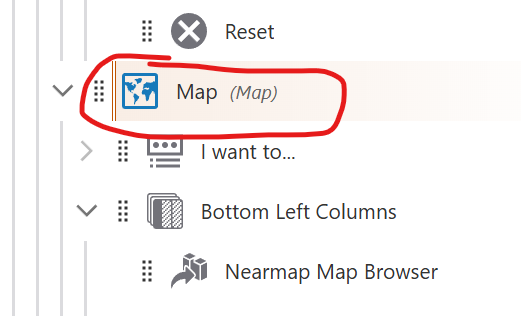
Sean Phayakapong Click the Map Component, then scroll down past the map layers to Context Menu. You can add, remove, and edit the commands and workflows in the list. This is the menu you see when you right-click on the map.
 1
1 -
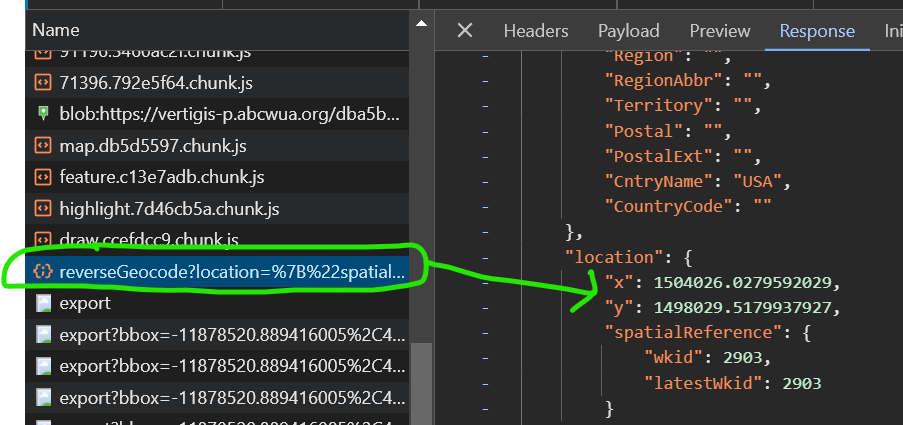
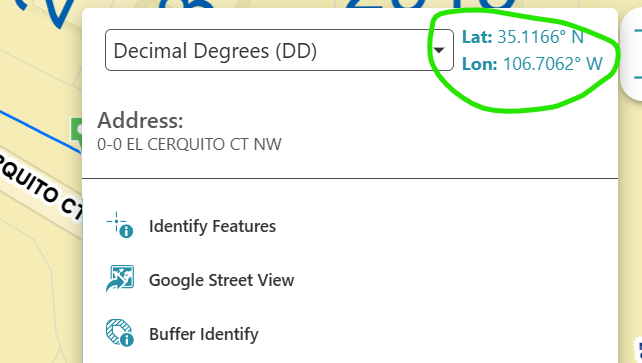
Jack Charde When you configure this in the maps context menu, it gets the location from a reverse geocode when you right-click. The Response here has been converted to State Plane, but the map is still in WGS84 so the coordinates passed to Google are the same as what you see in the pop-up.
When you use it from the Results Details it gets the location from the feature you identified. That one works well with point features and not so good with line and polygon, so I always encourage people to use the right-click method.
 0
0 -
Jessica Ridout that makes sense to me. Thanks! However. I do want to make sure I'm understanding your UI setup, as this looks similar to what I'm trying to re-create for my client. The image you show above with the map coordinates and address widgets above the other tools, this isn't configured for the map context menu, correct? I haven't found a way to do that myself. It looks to me like a panel component set to the popup slot for the Map component. in my rt-click I only see the list of tools I've configured for the context menu.
0 -
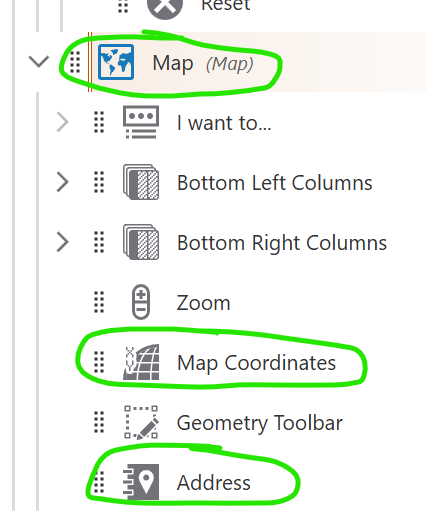
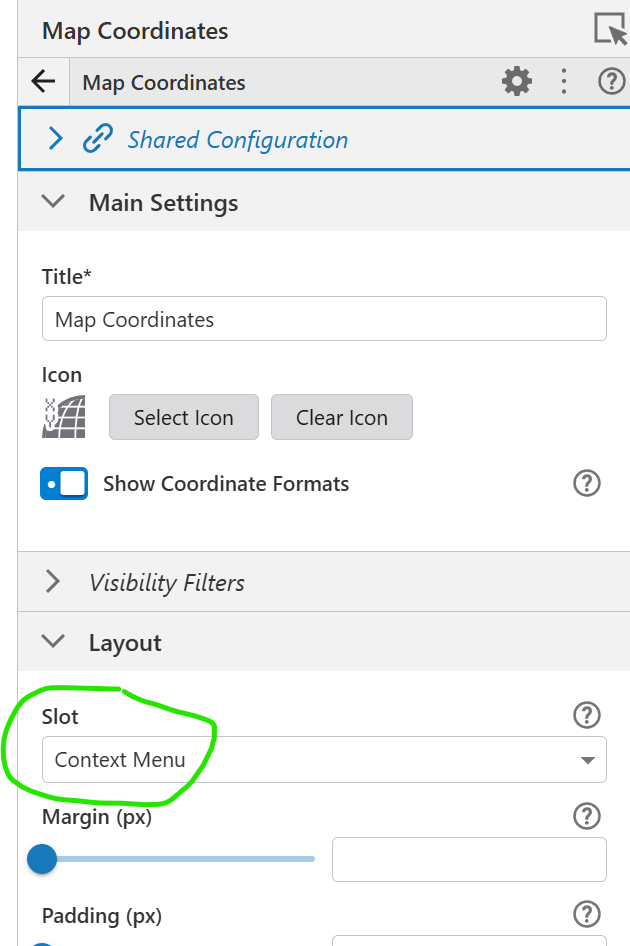
Jack Charde I have a Coordinates component and an Address component nested under the Map component. Both of those have their Slot set to Context Menu.
 0
0 -
Jessica Ridout I have no excuse for not seeing that slot option. Thanks for helping me remove the horse blinders!
0 -
Jack Charde Anytime! VertiGIS doesn't make this stuff very obvious, but the more I use VSW, the better I understand it all.
0 -
Jessica Ridout Also, for the API key you just place it instead of the 1 right? Where I placed “API KEY”
0 -
Sean Phayakapong That's correct! …?api=<your_api_key>&…
0 -

Another option is to develop a custom component using VertiGIS Studio Web SDK. Bit of a learning curve, but there are some example components on GitHub that can be modified. https://github.com/vertigis/vertigis-web-sdk
You will need to develop the component in the SDK, build and Upload Library (Built Component) to VertiGIS Studio Web Designer. Verti has improved error handling for this process, as we experienced issues early on.
The SDK experience is similar to ESRI, if you have developed in their environment this will be an advantage. If you haven't developed in either of these environments, I recommend spending time understanding how the dev environment is structured.
This solution requires a Maps JavaScript API which is free to setup via Google Cloud APIs & Services. I recommend spending some time reviewing their Terms of Service. For example, TOS requires Street View to open in a new browser tab.
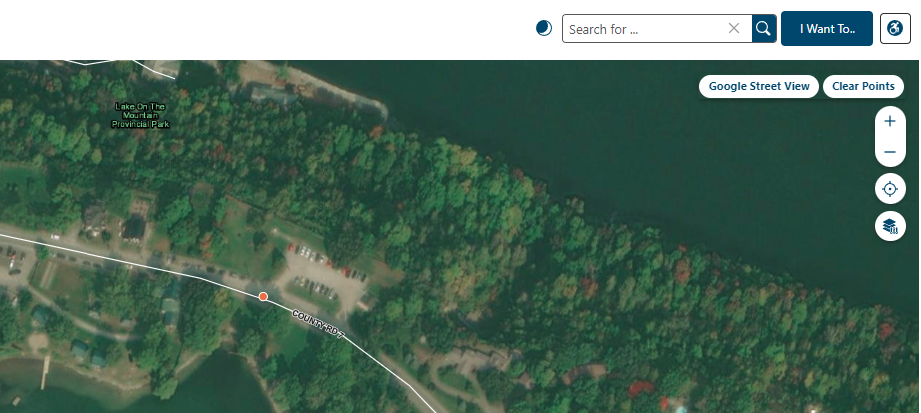
Functionality for our Street View Component:
1. User clicks the ‘Google Street View’ button on the map, cursor changes to crosshair.
2. A map click collects the coordinates, point is dropped on the map, and Street View opens in a new browser tab.
3. User can drop up to 10 points, and we have included a button to clear all points.
 0
0 -
Hey Kevin Van Dijk,
Thanks for the other info! This may be the route we take if they don't like the map context menu option. This custom component example you've shared seems like something that could be achieved through a workflow, too, right?. Add a button to the map, have the button run a workflow to let the user add a point or a few points, construct the URL from the resulting map coordinates, and open a new browser tab. Just thinking out loud for my own sake :)
0 -
I can't seem to get this URL to open street view properly. I have my API key for the Street View Static API, but when the URL opens on a map click, it's just a state level view in Google Maps. It doesn't load on the location. I made my API key unrestricted just to test whether restrictions were causing the issue, and it still doesn't load properly.
This URL: https://www.google.com/maps/@?api=1&map_action=pano&viewpoint={Location.Feature.Latitude},{Location.Feature.Longitude}&heading=-45&pitch=0&fov=80 does not work. https://www.google.com/maps/@ is not designed to take an API key.
Switching to https://maps.googleapis.com/maps/api/streetview?size=640x480&location={latitude},{longitude}&heading=-45&pitch=0&key=<your_api_key> only returns a static image of street view at the location, and at the requested image size.Jessica Ridout Is yours only returning static views in the new browser tab, or does it open an interactive street view? When your API key was set up, how was it restricted if at all?
0 -

I have followed street view embedding for awhile now, haven't seen anyone document or provide a solution like there was for Geocortex :(
1 -
Steffen Helgerod It appears that embedded street view actually violates Google's TOS so I doubt there will be another solution in VertiGIS Studio, other than using the Open a URL command to open street view in a new tab. I have this available in the apps I made for my client with the right-click context menu, pulling lat/long to build a URL that can open in another tab.
0
Please sign in to leave a comment.
Comments
26 comments