Problem
The geometric network is supposed to be created on an SDE default connection using the update script (NETDEF.XML).
At the end, the following error messages may appear:
- OLE error $80040411 (FDO_E_FEATURECLASS_NO_SHAPE_COLUMN)
- OLE error $80040302 (FDO_E_DATASET_INVALID_NAME)
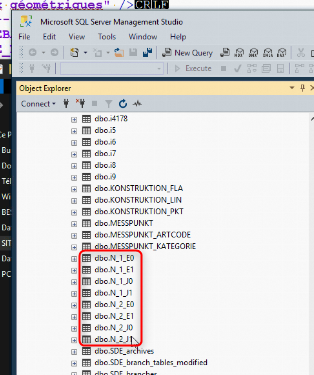
- Some conflict with a table named "N_1..." or "N_2..."
Solution
The OLE errors could be resolved using the following Geotools:
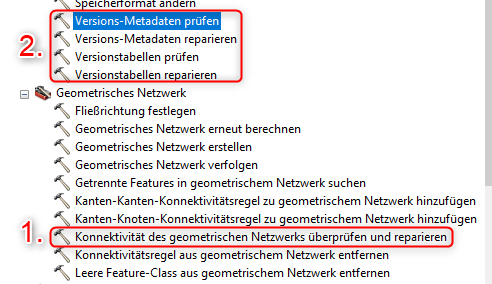
- Check and repair the connectivity of the geometric network
- Check version metadata
- Repair version metadata
- Check version tables
- Repair version tables
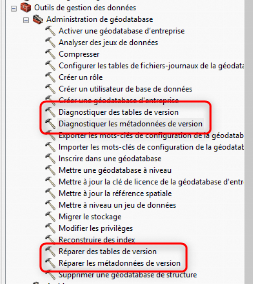
In French:
The conflict with the "N_" tables could be resolved by
- Ensuring that the geometric network is not present in ArcCatalog.
- Closing ArcCatalog, GEONIS, and all database connections to the SQL Server.
- Logging into Microsoft SQL Server Management Studio as an admin.
- Manually deleting all "N_" tables in the database.
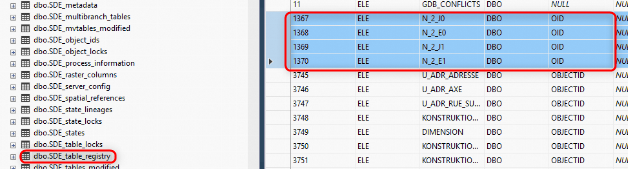
- Manually deleting all N_ entries in the SDE-table_registry.
- Attempting again to create the geometric network using the GEONIS update script (NETDEF.XML).
Create Geometric Network with SDE Connection
In order to create the geometric network using the update script (NETDEF.XML), the following prerequisites must be met.
- There must be a deversioned and compressed default SDE connection available.
- No one should be connected to the database.
- An owner connection must be used.
Comments
0 comments
Article is closed for comments.