Designer won't open if web map no longer exists.

We are unable to open our app in Designer when the Web Map which is the app is build open is deleted/no longer exists. Thus, it is not possible to restore your app if something happens to your Web Map.
When trying to open the designer, the following message is displayed:
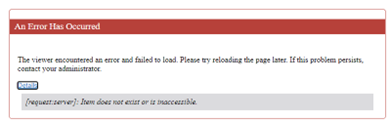
Further, the “Download App” option is greyed app, so the app can't be downloaded and restored through the .json.
We also tried opening the .json window, with SHIFT+CTRL+E, to change the ID of the Web Map to a new one. However, it won't open and just keeps “loading” as seen below:
We tried changing the Web Map through the Item Manager but this did not work and after having changed to a new and working Web Map, the error was still displayed.
This is something which, of course, worries our customers immensely.
I assume it a bug, but wonder if anyone else has experienced the same or found a workaround to the issue? All the other components in the app should still be working and it should be quite straight forward to change out the item og the Web Map.
-

Hi Olivia,
I tested this out by deleting the webmap used in a VS Web app, and was able to replicate the error message you were seeing.
However, after creating a new webmap using the same map service, I was able to replace the ""webMap" value in VS Item Manager for the VS Web app in question with the updated ArcGIS webmap item and the app then loaded successfully, so it should work.
Feel free to open a support ticket with us if you aren't able to get this working and we are happy to take a look!
0
Du måste logga in om du vill lämna en kommentar.
Kommentarer
1 kommentar