Layer Slider Interface

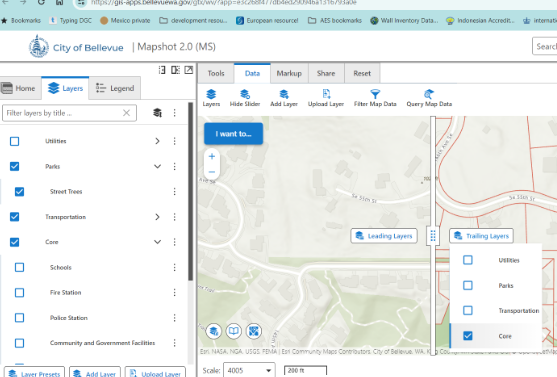
Hi. Question about the layer slider tool. I noticed that the dialog that allows you to choose leading or trailing layers, only shows the top level, if you have layers grouped. Is that by design? I think it would be useful to be able to choose particular layers. For example, in the screenshot below, I can choose the ‘Core’ group, but not able to select only the schools layer within that group.
-

Hi Zorba. Feel silly asking this, but how do you access the layer slider tool? I don't see it as a component.
Thanks,
Chris
0 -
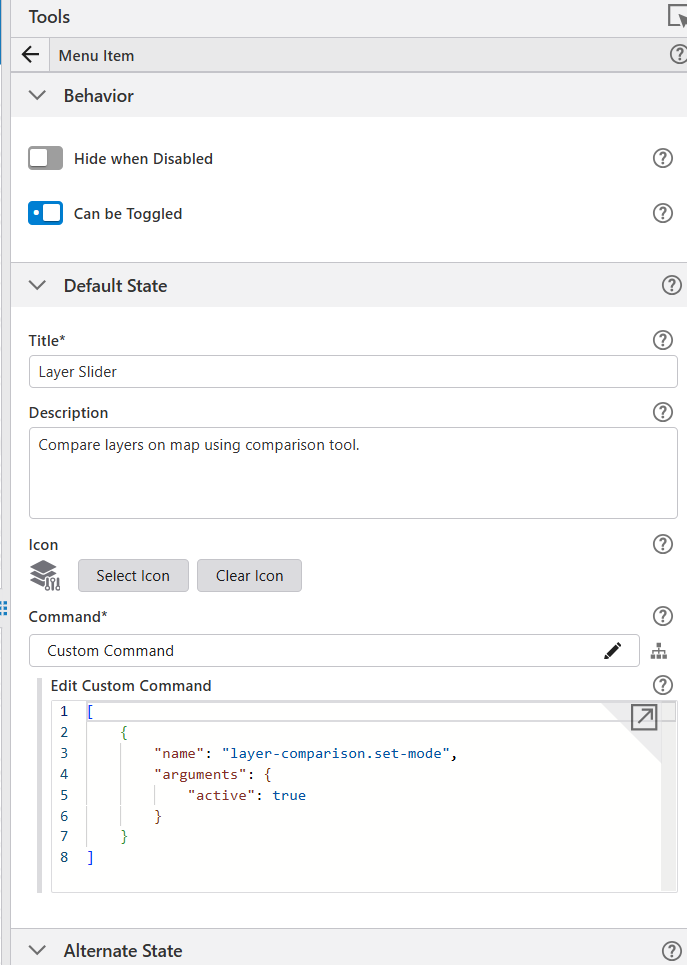
No worries - it's not obvious how to add it. Looking at my app, it appears to be a custom command. I have it as a menu item in a toolbar. When you add an item, you'll see an option at the bottom for custom commands, so choose that. The item is configured like below. Note ‘Can be Toggled’ should be checked. And the command for default state is like this:
[
{
"name": "layer-comparison.set-mode",
"arguments": {
"active": true
}
}
]
For alternate state, it will be the same, except the active argument will want to be false. Likewise, you'll want to use appropriate language for the title, description and icons.
Hope that hleps.
 0
0 -
Wow, thanks Zorba. Not exactly obvious, especially since I didn't know the functionality even existed before seeing your post. Got it working using your example.
Chris
0 -
Ah, I see it now. The functionality is built into the map component, in the Layer Comparison section. That lets you create it without using custom commands.
0 -

Does this tool not work with layers that are in the same map Image layer or group in a web map? Is it possible to make that happen?
0
Du måste logga in om du vill lämna en kommentar.
Kommentarer
5 kommentarer