Scale based symbology; mismatch between map and printscale

Hey,
The print scale in the printing GUI does not reflect the actual map scale.
This is due to the zoomed-in print-preview window, and if you change the browser window size the print scale will change, but the map scale will not.
This behaviour makes sense and is intended, but this mismatch between print and map scale presents issues with scale based symbology (in this example it's actually just different layers activated with visibility ranges).
In the screenshot below the map is set at scale 1:5500 which generalizes property borders to grey polygons. If i prompt a print at this map scale, the print GUI scale will be set at something smaller, in this case 1:3963.
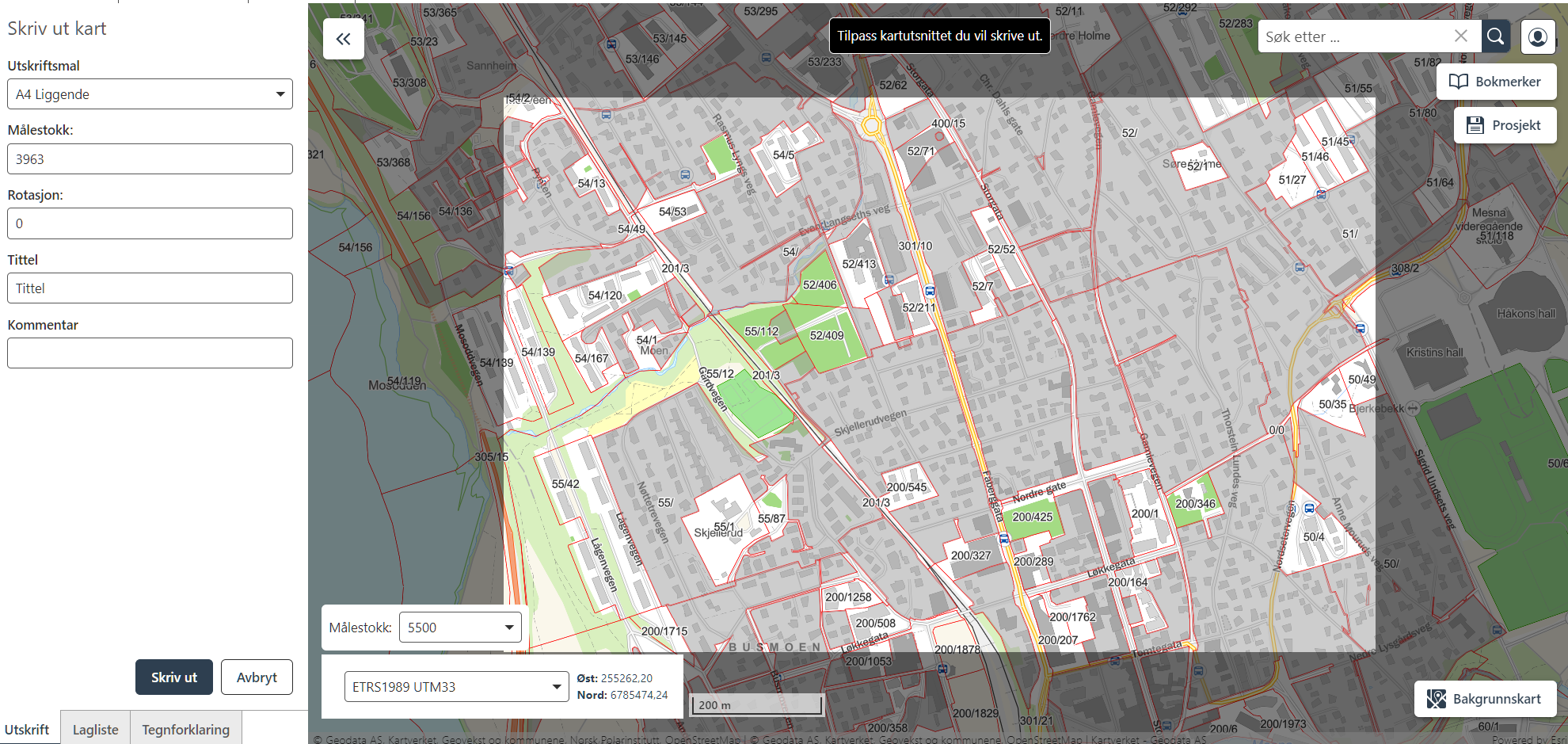
This generalized symbology is not available at scale 1:3963, and the output PDF will look different than expected:
The user could set the print scale to the same as the current map scale to output the correct symbology. This will however also increase the map scale, and the print preview window will also be larger. This method would be both confusing and annoying for the end-user, as they might have found a perfect extent for their print.
There are workflow-ways around this, but my ideas are:
- The print preview should reflect the symbology that will be rendered at that scale.
- The print preview window should be adjustable.
Regards,
Vegard Sulebakk
Du måste logga in om du vill lämna en kommentar.
Kommentarer
0 kommentarer