Clean out unused items in VS Web json

I created a Vertigis Studio workflow and added it to my Vertigis Studio Web application (as button on the map). Later, I decided I didn't need that workflow and deleted the button. Now, as I prepare to deploy my solution to production, the deployment step indicates that the workflow still remains. Examining the underlying json confirms that it is still included, despite not being used anywhere.
1) Is there an easy-button or utility that can remove unused components?
and/or
2) is there a recommended technique to remove components, to ensure they don't linger in the json?
-

I had this exact scenario. I put in a support ticket and an analyst walked me though removing the orphaned workflow from the Item Manager. I'm glad I didn't attempt that on my own, at least the first time. It can be done, but my suggestion would be to get some assistance.
0 -

I was about to post on this very topic today!
I just noticed a whole bunch of extra json when I removed and added a smaller webmap, with not so many layers. The old layers are still referenced in the json for some reason.
There looks to be a whole lot of sublayerExtensions blocks that remain everywhere in the code..
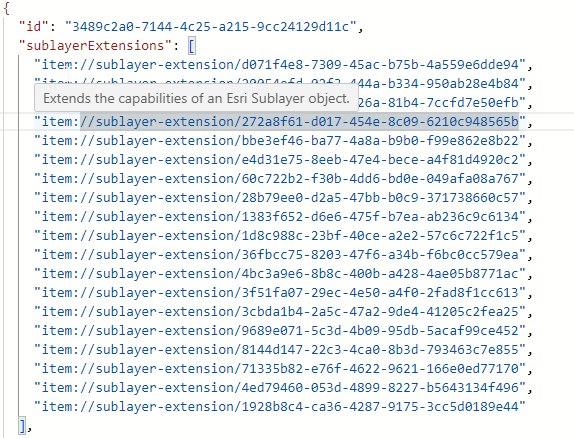
that get further defined later in the code.
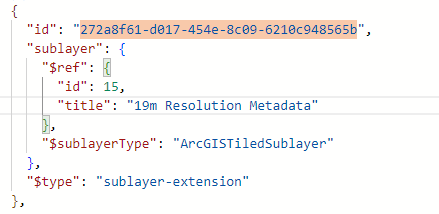
I've got hundreds of these left over from removing a large webmap and testing with a smaller one, but still keeping the original UI components, as this makes a copying an app a bit troublesome - unless I'm doing something completely wrong here?
Interested to see if anything gets done in this space?
cheers
Gareth
1 -
This morning, I experimented with creating a barebones application and a few buttons, followed by removing some of them. I'm trying to figure out how to replicate the issue, so I don't run into this again. So far, the web designer software is cleaning this up correctly.
Anybody have an idea what causes the leftover JSON to remain? Is certain types of items (i.e. Gareth's example with a web map, or swapping out workflows) or when permissions change of shared items, solar flares, gremlins, etc.?
0 -

In my experience, there is some leftover references to the workflow in the Locale section of the json when removing workflows and like Gareth mentioned it is then later defined later in the code. I have not tested on my end if this is caused by adding a workflow through the add component process or if you're referencing a workflow via the custom command (workflow.run) in the event processing (ie, Application Initialized) process or chaining commands together.
0 -
I actually went in a did a Refresh on the Map component, and also enabled the Auto-clean extensions option under the Info option on the left hand side of VSW Designer.. It seems to be doing the trick now. I also had to remove a bunch of edit tools associated with feature layers that were no longer in the webmap, so it was hanging onto these layers in the json, but that's expected I guess. No fault of the program there - only the user!
0
Du måste logga in om du vill lämna en kommentar.
Kommentarer
5 kommentarer