Feature Actions - Results List and Results Details Separate Configuration

It would nice to configure feature actions separately for Results Lists (multiple features selected) and Results Details (single feature selected). This would avoid having feature actions available for both when some are designed or best suited for single-feature use, while others are better suited for multiple selections.
Example 1: Restrict a workflow-triggering feature action to Results Details, if it relies on input from a single selected feature. Avoid displaying it in Results Lists, where multiple features may be selected.
Example 2: Keep "Export to CSV" in Results Lists for quick export of multiple features. Remove it from Results Details, as exporting a single feature is seldom practical.
-

I ran into a similar issue with feature actions in the results table where I only wanted to show the feature action if there was only one result. I found out that you can add a simple Arcade script to run a command or workflow only if there is one feature in the results. Here is an example to only show the Streetview option for a single feature:
[
{
"name": "arcade.run",
"arguments": {
"canExecuteScript": "return Count($features) == 1"
}
},
{
"name": "system.open-url",
"arguments": {
"url": "https://www.google.com/maps?cbll={Latitude},{Longitude}&cbp=12,20.09,,0,5&layer=c"
}
}
]
You can modify the count to run if there is more than one feature also:
"canExecuteScript": "return Count($features) > 1"
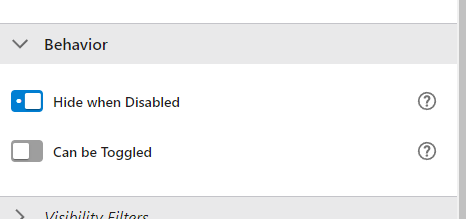
The other important part is to make sure you check the Hide when Disabled button in the Behavior section. So when the Arcade script runs, it will disable the feature action if the condition is met.
Hope that helps.
2 -

Jeff DeWitt Thank you for this example. Do you know what the code would be to run a workflow with the results context? I found this but it's not entirely clear to me what the arguments are, for example “id” vs “portalItem”.
0 -
Jeff DeWitt Never mind, when I selected the workflow and then clicked to edit the custom command, the workflow run section was populated for me! Thank you for this. I still think it should be a setting which we can customize but this works for me.
0 -

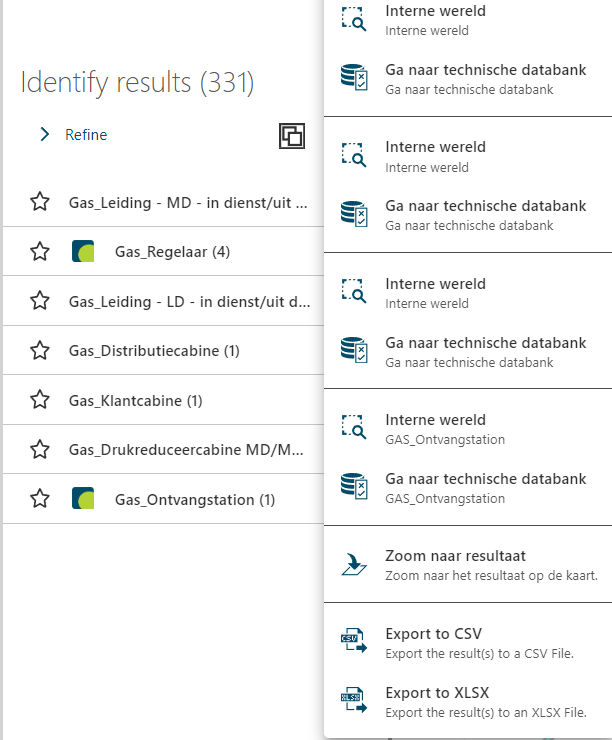
Cam Barnard Is this the way to go to keep them seperated?
We now have multiple features with only one result which still gives a big list of the same feature actions
We only want to have the actions for the identify results ( Export & Zoom )
 0
0 -

+1 from me. It would be really useful to have a better way to handle actions from both results list, results details, and let me add, feature actions set on the individual map layers separately. For result details, the total number of feature actions from different sources tends to pile up and makes it necessary to scroll to get to the rightmost feature action. For the results details, an expandable list for each source could work fine.
I think, though, that it is already possible to separate the actions between results list and results details, but you'll have to edit the app.json directly. You could make a separate object of “$type”: “menu” for both options, and then set the feature-details to use the first menu and feature-summary to use the second.
It would be really good to be able to control this from the designer.
1 -

Regarding the method suggested by Jeff (using arcade.run to set canExecuteScript parameter), wondering if this could be extended for other use cases. Let's say one had a more complicated logic to implement that would require a multi-line arcade script, for example?
Or could we use the workflow.evaluate command instead of arcade.run, to return a boolean value to canExecuteScript? A workflow could involve a much more sophisticated logic to control whether or not a action is displayed. For workflow.evaluate, I'm not seeing a canExecuteScript paramter, so guessing this is not an option.
Curious what is feasible here?
Thanks
0
Du måste logga in om du vill lämna en kommentar.
Kommentarer
6 kommentarer