Result-list component - more control over list-item height

Hello
I would like to suggest to add or extend the ability to control the height of the list-items in the Results-list component. There is to little flexibility in the visualization in the current component, which leads to the UI-experience being degraded.
In the example below is a Results-list component that shows available webcams. The list-items contains:
- Title of webcam
- Owner of webcam
- Thumbnail for better reference
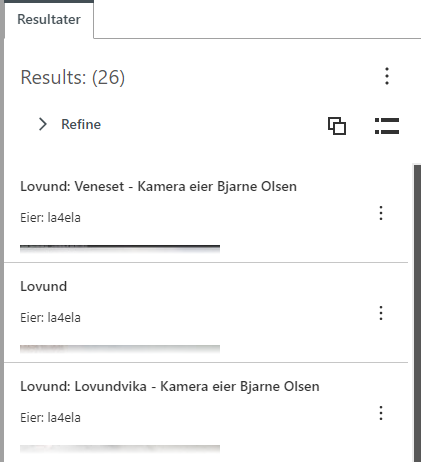
The current way to define height is by accepting a rigid height that is either set by default or custom height via app-settings.
I would like to have the option to choose if the list-item-height could be set to auto or atleast a max-height. I think this would improve the flexibility of the results-list component.
klind regards
Tor R Børset
-

I use the Inject CSS Workflow activity to achieve this in several of my apps. Throw that together with markdown and you have a lot more flexibility than it would first appear. Some markdown styles (bold, italics, and monospace) create their own DOM elements that can be bound to, I like using the .nth-child pseudoclass to bind to specific parts of my form element items' text.
That said, this a somewhat kludgey workaround for more flexible item text. Items' max-height property is much more straightforward to set and won't require the time or creativity, just use the Set Form Element Property activity to give your form element a .styleName property and use that to bind to your items.
1 -
A workaround is better than sticking with the default solution!
I am not quite sure I understand how to achieve what you suggest. Could you elaborate a bit, my wife tells me im a slow learner. Finding a solution to this would be magnificent seeing this is a problem on several of my apps.2 -

I'm also searching for any examples/help on using the Inject CSS activity in the Results List Component of VSW.
1 -
Zack Robison , it sounds like youre suggestion is spot on for a workaraound. Could you give an example of how you set the .styleName property and access this through the Inject CSS workflow activity?
0
Du måste logga in om du vill lämna en kommentar.
Kommentarer
4 kommentarer