How to open the website instead of displaying hyperlink

Currently my workflow ends with the DisplayHyperlink control and at runtime displays a hyperlink in a small window to the user. How can I skip the window with the hyperlink and just open the webpage?
Many thanks.
-

You can use the RunExternalCommand activity and specify "NavigateToUri" as the Command and your URL as the CommandParameter.
--Ryan
0 -
Thanks Ryan.
0 -
Big thanks Ryan! I was trying to do the same thing as Josh - but using the OpenWebPage command from the RunExternalCommand Activity - without success! Not overly sure why this would fail as it would seem to make sense in opening a web page with the supplied URL - but obviously a subtle difference!
cheers
Gareth
0 -
The difference is quite subtle.
- The OpenWebPage command uses (http://msdn.microsoft.com/en-us/library/system.windows.browser.htmlpage.popupwindow.aspx) System.Windows.Browser.HtmlPage.PopupWindow under the hood. Silverlight enforces that this method must be invoked directly by a user. For example: via a button click. If you try to invoke this from something asynchronous, such as after a HTTP request (this is the way workflows operate), then it will be denied. See the "Constraints" section of the documentation.
- The NavigateToUri command uses (http://msdn.microsoft.com/en-us/library/cc189809.aspx) System.Windows.Browser.HtmlPage.Window.Navigate which does not impose the above restriction. However, this method is more susceptible to popup blockers.
--Ryan
0 -
Thanks Ryan, that would explain why it would work from the I want to... menu and not from the workflow ; )
0 -
i could not find "NavigateToUri". I realized that this post is bit old. I used "OpenWebPage" in my workflow for html viewer and it worked. The pop up blocker has to be off for the browser.
Thanks.0 -
For some reason when I use the "OpenWebPage" function, it slightly modifies my passed URL. However, when I use display hyperlink instead, the URL stays untouched. I'm not sure why this is but this change is affecting the URL enough to make it not work as planned.
EX. "%40" is getting converted to "@"0 -
Also, I cannot get "NavigateToUri" to work properly. It basically does nothing and that must be because of our browser settings? 0 -

Hi Eric,
The NavigateToUri command was only available in the Viewer for Silverlight. In the Viewer for HTML5, the OpenWebPage command is intended to do the same thing.
I have filed a bug regarding the unexpected decoding of the %40 to the @ sign. It is in our system as GVH-11988.
In the meantime, you may be able to work around the issue by using an intermediate page that accepts the arguments from Workflow and then performs a second redirect to the page that expects the encoded @ sign, or you may use the Display Hyperlink activity to present a link to the user.
Regards,
-Malcolm0 -
Update: as of 2.7, the OpenWebPage command can take an additional boolean parameter 'isLink' to indicate that the string parameter is a URL and therefore should not be encoded. This addresses the bug Malcolm references, above (GVH-11988).
This currently is not documented in the SDK documentation - I've asked that it be added for 2.8.0 -
Can you elaborate or show an example of how you implement that additional boolean parameter in the OpenWebPage command?
Thanks
Tami0 -

Hi Tami,
I've created an improvement to our documentation to include this information. This can done using this syntax in the Command Parameter field: Newtonsoft.Json.Linq.JObject.Parse("{url: 'http://google.com', isLink: true}").
Thanks, Stefan
0 -
Is there a way to force the OpenWebPage command to open the web page in the same tab? It is opening it up in a separate tab/window by default.
Thank you,
Stephanie0 -
Similar to Stephanie's comment, the browser asks to open potentially unsafe content and therefor a "no" answer means they can just use the viewer. 0 -
Can you send a link to the documentation for this? I'm trying to make a simple workflow that just goes to a static web page - perferably opening in a different tab or window - but cannot quite get the syntax down. 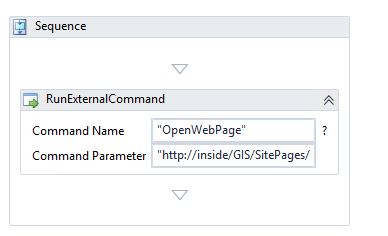 0
0 -

@Becca: that does not appear to be a valid HTTP URL.
The syntax looks correct, though.0
Du måste logga in om du vill lämna en kommentar.
Kommentarer
16 kommentarer