Can design form button be activated by enter key AND mouse click?

Is there a way to configure the display form button (button editor?) so that when a user has the workflow open, they can press enter to activate the button? Currently I can only see it activates when you click the mouse on the button?
0
-

Yes, check the Is Default Button checkbox for your button.
0 -

Hi Nico,
I am unabel to find the "Is Default Button checkbox" in the Form.
Could you please let me know where can I find it.
Thanks
Srikanth0 -
Display Form activity > Add/Remove Buttons button > Each added button has this checkbox 0 -
Thanks Nico, for letting me know about the Add/Remove buttons - but I am still not clear as how we set the button values - Here, for the first button - I gave the name as "OK" and the value as "Enter", and for the second button - both name & value are "Cancel".
What I am looking is - if the user enters the "Enter" key - it should activate the"OK" button. Could you please provide your inputs on it.
Thanks
Srikanth0 -
Should be as follows:
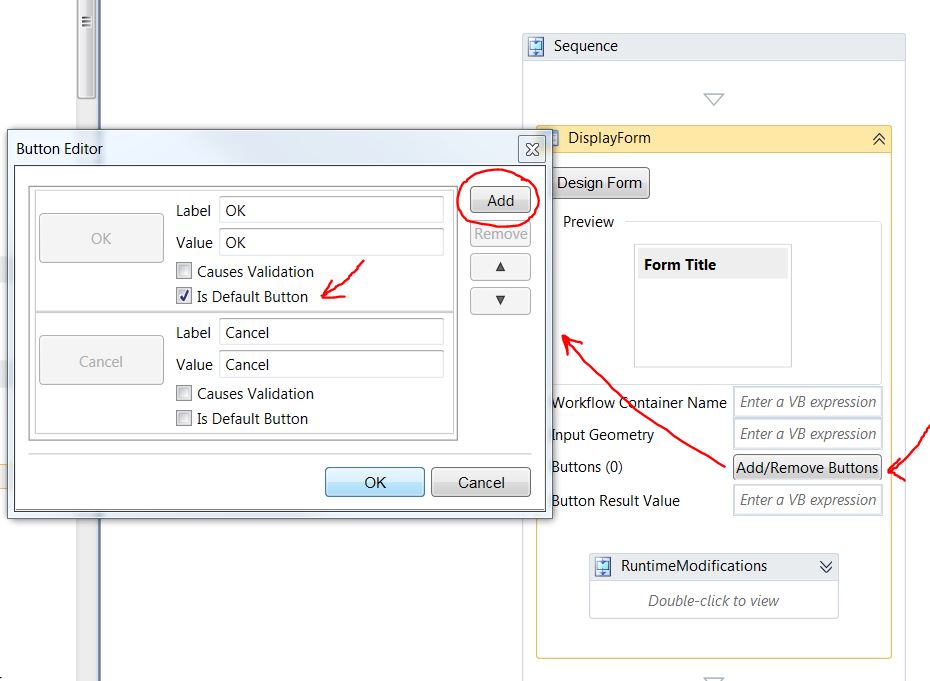 0
0 -
Thanks Marshall for providing the steps as how to do it.
But, what I have seen is - although I add the button and make it as "Is Default Button" in the Firm - this works only with the Form having only text boxes, but If I have a form
which has combox, date selector box - clicking on enter key doesn't close the form - instead when hit the enter key - the pointer points to data selector box.
If you have any ideas, please let me know.
Thanks
Srikanth0 -

Have this same question to the community - has anyone found a way yet to allow the user to select the keyboard "enter" key to function the same as a button would to execute search in a workflow 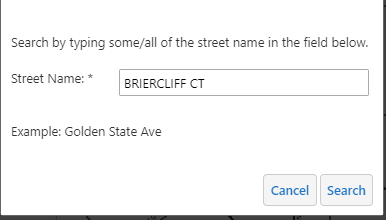
need the enter key to work with an AutocompleteBox? We have two buttons for the user but often they equate hitting the enter key with the Search button provided in the workflow. In the workflows we have the enter key on the keyboard does nothing.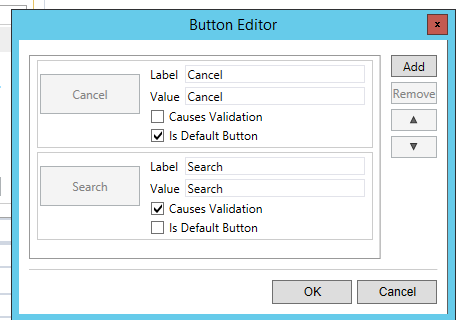 0
0
Du måste logga in om du vill lämna en kommentar.
Kommentarer
7 kommentarer