secure service connection error

I'm trying to add a bunch of web services from ESRI that use token authentification to my essentials map but I am always getting a connection error.
For instance, I am trying to add this terrain elevation:
http://www.arcgis.com/home/item.html?id=2729e694b9b34738a59075aed367dedd
In the authentication settings I select the token security option and I use the user and password from my esri account, leaven the token url blank, but it doesn't work.
I have tried to use something like this in the token url.
https://www.arcgis.com/sharing/generateToken?username=<esriuser>&password=<esripass>&client=referer&referer=http://www.arcgis.com&expiration=1200000&f=json
I get the token if I use it in a browser, but the connection doesn't work in essentials.
Could someone point me in the right direction? Thanks
0
-
Hi Jose, in order to use ArcGIS OnLine content that requires a sign in with an ArcGIS online user, you have to integrate Essentials with ArcGIS online. See the details on section "8.3.5 Configure Manager Sign-In Using ArcGIS Online" from the "Geocortex Essentials 4.4 Installation Guide"
Once you've integrated the GE Sign in with AGOL, you have to use the reference web map option within your Essentials Site to add the map.
Hope it helps,
Alejandro0 -
Hi Alejandro,
my Essentials is already integrated with AGOL. I'm also not sure on the "reference web map option". I thought I had to add a map service and create the connection in the service connections tab. That's where I'm stuck since the web service uses a token and I'm not able to pass the token along.
Please, take a look at the screen shot to see how I'm doing it.
Thanks!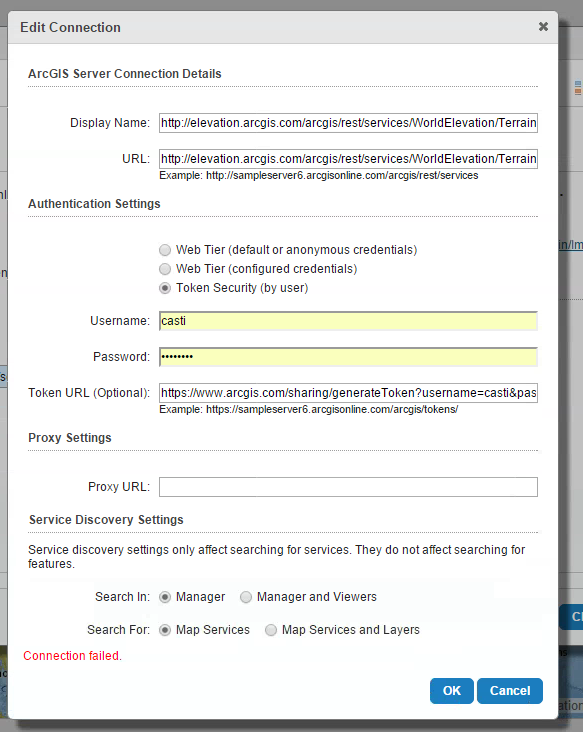 0
0
Du måste logga in om du vill lämna en kommentar.
Kommentarer
2 kommentarer