Can I create a custom query for a wms layer using a workflow?

I'm struggling with the concept of being able to use something like the query task to query a wms layer using a workflow (in workflow designer). Is there any way to do this? It seems that the workflow designer implemented for Essentials is only operative for Esri map/feature services...or am I missing something?
Michael
0
-

In your querytask you would enter the URL for the rest endpoint of Essentials and not the WMS url.
for example: http://<servername>/Geocortex/Essentials/Rest/sites/<sitename>/map/mapservices/18/layers/0/query0 -
Nelson,
Thanks for that quck reply!
I am not having any luck with what you proposed. I tried the query task with an ArcGIS Server service with success, but no luck with the wms layer using the rest endpoint of Essentials. Here is an image of my basic query: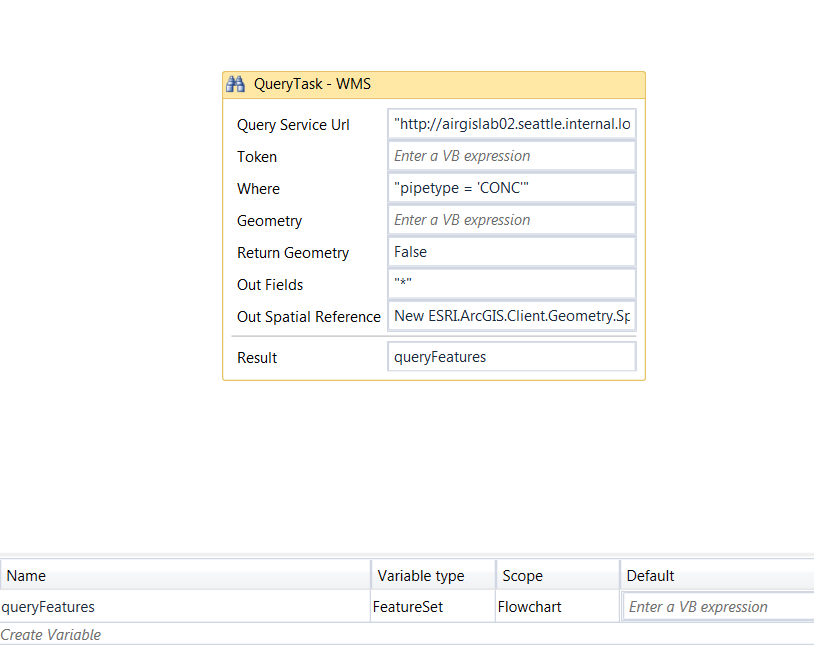
The query service url is:
"http://airgislab02.seattle.internal.local/Geocortex/Essentials/REST/sites/NewGeoserverTest/map/mapservices/0/layers/1/query" (I can get to this URL if I put it in my web browser...so all looks good as far as validity of the URL. Obviously, this is an internal URL, so you will not be able to get to it to test.)
and the Out Spatial Reference is: New ESRI.ArcGIS.Client.Geometry.SpatialReference(4326)
I have run the query at the Essentials REST endpoint and it works (although I have to use pos:pipetype instead--I did make this change in the query parameters shown above as a test but it still errors out).
When I run this simple activity in the workflow designer simulator, I get the error: "The request is not valid."
The same test with an ArcGIS Server service (using mostly the same parameters) returns results and does not error out.
Any other ideas on how to make this work?
Thanks!0 -
Nelson,
I figured it out. You just need to leave off the "/query" on the end of the REST endpoint URL. So it would be something like in the Query Service URL: http://<servername>/Geocortex/Essentials/Rest/sites/<sitename>/map/mapservices/18/layers/0.
I also had to include the workspace and layer name in the where clause. So my where clause is like this:
Where: "pos:pipetype = 'CONC'"
Thanks for your help! That definitely got me pointed in the right directon.
Michael0 -

Thanks so much! we had the same issue, now able to query the WMS layers using the query task.
0
Du måste logga in om du vill lämna en kommentar.
Kommentarer
4 kommentarer