Now Available: New Versions of Geocortex Software

Geocortex Essentials 4.5 – alongside Geocortex Viewer for HTML5 2.6 and Geocortex Mobile App Framework 2.0 – are now ready for you to download.
While we’ve made some major upgrades to Geocortex Essentials to help you manage and configure your applications, many of the exciting features in this release can be found in our viewer and its offline capabilities.
- Geocortex Viewer for HTML5 2.6 is one of our most anticipated releases yet, and brings us to parity (with the exception of a few niche features) – and beyond – with our retiring Silverlight viewer. You can now save and share project files, upload data files to maps, search non-spatial data from geodatabase tables, include vector tiles in sites, and control viewer permissions.
- Geocortex Mobile App Framework 2.0 versions for iOS, Windows, and Android have been substantially improved, and now use Esri’s geodatabase replica format to store feature data on a device; this enables search, more advanced spatial intersections, and a smarter sync mechanism. We’ve also introduced offline maps for defining, downloading, and syncing offline data packages, removing the need for end-users to select an area of interest and specific layers for offline use. (As a reminder, we shared information with Geocortex customers earlier this month regarding licensing considerations for the newest version of Geocortex Mobile App Framework. If you haven’t had a chance to review it, yet, check out (https://support.geocortex.com/essentialsGSCForum?id=90660000000TSSIAA4) this post ).
To see detailed feature lists, please visit the product release page (http://geocortex.com/product-release) here ; to download these newest versions check out the (https://support.geocortex.com/essentialsGSCDownloads?productTitle=Essentials&sub-nav=downloads&main-nav=essentials) Essentials downloads page.
0
-

Getting the missing permissions error for the REST/bin directory. Rebooted the server, still got the error. Restrated the Geocortex Core Service, still got the error. Stopped the Geocortex Core service. Yep, still get the missing permissions error.
Boo hoo.0 -
I believe you can just stop Windows IIS while you do the install, that should clear the permissions issue on the bin directory. 0 -
What is the procedure to install both versions, when older versions are already up and running? 0 -
I'm sorry that you ran into this issue, Sean! I have created a new article where people can track what we refer to a 'known issues' for this release. I've included this error and the steps to fix the problem.
The article is (https://support.geocortex.com/essentialsGSCkba?sub-nav=kba&main-nav=essentials&#!/feedtype=SINGLE_ARTICLE_DETAIL&dc=All_Essentials_kba&criteria=BESTANSWERS&id=kA3600000008QTC) here .0 -

Anyone else running into a problem installing the new 4.5? When I try installing the msi, it shows the hourglass for about 20 seconds, then nothing happens. Previous versions install fine. 0 -
Hi Chris,
You may have a ghost install process stopping it. I would try restarting your PC and trying again. If this doesn't help feel free to open a support case.
Thanks,
Wayne Richard
Latitude Geographics Group Ltd.
Head Office: 300 – 1117 Wharf Street Victoria, BC Canada V8W 1T7
Tel: (250) 381-8130 | Fax: (250) 381-8132 | wrichard@latitudegeo.com
Developers of Geocortex web-based mapping software | www.geocortex.com
An Esri Platinum Business Partner0 -
Hello, all.
I just tried to install Essentials 4.5. I got through the installer and part of the post install process. When I got to the post install configuration, the wizard crashed. I had forgotten that I had installed Beta 2. After I uninstalled Geocortex Core and Identity Server (via Programs and Features), I re-ran the installer. All is well now. I was able to finish the post install process all the way through installing REST, RestManager, and the viewer template.0 -
A solution to my problem with the installer not doing anything. Geocortex Support figured out that in the file properties, it said "The file came from another computer and might be blocked to help protext this computer". Unblocking it fixed the problem. Thanks Jason!
Chris0 -
I have just upgraded to Essentials 4.5 and HTML5 2.6 and have run into a few problems already.
The main issue is with the Profile Chart in HTML5 2.6 outlined below.- Smart Label functionality seems to have been removed from the Chart configuration options, this doesn't seen to affect the Silverlight Viewer but in the HTML5 2.6 viewer the chart is labels on the horizontal axis are bunched and illegible! This is a big issue with the resulting chart from the Profile tool.
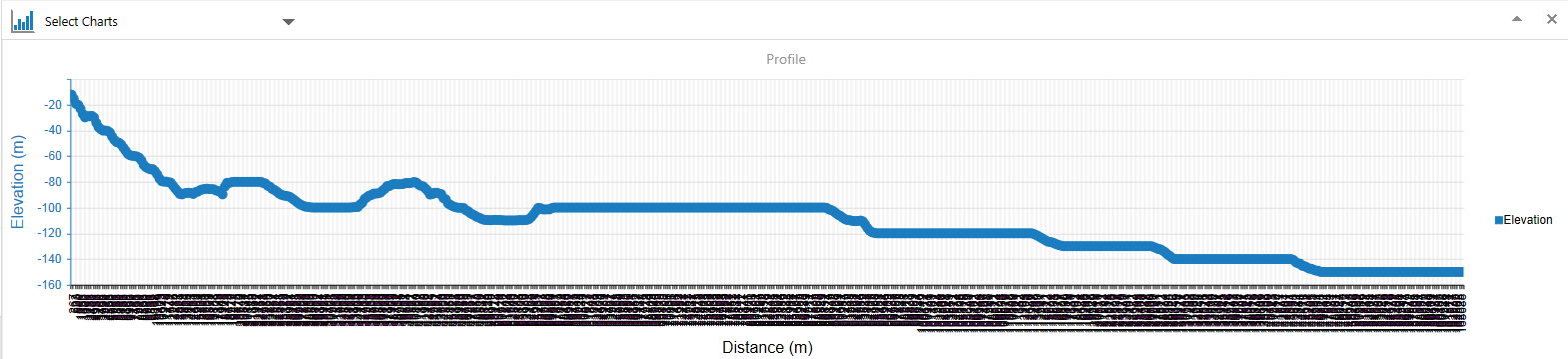
0 - Smart Label functionality seems to have been removed from the Chart configuration options, this doesn't seen to affect the Silverlight Viewer but in the HTML5 2.6 viewer the chart is labels on the horizontal axis are bunched and illegible! This is a big issue with the resulting chart from the Profile tool.
-
HTML entities are showing up instead of apostrophes and symbols (< rather than <) in the legend labels for feature layers. Feature service labels are displayed correctly. 0
Du måste logga in om du vill lämna en kommentar.
Kommentarer
10 kommentarer