Is it possible to symbolize a layer using a workflow?

Just wondering if it's possible to symbolize a layer using a workflow?
0
-
Anyone? 0 -
What type of layer are you wanting to symbolize (ie point, line, polygon) and with what type of symbol?
0 -
I was thinking of creating a workflow to symbolize building footprints by building ages.
As an example;- 1900 to 1950 red
- 1951 to 2016 blue
Then created another workflow to symbolize building footprints a different way.
1900 to 2000 red
2001 to 2016 blue
All the user would have to do is click on the workflow to automatically symbolize based on the workflow.0 -
Sound like you need to use a Class Break Render. Here a quick example
https://dl.dropboxusercontent.com/u/39930290/ClassbreakRendering.zip
To get the values and colors you want I would recommend using notepad++ and doing a find and replace all the { with \n{\n and } with \n}\n with Search mode set to Extended. Then after you finsh select all the lines and Edit>Line Operations>Join Lines or press Ctrl+J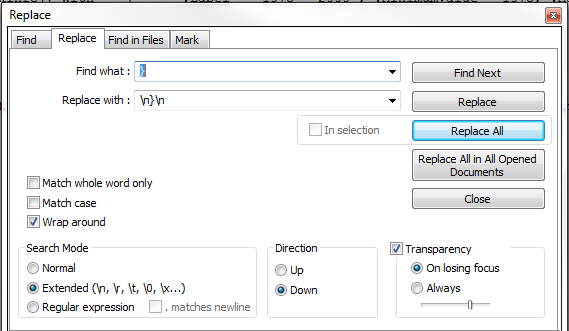 0
0
Du måste logga in om du vill lämna en kommentar.
Kommentarer
4 kommentarer