Street names don't print when using Current Extent option

Hi, I've got a bit of a strange one here. Using GVH 2.6, if I print using the Current Scale or a if I specify a scale, my street names show up in the pdf correctly. But if I use the Current Extent option, they don't display in the pdf. I don't know if this behavior is new to 2.6 or not. My street names are a combination of labels and annotation in a stand alone service.
Anyone else had this problem?
Thanks,
Chris
0
-

Hi Chris,
In most cases, Essentials produces a printed map that looks very similar to what you see in your viewer, but there will always be edge cases where you'll notice some discrepancies, and occasionally, the differences can be fairly significant.
If a layer that was visible in your viewer fails to appear in your printed map, it's usually because there's a discrepancy between the viewer's map scale and the printed map's scale (because we're trying to fit the same extent into two different aspect ratios). If the map's scale is close to the threshold of a layer's minimum or maximum visible scale, so that you're within that visible range in your viewer, but outside of that range in the printed map, you won't see that layer in your printed map. This has been a challenge for as long as we've offered a printing capability, going back to the days of Geocortex IMF.
Without seeing your application, my first guess would be that this is what you're experiencing. Is your viewer is publicly-accessible?0 -
Hi Jordan. Thanks for your suggestions. I don't think that's the issue though - the street text doesn't print at any scale. And I'm using a landscape template which is fairly close aspect ratio to the print template.
The viewer is at https://webmaps.orcity.org/Html5Viewer_2_6/Index.html?configBase=https://webmaps.orcity.org/Geocortex/Essentials/REST/sites/OCWebMaps/viewers/html5_OCWebMaps/virtualdirectory/Resources/Config/Default
The rest endpoint of the street text service is http://webmaps.orcity.org/arcgis/rest/services/Addresses/MapServer
It works fine in Silverlight BTW. I wonder, could it have something to do with the limitation of the html5 viewer not being able to zoom in between cache scales?0 -
Sorry, gave the wrong REST endpoint. It's http://webmaps.orcity.org/arcgis/rest/services/StreetText/MapServer 0 -
Ah, okay. This is indeed a bug (filed as GVH-9178 GVH-10769). The issue is that, depending on the differences in size and shape between the viewer's current extent and the print template's map area, the scale of the printed map can be quite different from that of the viewer, but the viewer's only telling the server about the layers it currently sees when it sends the print request.
Using your viewer, I printed a map with a scale of 1:4,800 in a browser window that was 1024x768, 1280x768, and 1920x1040. The resulting printed maps had scales of 1:4,987, 1:5,575, and 1:9,577, respectively. In the last case, that scale is outside the range of the street names layer's visible range (3,600 - 7,200), so the layer doesn't appear because the viewer's only told the server about "All Streets - 4800". Had the viewer also included "All Streets - 9600" in the request, this would have worked.
I've let the viewer team know you've encountered this.0 -
Thanks Jordan. I'll await a fix in the next version.
Chris0 -
Is this issue been resolved? I am having the same problem with the print map scale when I export to pdf using the current map scale some layers which are visible on the map are not shown on the pdf. Currently, I am running GVH 2.7.1. 0 -
As an update, the original issue I referenced above, GVH-9178, wound up being specific to a slightly different scenario involving print preview where, if you zoomed the viewer out while previewing and then printed, some layers originally seen in the preview would not appear in the print job because they were not visible from the zoomed-out view. The issue with Chris's viewer that I've described has been filed separately as GVH-10769. GVH-9178 was resolved in 2.7; GVH-10769 has not yet been resolved.
Mahender, I'm not sure if what you are seeing is what I've identified in Chris' viewer or if it's the more general manifestation of what I describe in my first reply to Chris: trying to preserve the same map extent while printing the map in a template that has a different viewing ratio than that of the viewer will sometimes result in a different scale being printed than what is displayed. If the change in scale from one to the other crosses the threshold between a layer being visible and not visible (or vice versa), the layers seen in the print job will differ from what was displayed in the viewer.
Could you elaborate on what you're seeing? Is your viewer publicly accessible?0 -
Jordan,
Many thanks for the response. Unfortunately, our site is not publicly accessible. I have included the following screenshots to understand the situation.
Map view: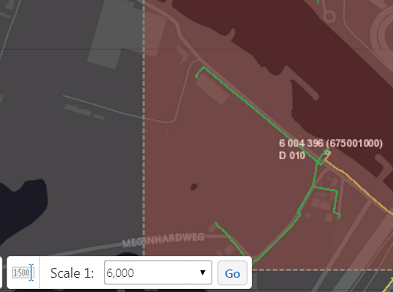
Print template :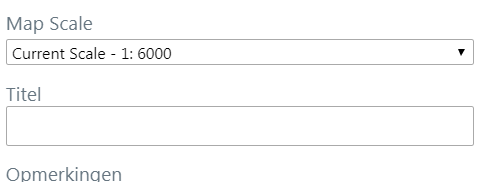
Pdf output: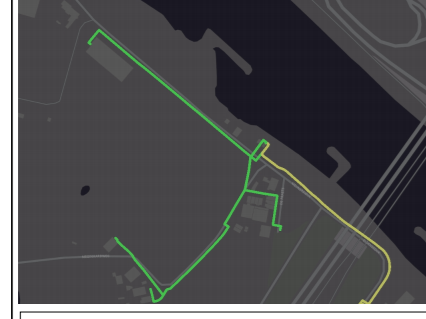
As you can see the layer is not visible in the pdf output when I use the current scale option.0 -
As there is a discrepancy between the print template map scale and actual map scale, I set 5900 instead of 6000. Then, the layers are shown in the print pdf. But for this, the user has to choose the scale from the drop down menu. If they use the current map scale option, then it results like in the above screenshot. Is there a way to hide the options 'current map scale' and 'current map extent' in the drop down menu? 0 -
Unfortunately, no. We looked at doing it several years ago, when the user didn't have the option of selecting the scale themselves, (GE-3075), but it became less of priority once users could choose their scale. I'll raise it with the team again. 0
Du måste logga in om du vill lämna en kommentar.
Kommentarer
10 kommentarer