Customizing the Scale

Is there any way to customize the scales now at the bottom of the maps since the HTML5 upgrade?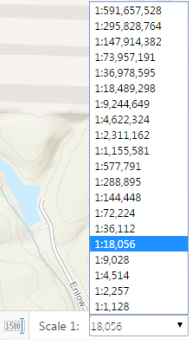
I appreciate the ArcGIS Online scales but I was also hoping to be able to type in "24,000" or "12,000" but it doesn't go to those scales even if you type them in. It goes to the nearest one such as 18,056 or 9,028.
I've checked the json files and can't seem to locate the array of scales below to see if I can alter them.
Thanks,
John
0
-
Hi John! If your map has a tiled basemap, the available scales are limited to the levels of detail offered by that basemap. You can see the same scales advertised by the service itself from its endpoint, e.g.:
http://services.arcgisonline.com/arcgis/rest/services/World_Street_Map/MapServer
The Silverlight API allowed you to manipulate the tile images such that you could request the scale closest to your desired scale and then stretch or shrink the images to fit that desired scale, but this functionality is not possible with the JavaScript API.0 -
That^ is some good information Jordan.
Would it be possible to have a drop down like above for zooming to the _available_ scales for the currently active basemap? (Assuming active is the top most basemap turned on).
That functionality would give us the ability to see what our scale is at and also navigate better. For example sometimes it's not clear if a map service with scale restrictions should be drawing or not. This is certainly a test case for releasing a production application.
Cheers,
Matt0 -
Jordan,
Thank you. I cannot see our rest endpoints because they are protected by GeoCortex (we use active directory). I have a "Scales" layer published and in ArcGIS Server Manager I went in and added the all of the ArcGIS Online scales plus the "24,000" or "12,000" rounded ones I was wanting. Still no dice. When I type in 24000 into the scale tool in the map, it still defaults to 18,056. Is there any work around? If not immediatley available is this something that is to be corrected in a future upgrade?
Thanks,
John0 -
Not sure what the "Scales" layer you are talking about. HTML5 is looking to see what actual scales you have cached. I don't believe you can mix and match scales - they have to be all the same, though some can have extra on either end. Back when Web_ADF first came out and we were also restricted to cached scales, we decided to use common engineering scale to make our folks happier. So we first started caching at 300, 600, 1200, 2400, etc. Divide by 12 to get engineering scales (1200 = 100 scale). Of course that means that we cannot use any of ESRI's cached services, since they are different. 0 -
Mike, I hope this is correct but we have a "Scales" layer published which goes at the bottom of my published services. I can then go into ArcGIS Server Manager and Add/Delete the scales inside that layer. However, it has now been greyed out and no longer allowing changes (see image below), leaving me with a mix of the ArcGIS/Bing Scales and a handful of ones I added. Is there a way around this?
If this is the wrong approach, where would I go to see the scales I have cached that HTML5 is looking for?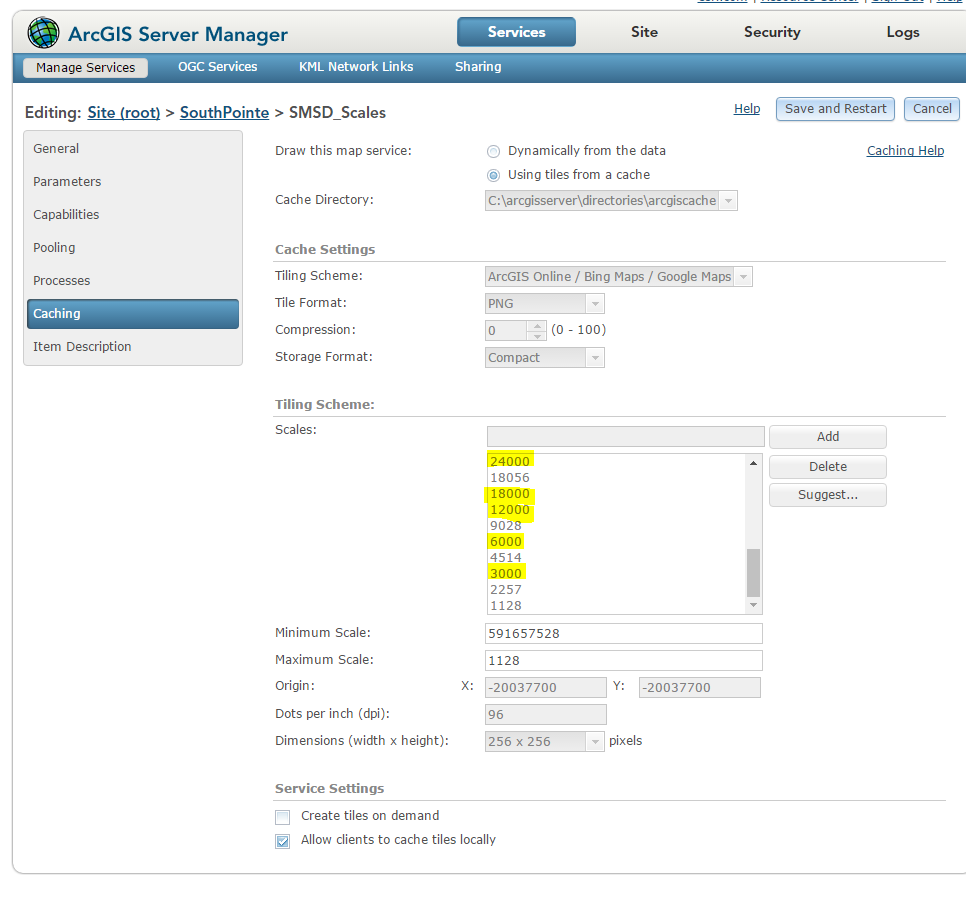 0
0 -
Is this still the case with the Javascript API in GVH? In other words, we still have to build our caches for these scales (engineering scales) in order to offer these scales to our users? 0 -
Hi Michael,
Yes, still the same situation with GVH. The new series 5 application (GWV) will allow you to select a scale or enter a scale. (https://www.geocortex.com/products/gwv/)
Regards,
Wayne Richard
Latitude Geographics Group Ltd.
Head Office: 300 – 1117 Wharf Street Victoria, BC Canada V8W 1T7
Tel: (250) 381-8130 | Fax: (250) 381-8132 | wrichard@latitudegeo.com
Developers of Geocortex web-based mapping software | www.geocortex.com
An Esri Platinum Business Partner0
Du måste logga in om du vill lämna en kommentar.
Kommentarer
7 kommentarer