Is it possible to move the Global Search bar to a different location in the viewer?

...We have limited space on the web page where the site will be embedded.
Thanks,
Adrien
GVH 2.5.2
0
-

Hi Adrien,
You can move the Global Search module via setting the region in the viewer configuration file. Regions are explained in detail in the Administrators guide.
As another/complimentary option, you can use CSS to get it exactly where you want it.
-Kevin0 -
Ok great, I'll try that. Thanks Kevin! 0 -
I modified the config so that the Search View is located in the Top Right Map Region, however, because I already have my Tools there, they don't lay side by side, but rather on top of one another. Is there a way to fix this without CSS or is this an example where custom code is needed? Thanks! 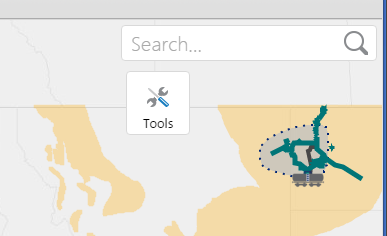 0
0 -
Hi Adrien,
If you have limited space, you might consider creating a workflow instead to let your users search, then calling your workflow from a toolbar button, or the "I Want To" menu. In this scenerio, you would disable the search box all together. Let me know if you're interested in that option, and if so I can provide an example workflow.
Cheers!
Danny0 -
Thank you for the suggestion, I am interested in that solution. An example would be great. 0 -
No problem Adrien, you can download the example workflow here:
http://data.latitudegeo.com/support/forums/global_search.xaml
Hope that helps!
Thanks,
Danny0
Du måste logga in om du vill lämna en kommentar.
Kommentarer
6 kommentarer