Multiple Instances of HTML5 Viewers

I would like to have two different instances of HTML5 Viewers, one for internal use and one for external use. I added a viewer template in the post intallation configuration and named it Internal. However the two viewers are showing up with the same name of "Internal"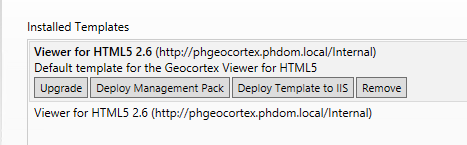
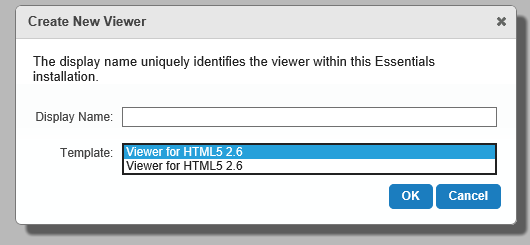
Also, when I got to create a new site and add a Viewer, there is no differntiation between the viewers names...
Any advice on how to create two different viewers with different names?
0
-
Hi Lisa,
if you want to have 2 different viewers on one site, you can add them from the same template, there's no need to add a second one in the Post Installer. You would simply give your new viewer a different display name (for example External and Internal) and launch them like this:
http://dbriggs-ess13/Html5Viewer/Index.html?viewer=Internal
http://dbriggs-ess13/Html5Viewer/Index.html?viewer=External
I hope that helps!
Thanks,
?Danny0 -
Hi Danny, Thank you for the response, but I dont think I explained what I needed very clearly. We have different maps/sites that can be externally accessible to the general public, but also maps/sites that can only be internally accessible. We would like to have two different viewer instances, so the externally accessible site points to the external url, and the internal site points to our internal url. We were thinking of installing two seperate instances of Geocortex, but feel like there is probably a better way...? 0 -
Hi Lisa,
Aah, I see, thanks for clarifying. In that case, I think you have it right, you would want a second template with a different URL and then you would reverse proxy to that URL.
I'm not sure how you ended up with 2 identical viewer templates in your Post installer though. You may need to open a support case so we can help you investigate that.
Hope this helps!
Thanks,
Danny0 -
If you want to install the same VTE a second time, we have found that it's best to make a copy of the VTE, unzip it (it's just a .zip file renamed to .vte) and change the TempateID, DefaultVirtualDirectory, DisplayName and Description fields. You can then zip the files up into a new .vte (different name) and install that. It should list your new template in the list when you create a new viewer. 0 -

Thanks for the tip, Peter. We have the same issue as Lisa with the viewer templates all appearing the same in the Post Installer even when we gave them different names during deployment. We'll have to give your method a try going forward. 0
Du måste logga in om du vill lämna en kommentar.
Kommentarer
5 kommentarer