ADFS: Has anyone implemented this with GE - with more than one User?

Hi Folks,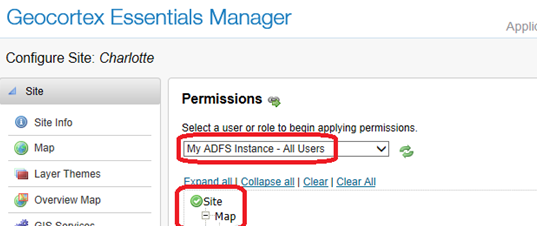
We have a directive to move our Apps to ADFS Authentication, and I'm no expert on this believe me!
We've implemented it and have it working thanks to some instructions from our local distributor here (originally from LG) but we have it to the point where it will only allow you to choose "All Users" which sort of defeats the purpose!
see image below..
Can anyone shed some light on how I can make ADFS provider more granular with all the roles I need to allocate..??
cheers
Gareth
0
-
Hi Gareth,
I've got the exact same question. Dissapointing to see that you've had no responses to your post. Don't suppose you managed to find the answer elsewhere?
Cheers,
Beth-Anne0 -
Beth-Anne,
Not really would be the answer, although we have contracted some external help to look at potential ways of implementing it across both ArcGIS Server and Geocortex as a more holistic approach.
It would also be nice to hear what LG have in the pipeline on this topic.
Will keep you posted on any updates!
regards
Gareth0 -

Geocortex Identity Server Integration Guide (https://digitaldataservices-my.sharepoint.com/personal/tom_neer_digitaldataservices_com/_layouts/15/guestaccess.aspx?guestaccesstoken=grzrYHtQV046ebgPk8w1UQorBxoa4SYFnEbXnInKnX4%3d&docid=0191168daeb594cdaab52150ed347c05f)
Please note that there is an update to:
Step 3: Register the Home Realm with Essentials · Open the Security Store for your Essentials instance.
· For Essentials 4.3 and later, the Security Store is accessed with an editor program.
o For Essentials 4.3, this program is located in .?
o For Essentials 4.4 and later, this program is located in C:\Program Files\Latitude Geographics\Geocortex Core\NSRoot\Geocortex\Core\Roles\SecurityStore\2.3.1\Editor\Geocortex.Platform.Roles.SecurityStore.Editor.exe by default.
This is not for the faint-hearted. Make sure you have backups of EVERYTHING before implementing this.0 -
Thanks Tom,
There is a slight difference in our docs - with that updated step 3, so thanks very much for sharing!
I'll try it on for size and see how it goes..
thanks again
GF0 -
We do have a Knowledge Base Article up now that will be kept up to date describing how to configure the ADFS integration. It's located (https://support.geocortex.com/essentialsGSCkba?id=kA3600000008QUj) here .
Setting permissions for ADFS Groups or specific Users is possible, but it is advanced so we recommend you contact the (To: support@latitudegeo.com) Latitude Support Team (or your local distributor) for assistance with the following instructions:
To set permissions for ADFS groups, you have to manually edit the Site.xml and set the user/role information in the <Permissions> element at each level that you want to secure. If you’re setting permissions more fine-grained than just at the site level (ie hiding workflows, certain layers, reports, etc), you’ll find it easier if you go in to Geocortex Manager and create a dummy Geocortex Identity Server user that has a unique name, and then set the permissions first using the UI on the permisssions page in Manager so that when you edit the Site.xml, you can search on that name to find all of the locations that you need to change. Also, be sure to close Manager before you make any changes to the Site.xml otherwise they may not save properly.
Once you’re in the Site.xml look for the <Permissions> elements which look similar to this:
<Permissions Inherit="True">
<Allow ValueType=" (http://www.geocortex.net/security/claims/weak-identifier) http://www.geocortex.net/security/claims/weak-identifier " Value="GIS Admins" Issuer="urn:gcx:idp:4232F960-E39A-4518-BC50-3657CB4B1506" OriginalIssuer=" (http://picard.latitudegeo.com/geocortex/identityserver) http://picard.latitudegeo.com/geocortex/identityserver " />
</Permissions>
To get the correct values for the ValueType, Value, Issuer, and OriginalIssuer properties, you’ll need to go to the Geocortex REST Endpoint for the site ( http://server/Geocortex/Essentials/REST/sites ), sign in as a member of the group that you want to set, and then click on the user name in the top right corner of the page. This will take you to the /REST/security/userInfo page that details all of the claims for that user.
Find the claim that list the Value as the group that you want to se, and use the Value, ValueType, Issuer, and OriginalIssuer values for that claim in the <Permission> element in the Site.xml.
Note that the top level elements are listed alphabetically so if you want to set permissions at the Site level, you’ll have to scroll down towards the bottom to find the <Permissions> element that isn’t nested within another tag.0 -
Thanks Victoria,
I'll do some testing..
cheers
Gareth0 -
As far as I can tell, the issue still applies to GE 4.5.1 ... so is there any advise from LG / Geocortex on how to ease the pain of editing site.xml's? Or getting the ADFS users / groups on the drop-down list when assigning permissions? 0 -
Hi Edgar,
I agree, it would be nice to have those usernames and group names show up in the permissions dropdown. I've filed an improvment for this (GE-8399), and will update the forum post when I know more.
Cheers!
Danny0 -
Thanks Danny - much appreciated 0 -
We got it setup but we have multi-forest env. and ESRI only supports one forest implementation, so its a bust for us. 0 -

Portal for ArcGIS supports ADFS as identity provider. Could this be the solution here, to make it easier to configure site security permissions to specific ADFS groups?
The idea is that you set up your Portal for ArcGIS to use ADFS. Then you connect your Geocortex to your Portal for ArcGIS to be used as your identity provider. I am interested to hear if anybody have successfully implemented this setup?
Thanks, Martin0
Du måste logga in om du vill lämna en kommentar.
Kommentarer
11 kommentarer