The clearcollectionfirst argument is obsolete... OK great! WHERE do I fix it?

I am using the elevation profile workflow that originated with the LA county site. Since upgrading to viewer 2.6, it's broken. You have to run a profile a second time to get a result. I assume that this clearcollectionfirst argument is the culprit since there's nothing to clear unless you've already run the thing... maybe?
The error tells me to use SetOperation instead... Troublesome thing is that I cannot figure out where I do that. I can't find it in the xaml.. I can't find it in the workflow designer. I don't know where to look, even though I assume this is pretty basic stuf..
Please help!
0
-
Did you figure this out? 0 -
Well I finally found ClearCollectionFirst in the xaml... Not sure how I missed it, but I still don't know what the values to use for SetOperation are... stay tuned. 0 -
Hey guys,
Clear Collections First has been replaced with Combine Mode. This was done to give you more options when it comes to clearing the collections. You can now add to them, subtract from them, union them with other collections, or replace them (replacing is the equivilent of Clear Collection First being set to true). Here's a screen shot showing you where you can set those options: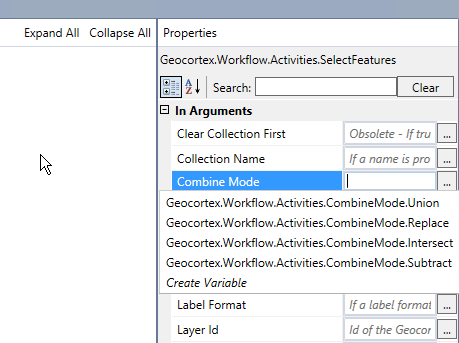
And here's a video from one of our developers talking about the new workflow activities in 4.5 (including the details about the new Combine Mode option)
Link to video (https://support.geocortex.com/essentialsGSCVideo?sub-nav=videos&main-nav=essentials&#!/feedtype=SINGLE_ARTICLE_DETAIL&dc=Geocortex_Essentials_vid&criteria=BESTANSWERS&id=kA560000000CbC7)
I hope this helps!
Thanks,
Danny0 -
This does help, thanks! It makes sense. Unfortunatley, it doesn't solve the problem with my workflow that I thought it would. Since upgrading, I have to run the profile tool workflow at least once before it will display any results. I was hoping it had something to do with the features selected. 0 -

The value to choose for Combine Mode (when removing True from Clear Collections First) is
Geocortex.Workflow.Activities.CombineMode.Replace
0 -

Anyone having issue with different feature sets added to a colleciton all having the same tab name as the last feature set added to the collection?
Html Viewer: 2.9.2
Collection name
"12 Digit HUC Results"Feature Set 1 (SelectFeatures)
FeatureSet Display Name: "Animal Species by 12 Digit HUC"
Layer Name: "HUC12_AnimalSpecies"Feature Set 2 (SelectFeatures) This is called in a sequence AFTER Feature Set 1
FeatureSet Display Name: "Ecological Systems by 12 Digit HUC"
Layer Name: "HUC12_Ecosystems"
Combine Mode: Union (I have also tried all other options)
Result
12 Digit HUC Results collection in table view has two tabs. BOTH are named "Ecological Systems by 12 Digit HUC". Why?0 -
To answer my own question. The FeatureSetId argument must be set in the SelectFeatures activity for gcx display process to differentiate between FeatureSets within a collection. The display name itself is not enough. Figured this was treated similar to the layer id / layer name, but it is not. 0
Du måste logga in om du vill lämna en kommentar.
Kommentarer
7 kommentarer