toolbar width

Is there anyway to change the width of the Toolbar? It is taking up a lot of real estate when open, and I don't like the Compact toolbar much...
0
-

Mike,
This should get you started. Tested on GVH 2.6 & 2.6.1. Place this .css into the viewers Custom css file "Desktop.css" located at
\VirtualDirectory\Resources\Styles\Custom\Desktop.css
/* ------Begin Group Tabbed Toolbar Modifications - 4-4-2016 */
.transient-toolbar {
padding: 0 0 0em 0;
margin: 0em 0em 0em 0em;
}
.toolbar-group h4 {
height: 0em;
font-size: 0em;
}
.toolbar-body.large .toolbar-group {
min-height: 4.8em;
padding-bottom: 0em;
}
.toolbar-item p, .toolbar-item label {
line-height: 0.9em;
margin: 0 0.3em 0em 0em;
}
.toolbar-group p, .toolbar-group label {
font-size: 0.85em;
}
.toolbar-item {
height: 4.0em;
}
.toolbar-body button {
margin: 0em 0em;
}
.transient-toolbar li, .toolbar-body ul li, .flyout-menu ul li {
margin: 0.12em;
}
/* Toolbar Tab - "Main...Find Data...Tasks...Mapping...Tools" - 08-06-2015 */
ul.toolbar-tab-control li button {
font-size: 0.9em;
padding: 0.1em 0.75em;
}
ul.toolbar-tab-control {
padding: 0.15em 0em 0em 0.5em;
}
.transient-toolbar .toolbar-item > img, .transient-toolbar .toolbar-item > span.icon {
margin: 0.2em auto 0.2em auto;
}
.toolbar-item.select-double select {
margin-top: 0.55em;
}
.toolbar-item.select-double select + select {
margin-top: 0.45em;
}
/* ------End Group Tabbed Toolbar Modifications - 4-4-2016 */0 -
Thanks richard. I've tried changing a couple of values, and I'm not seeing any changes in the toolbar appearance... In particular, I would like to decrease the space between the tools and the tool group label - any idea which of these I would change? Also, what does "em" stand for? 0 -
Mike,
EM is a relative unit of measurement in web design. See more info here - http://www.w3.org/WAI/GL/css2em.htm
The css code that I attached above removes the Group Label altogether.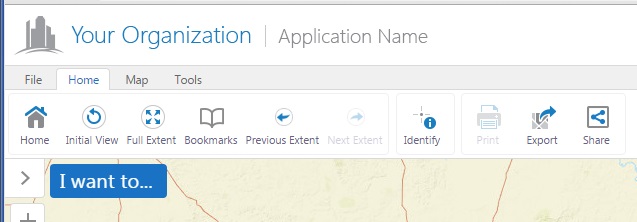
I had a working solution to minimize the space containing the group label, but that css no longer is valid as Latitude Geographics added the transient-toolbar to the toolbar menus not to long ago. So I dealt with it by just removing it. If you open your site in Chrome, you can right click on an interface object like a tool button then click inspect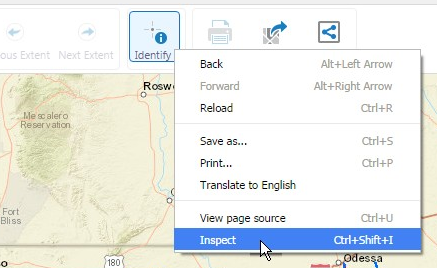
The Chrome developer tools will open.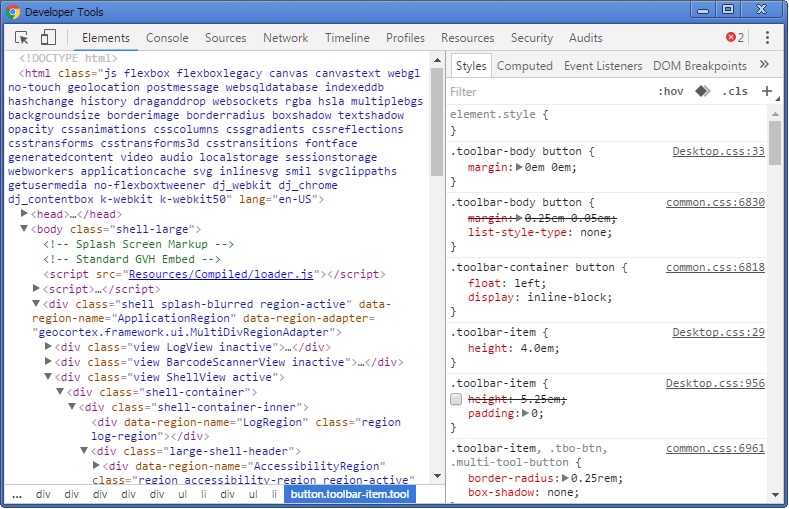
In this interface, you can play with the css settings directly in real-time. This will aid you in finding the correct css values to over-ride by placing that code in the viewers Custom css styles file "Desktop.css". Modifying the newest GVH toolbar in css will take you some time as one change will affect another element. I hope this helps.
Rick0 -
It did not remove my group labels... This should work for all sites? 0 -
Yes, It should work for all HTML5 GVH 2.6 & 2.6.1 sites. The first image in my reply shows the Web GIS (Full) toolbar configuration that was added to a viewer in a site. No other modifications other than placing the .css code into the Desktop.css file located in the Styles\Custom folder for that particular site. The ...\Styles\Custom\Desktop.css file overides the default viewers css styling. 0 -
I made the change in the inetpub folder, not in the Sites folder. Working now, thanks. 0 -
Sweet! 0 -
Thanks Richard, I added your snippet to our viewer and it works much better! 0
Du måste logga in om du vill lämna en kommentar.
Kommentarer
8 kommentarer