A few questions regarding using multiple instances of Essentials:

1.Can multiple instances be run on clustered servers? We currently have only one, unnamed instance and were hoping to add a named and also keep the unnamed instance
2.Do additional instances (same version) require additional licensing?
3.Can each instance have different security providers activated? (e.g. Windows only on an internal instance and GC Identity Server on a public instance)
0
-
Hi Vernon,
To answer your questions in order:
1. Yes you can have multiple instances run on clustered servers. You can have as many named or unnamed instances as you want.
2. Additional instances on the same server do not require additional licensing. One server equals 1 license and you can have as many instances on that one server as you like. This can include instances of the same or different version; it does not matter.
3. Each instance has its own Post Installer so yes you can have different security providers activated for each one.
I hope this helps.
Regards,
Carmen0 -
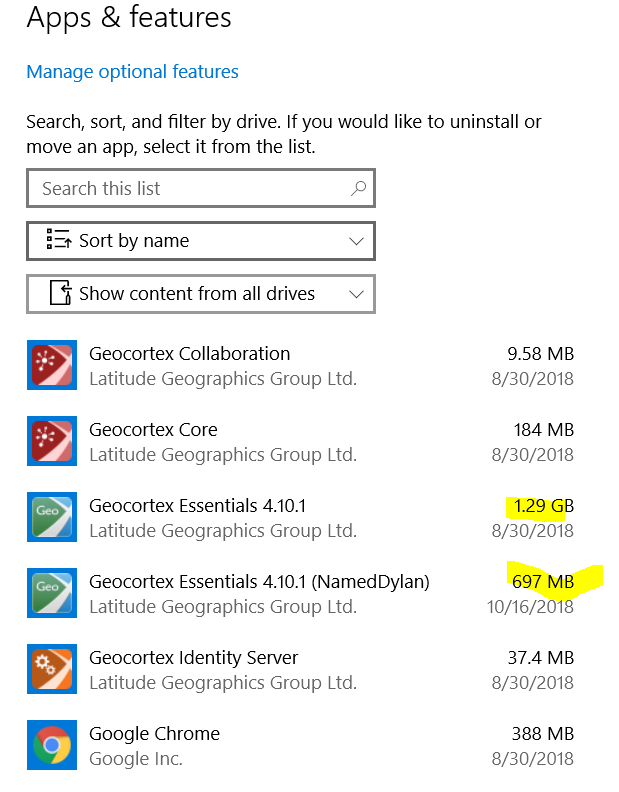
Any thoughts on why the Instances have 50% different in size?0 -
Hi Dylan,
This is an issue we've seen before, a bug in the Windows 10 Apps and Features tool. It happens on other applications as well. The number you are seeing for (NamedDylan) is accurate. All the other applications shown in your screenshot are showing double the actual size.
If you open Programs and Features and enable the Size column, you should see accurate sizes (Collaboration: 4.79MB, Core: 92MB, Essentials: ~697MB, Identity Server: 18.7MB). You can also just click on the items and the information displayed at the bottom of the window includes size.
Thanks,
Aaron Oxley0
Du måste logga in om du vill lämna en kommentar.
Kommentarer
3 kommentarer