Run A Report from Map Tip not working for me.

I have a layer that has 3 reports added to it, and a site with 3 different workflows to run those reports. All of the reports run without a hitch through the workflow, but fail when I try and run them through the "Run a Report" option in the map tip. I get a generic error stating: "An error occured when attempting to run your report."
The following is what I am seeing in the essential logs: <Event Timestamp="2016-05-11T20:07:44.1141357+00:00" Level="ERROR" Identity="Guest"><Message>Exception has been thrown by the target of an invocation.
Error performing the query: [].
</Message></Event>
<Event Timestamp="2016-05-11T20:07:44.11514+00:00" Level="DEBUG" Identity="Guest"><Message>InvalidOperationException:
at Geocortex.Gis.Services.ArcGisServer.Rest.Proxy.RestResource.RequestJsonObject[T](String operationUrl, Dictionary`2 operationParameters, ITokenProvider tokenProvider, Boolean storeInCache)
at Geocortex.Gis.Services.ArcGisServer.Rest.Proxy.LayerBaseResource.Query(ITokenProvider tokenProvider, StandaloneGeometry geometry, String whereClause, String objectIds, TimeExtent timeExtent, SpatialRelationType spatialRelation, Boolean returnGeometry, SpatialReference inSpatialReference, SpatialReference outSpatialReference, String dynamicDefinition, String gdbVersion, String orderBy, Boolean returnIdsOnly)
at Geocortex.Gis.Services.ArcGisServer.Rest.ArcGisRestQueryFunctionality.a(IQueryableLayer A_0, StandaloneGeometry A_1, String A_2, String A_3, TimeExtent A_4, Boolean A_5, SpatialRelationType A_6, SpatialReference A_7, String A_8, String A_9, String A_10)
InvalidOperationException: Error performing the query: [].
at Geocortex.Gis.Services.ArcGisServer.Rest.ArcGisRestQueryFunctionality.a(IQueryableLayer A_0, StandaloneGeometry A_1, String A_2, String A_3, TimeExtent A_4, Boolean A_5, SpatialRelationType A_6, SpatialReference A_7, String A_8, String A_9, String A_10)
at Geocortex.Gis.Services.ArcGisServer.Rest.ArcGisRestQueryFunctionality.Query(LayerQueryFilter queryFilter)
at Geocortex.Essentials.FeatureLayer.Query(LayerQueryFilter queryFilter)
at Geocortex.Essentials.Reporting.Transforms.LayerDataTransformer.Execute()
at Geocortex.Essentials.Reporting.ReportRunner.GetReportContextData(ReportContext reportContext, ImageTable imageTable)
at Geocortex.Essentials.Reporting.ReportRunner.b()
at Geocortex.Essentials.Rest.Resources.RunLayerTemplateReportOperation.Run(RunTemplateReportOptions options)
at Geocortex.Essentials.Rest.Resources.RunTemplateReportOperation.RepresentAsJson()
at Geocortex.Essentials.Rest.Resources.ResourceBase.WriteJson()
TargetInvocationException: Exception has been thrown by the target of an invocation.
at System.RuntimeMethodHandle.InvokeMethod(Object target, Object[] arguments, Signature sig, Boolean constructor)
at System.Reflection.RuntimeMethodInfo.UnsafeInvokeInternal(Object obj, Object[] parameters, Object[] arguments)
at System.Reflection.RuntimeMethodInfo.Invoke(Object obj, BindingFlags invokeAttr, Binder binder, Object[] parameters, CultureInfo culture)
at b.Invoke(RequestContext A_0, RestContext A_1)
at Geocortex.Essentials.Rest.EssentialsRestRequestDispatcher.a()
RestException: Exception has been thrown by the target of an invocation.
Error performing the query: [].
</Message></Event>
<Event Timestamp="2016-05-11T20:07:50.1131384+00:00" Level="INFO"><Message>[2016-05-11 20:07:50,113][DEBUG][8 ][ ][Geocortex.Platform.Infrastructure.Retry] While<CSRedis.RedisClient>(1000, 200000, 1.15, 20) called from CreateConnectedClient</Message></Event>
<Event Timestamp="2016-05-11T20:07:50.1171388+00:00" Level="INFO"><Message>[2016-05-11 20:07:50,117][DEBUG][8 ][ ][Geocortex.Platform.Infrastructure.Retry] whilePredicate returned false, successfully exiting Retry.</Message></Event>
Any help on this one would be appreciated. I am sure I am missing a check mark somewhere.
Thanks,
Aaron
0
-
Can you show how you configured your maptip? 0 -
Thank you for getting back to me. Here is how it is configured in essentials: <div style="font-weight: normal;"><span style="font-size: large; font-weight: bold;">Taxlot: {APN}</span></div><div style="font-weight: normal;"><br/></div><div style="font-weight: normal;"><span style="font-weight: bold;">{SiteFull}</span></div><div style="font-weight: normal;"><span style="font-weight: bold;">{SiteCity}, {SiteState} {SiteZip5}</span></div><div style="font-weight: normal;"><br/></div><div style="font-weight: normal;"><div style="font-size: 13.3333px;"><span style="font-weight: bold;">Ownership: </span><span style="font-size: 10pt;">{Ownership}</span></div></div><div style="font-size: 13.3333px;"><div style="font-weight: normal; font-size: 10pt;"><span style="font-weight: bold;">Tax Account: </span><span style="font-size: 13.3333px;">{TAXID}</span></div><div style="font-size: 10pt;"><span style="font-size: 13.3333px;"><span style="font-weight: bold;">Property ID:</span> </span><span style="font-size: 13.3333px;">{PropertyID}</span></div><div style="font-weight: normal; font-size: 10pt;"><span style="font-size: 10pt; font-weight: bold;">Market Land: </span><span style="font-size: 10pt;">{MktVLand}</span></div><div style="font-weight: normal; font-size: 10pt;"><span style="font-size: 10pt;"><span style="font-weight: bold;">Market Structure:</span> </span><span style="font-size: 10pt;">{MktVImprov}</span></div><div style="font-weight: normal; font-size: 10pt;"><span style="font-size: 10pt;"><span style="font-weight: bold;">Market Total:</span> </span><span style="font-size: 10pt;">{MktVTotal}</span></div><div style="font-weight: normal; font-size: 10pt;"><span style="font-size: 10pt; font-weight: bold;">Assessed Total: </span>{AssdTotal}</div><div style="font-weight: normal; font-size: 10pt;"><span style="font-weight: bold;">Levy Code:</span> {TaxRate}</div><div style="font-weight: normal; font-size: 10pt;"><span style="font-size: 10pt; font-weight: bold;">Legal Description:</span><span style="font-size: 10pt;"> {LegalDscpt}</span></div></div><div style="font-weight: normal; font-size: 13.3333px;"><br/></div><div style="font-weight: normal; font-size: 13.3333px;"><br/></div> Here is what it looks like within the viewer: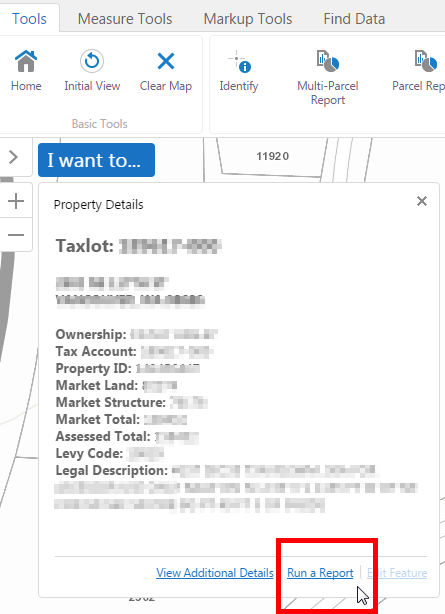
Best,
Aaron0 -
Aaron,
So you are referring to the default "Run a Report" - Did you make any changes to the report to make it work in the workflow? Probably a dumb question, but I'm assuming you've added these reports to their respective layers in the Report tab? When you click on "Run a report" you see the 3 reports, and it is not until you try to run one that you get the error? At what point - after you have selected your features?0 -
Hi Mike,
No, the workflow just references the Map Service, and calls the report based on its number in the settings for the layer.
I do have 3 reports (all of te ones added to the layer) as options. When I choose either of them, it pauses for half a second and then fails.
Thanks again for your help.
Best,
Aaron0 -
Have you tried creating a dummy site with the needed service, and trying the reports there, before anything else happens? Have you looked at the Geocortex logs? How about Fiddler? 0 -
I was able to resolve this by deleting the layer and re-adding it to the site. Not sure what the issue was, but that was one way to fix it. 0
Du måste logga in om du vill lämna en kommentar.
Kommentarer
6 kommentarer