how do you add a custom coordinate system in the HTML5 2..6 viewer

Is there a way to add a custom coordinate system to the coordinates module (Map Coordinate widget) and use it in the new plot coordinates tool? We have a customer that would like to include the U.S. National Grid.
Essentials: 4.5
HTML5 2.6
Thanks,
Frank
0
-

Did you ever figure out how to do this?
Thanks!0 -
Adding a new spatial reference system via a well-known ID (WKID) or well-known text (WKT) is relatively straightforward: in Manager, you edit your site and then your viewer. Select the Map page and then enter your SRS via the Map Coordinate Systems section.
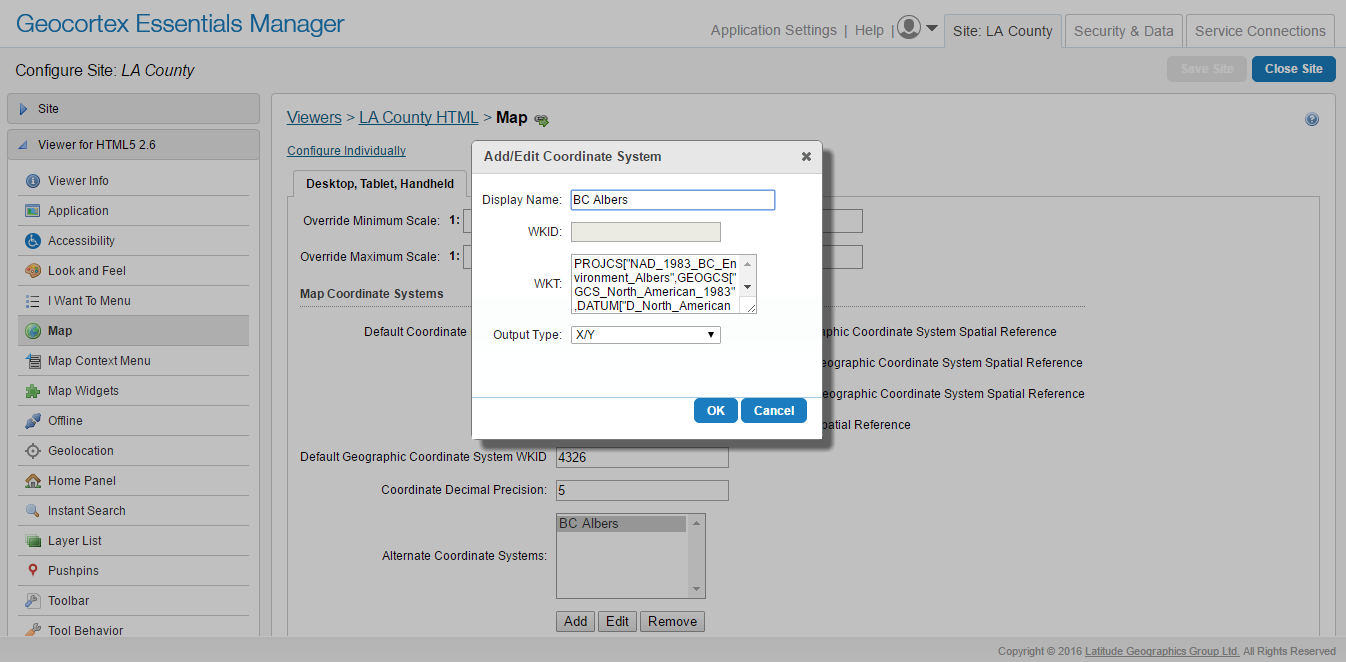
That SRS will now be available for both the mouse coordinates widget and the plot point tool.
This will work for most coordinate systems using one of the following units:
* Latitude/Longitude (Decimal Degrees)
* Degrees, Decimal Minutes
* Degrees, Minutes, Seconds
* X/YUnfortunately, (http://www.fgdc.gov/usng/how-to-read-usng/index_html) US National Grid spatial addresses are a different sort of beast, and the viewer doesn't currently handle them. I'll follow up with a developer to see how difficult it would be to include this capability in the future. In the meantime, it may be possible to build a workflow that is capable of converting lat/long into USNG addresses.
0 -
FYI. US National Grid (USNG) coordinates are based on the UTM with NAD 83 as the underlying datum. MGRS (Military Grid Reference System) is based on WGS 84 and is valid around the world. So the idea is if UTM can be supported, then USNG/MGRS coordinates can be computed from the UTM coordinates. More info available at http://usngcenter.org/ 0 -

@Jordan - ArcGIS Server has a To GeoCoordinate and From GeoCoordinate functions that LG has not exposed so we wrote our own module for Workflow Designer, specifically to get USNG coordinates. Unfortunately, we were trying to get some help from LG on how to properly format the Workflow Modules and we hit a brick wall. So we never publicly released it. But if you are interested, we would be willing to share if we could get some input from LG developers on how we can format out custom workflow modules so we can release it for free. 0 -
MGRS support for coordinate tools has been discussed, but its implementation is still in our to-do list. I've raised the possibility of including support for both USNG and MGRS in a viewer release following 2.7.
In the meantime, Tom, I'd be happy to help get you some answers on your workflow module, if you want to (To: community@geocortex.com) email me the details.0 -
Update: this feature is being considered for HTML5 viewer 2.8. Also, I've slightly repurposed (https://support.geocortex.com/essentialsGSCIdeasDetail?c=09a6000000008RsAAI&id=087600000004MbDAAU) this idea to represent support for both USNG and MGRS, as discussed in this thread. 0 -

Any update on MGRS support? 0 -
It's tentatively planned for 2.8, but there are still some other features to be completed first. We should know more in the next few weeks. 0 -
When is 2.8 going to be released? We need MGRS support. 0 -
Geocortex Viewer for HTML5 2.8 will be released in the next few days; unfortunately, MGRS and USNG support will not be available in this release. This development is on the list of planned features for the 2.9 viewer, but even then, given the very quick turn-around required to release in time to support our next-generation workflow, I can't guarantee that it will be in 2.9, either.
I realize that this is not good news for several of you, and I wish it were otherwise. I will continue to provide updates as they're available.0 -
If you watched (https://support.geocortex.com/essentialsGSCVideo?sub-nav=videos&main-nav=essentials&#!/feedtype=SINGLE_ARTICLE_DETAIL&dc=Geocortex_Essentials_vid&criteria=BESTANSWERS&id=kA5600000004IfQ) this morning's webinar , you may have caught Drew talking about the feature release following 2.9 -- MGRS and USNG support was one of the features called out for that release. I'll try to get a projected date for that release, though dates get more vague the further they get from the present.
In the meantime, Kevin Penner, one of our senior Professional Services developers, has taken it upon himself to provide a quick (https://support.geocortex.com/essentialsGSCCodeGallery?sub-nav=codegall&main-nav=essentials&#!/feedtype=SINGLE_ARTICLE_DETAIL&dc=Geocortex_Essentials_cg&criteria=BESTANSWERS&id=kA46000000007pj) code gallery sample that allows you to take a coordinate in MGRS or USNG and reproject it to the map's spatial reference using (https://geoutility.codeplex.com/) GeoUtility . It won't be a substitute for native support, but, if you're handy with workflows, it may serve as a jumping-off point for your own USNG or MGRS workflow.0 -
Update: support for MGRS and USNG will be available in HTML5 viewer 2.9. 0
Du måste logga in om du vill lämna en kommentar.
Kommentarer
12 kommentarer