Feature detail bottom region overlaps top left region for GVH 2.6

GVH 2.6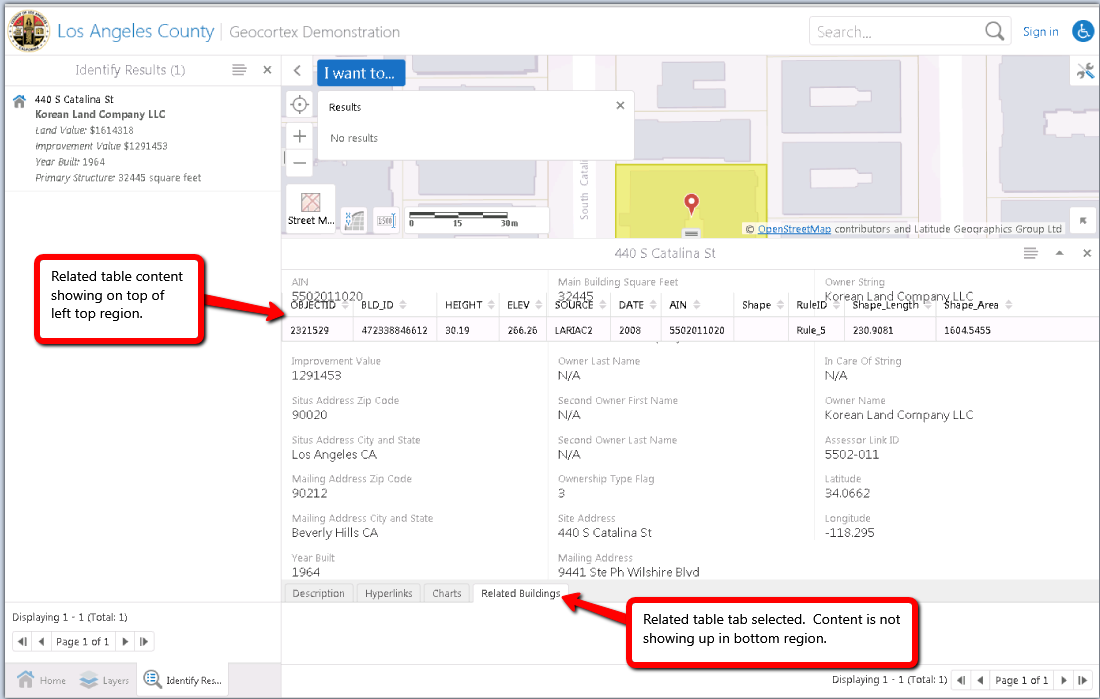
GE 4.5 (LA County example site)
I've tried laying out some feature details similar to the "Expanded Feature Details (https://support.geocortex.com/essentialsGSCVideo?sub-nav=videos&main-nav=essentials&#!/feedtype=SINGLE_ARTICLE_DETAIL&criteria=BESTANSWERS&id=kA560000000CajtCAC) " video. I'm running into an issue where bottom region content displays on top of left top region content. The behavior happens for related tabular content and charts view providers. It does not happen with description, hyperlinks, or attributes (details) view providers.
If I configure the layout like the following from the example video
"defaultViewMode": "expanded"


{
              "type": "geocortex.essentialsHtmlViewer.mapping.modules.FeatureDetails.FeatureDetailsProviders.AttributesViewModel",
              "viewId": "FeatureAttributesProviderView",
              "viewType": "geocortex.essentialsHtmlViewer.mapping.modules.FeatureDetails.FeatureDetailsProviders.AttributesView",
              "iconUri": "Resources/Images/Icons/Toolbar/details-24.png",
              "markup": "Mapping/modules/FeatureDetails/FeatureDetailsProviders/MultiColumnAttributesView.html",
			  "targetRegion": {
				  "expanded": "FeatureDetailsTopLeftRegion"
			  },
              "title": "@language-feature-attributes"
            }
Here is a screenshot of the problem.
0
-
Here is a better image of the problem.
http://i.imgur.com/ItZ80kS.png
http://i.imgur.com/ItZ80kS.png0 -

Tyson,
Can't answer this particular question, but your site would look better if you added more formatting for your numbers - Currency, 0 Decimal places would give commas, or Number, 0 decimal places for some of the others... Can set for individual fields now in Manager...0 -
That site in the image is the Geocortex example site that comes with Essentials. I used their example site to replicate the issue we were having on our actual site. 0

Du måste logga in om du vill lämna en kommentar.
Kommentarer
3 kommentarer