HTML5 startup parameters (show legend)

I have a startup URL that opens my map with a particular layer loaded. By default we show the home panel but for this particular startup URL I would like the legend to be visible at startup. Is it possible in HTML5 2.5 to configure the URL parameter to do this?
Thanks,
Dan
0
-
Doubt you could do this as a URL parameter. Would be better to do in a workflow. 0 -

The hybrid approach would be to use a URL parameter to run a workflow. You can use this parameter at the end of your URL to do that.
&runWorkflow=yourWorkflowId
Setting the workflow to run on startup through GE Manager is more direct, but this way is better if you want to create a hyperlink to run a startup workflow on your viewer only in some situations, not every time someone loads the viewer.0 -

If the workflow (SearchRoadClosuresByEvent) requires a string parameter (EventName), how would the URL need to be structured if we want to pass the EventName that is a string?
I have tried several things, but everytime I try to add a parameter after the workflow name, the application does not work.
Thanks,
Carmen0 -
The syntax is to put at the end of your URL would be:
&run=SearchRoadClosuresByEvent&EventName=YourValue
Here's an example of that syntax in action in our ArcGIS Online Zoning Map (http://brooklynpark.maps.arcgis.com/apps/webappviewer/index.html?id=5f3b7a6c9d494a1d976233aa8d687fd8) , in which the More info for this address link opens a Geocortex viewer and runs a workflow with the property address as the input argument.0 -
Super! I finally got it to work. Thank you for your example as it was very helpful.
Why mine wasn't working: I was 1) still trying to use &runWorkflow and 2) trying to use
"?EventName = myeventname" instead of "&EventName...."
Thanks,
Carmen0 -
I like the ShowLegend workflow approach. Does anyone have a generic workflow for this that they would like to share? 0 -
It's a short one, so here's a screenshot. 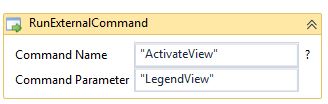 0
0 -
John -
Thanks for the advice. The legendview workflow sort of worked.The legend "panel" displays but it is blank until the map extent is moved slightly or basemap is toggled. Is there a way in the workflow to slightly move the map view to encourage the legend to display?
Thanks again,Dan
0 -
Hmm, I'm not seeing that behavior in my test app, what version of GE are you running? I'm testing in GE 4.6 with the GVH 2.7.
Not sure if this'll do the trick for you, but you could run the "ZoomToInitialExtent" command. That might nudge the map like you're trying to do.0 -
Hi John,
Thanks again! We are running Essentials 4.6.2 HTML5 Viewer 2.7.1. Data is from Dynamic Layers. I don't think "ZoomToInitialExtent" will work since we do use startup URL parameters that often include &scale= and ¢er= parameters. I was thinking if I could flash the toolbar or banner open and then closed this would nudge the map view. I saw from one of your other posts how to add/remove the Banner using the "BannerView" command parameters. If that doesn't work I might try the same with toolbar - Do you know of a list somewhere with all the command parameters that work with the External Commands for Activate/DeactivateView?
Best regards,
Dan0 -
The API reference is a good place to find commands, and if you click on the ? next to the Command Name argument in workflow designer it also gives you a ton of command examples. Other than that, I've found commands by looking in the viewer config (no magic trick there, just a lot of digging and trial and error). 0 -
Another approach would be to save the project in the state you want it, and then share the saved project... 0
Du måste logga in om du vill lämna en kommentar.
Kommentarer
12 kommentarer