Why does the BaseMap selector sometimes say "BaseMap" and sometimes the name of the visible base map service?

Essentials 4.5.1 HTML5 Viewer 2.6.1
I have one viewer where the BaseMap Selector says "BaseMap" when the viewer opens, and another viewer wher the BaseMap Selector says "Street Ma..." when the viewer opens.
What is the deciding factor that drives this behavior? As far as we can see, both viewers are configured the same way. Our customers prefer to have it say "BaseMap" on viewer launch.
Let us know if you have any ideas.
Thanks!
0
-

Could it be how it is named in the site configuration under the Basemaps Tab? I have changed the name there and also renamed it under the Map Services list. just an idea...little things like that can be easy to miss. 0 -
That changes the Display Name of the individual Base Map layer, which is okay, but does not address the issue of why the BaseMap Selector widget is labelled one way in one viewer and a different way in another viewer. I'm trying to identify where the BaseMap Selector Label is being defined and what criteria drive that definition differently between two viewers that appear to be configured the same way. 0 -
I'm using the same versions (4.5.1 and 2.6.1) and my base map selector widget shows the display names of the base maps. There is no other label on the widget. The hover text shows the display name also. I'm assuming you've done this already for the site and have more than one viewer for the same site where the display name/widget label is not the same for both? 0 -
Hi Sean,
I would expect the label to say "BaseMap" if:
- you had multiple basemaps
- you had basemaps comprised of multiple map services, configured on the Basemaps page in Manager
- the default visible layers currently selected did not match exactly what was configured on the "Basemaps" Manager page
The label of "BaseMaps" would signify that a basemap, as configured on the Basemaps page, is currently not selected.
If this is not the case in your site, I would submit it as a bug.
Regards,
?Wayne Richard
Latitude Geographics Group Ltd.
Head Office: 300 – 1117 Wharf Street Victoria, BC Canada V8W 1T7
Tel: (250) 381-8130 | Fax: (250) 381-8132 | wrichard@latitudegeo.com
Developers of Geocortex web-based mapping software | www.geocortex.com
An Esri Platinum Business Partner0 -
Hello,
I'm having a similar issue to that which Sean is describing. When I added our new air photo to the Basemap Switcher and Photo Slider, the default settings seemed to change. For example, this is what was occuring before: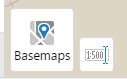
And now when I open the map up, this is how it defaults: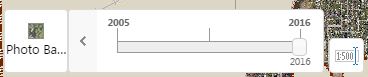
I would rather it open the previous way, but basically my question is twofold. First, is there a place to change how the title is displayed? Secondly, is there a way to have the slider bar not open by default? I couldn't find anything in the Administrator's Guide or in the Viewer JSON file that seemed to work, so perhaps this is a bug?
When I initially configured these basemaps, it was for the previous versions (Essentials 4.4.3 and Viewer 2.6) and now I am trying to work at Essentials 4.6.1 and Viewer 2.7. However, the problem only showed up when I made a change to the Basemap settings, as the first picture is from a different map with the same software settings.
Thanks for the Help,
Greg0 -
My experience is the slider is open by default if you have one of the aerials on by default. If none are on, then the slider is closed at open. I also would like to be able to control this... 0 -

Like Wayne says, the widget will show 'Basemaps' if no basemaps are turned on or more than one are turned on in the Layer List at viewer load.
The Basemaps section for your site in Essentials will allow you to change the names that appear in the widget. Otherwise, it just takes the service name. And each service has a 'Short Display Name' property that will show on the slider.0 -
Dan - Thanks, I've noticed this behavior, but previously I had one basemap turned on at launch and it did show "Basemaps," so I was wondering if something had changed in the setup between versions. This isn't a huge issue generally, but like Mike mentions, it would be nice to have greater control over how this looks, generally. 0 -
Did you have a custom transparency on that visible basemap? I remember having issues with the basemap slider in the past because I had changed the default tranparency of some basemaps. Maybe this also affects the widget in general.
This thread got me thinking about the basemaps, though. I also would prefer more control of the widget and basemaps, in general. I just posted something in the Ideas section conerning different basemap settings for each type of viewer:
https://support.geocortex.com/essentialsGSCIdeasDetail?c=09a6000000008RsAAI&id=087600000008eT9AAI&categ=all&sub-nav=ideas&main-nav=essentials0 -
I'm having a new issue where when I colapse the slider, it doesn't say anything now... 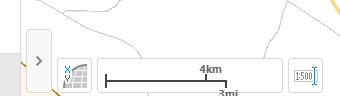 0
0
Du måste logga in om du vill lämna en kommentar.
Kommentarer
10 kommentarer