Report PDF link fails to display

Hello all,
I have adapted two workflows found on this support site: the free Parcel Report workflow from Latitude, and another called "DrillDown" from a user in Utah.
My workflow is meant to query multiple layers at a point location, and apply the resulting attribute values to a report. When my workflow only dealt with querying a single layer, I was able to produce a PDF report successfully. Then I tried to add a query for a second layer in the same Map Service. I used the Query Task and Parallel workflows to get the geometries for the two layers (without displaying selections), converted these Feature Selections to Data Tables, and added those Data Tables to a DataSet that would be used as the report source.
Before creating the report, I use a decision to ensure the selected feature count is greater than 0.
Since I have two layers, I created a master report and subreport. I was sure to reference the DataTable name of the subreport data in the subreport box in my master report, as well as the subreport name with .rpx. I used the pre-built sequence in the Parcel workflow to obtain the master report ID.
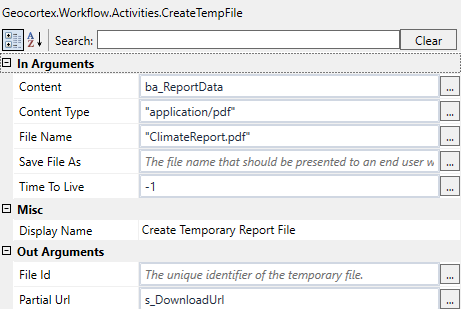
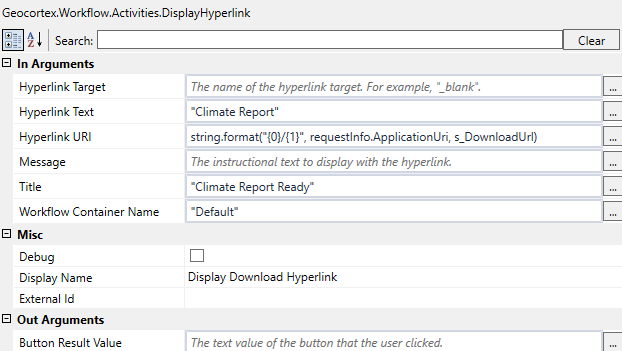
Because the regular Report function in Workflow Designer is basic, I switched to using a Report Template which calls on the report source DataSet and converts it to a Byte[] data type. Then I use the CreateTempFile and DisplayHyperlink functions to let the user download the report.
When I run the workflow in my site (with the workflow added, arguments (for URLs, etc.) filled out, and Master Report added to my main layer), every step goes smooth, including capturing the geometry, until I click the final "Run Report" button on the form, which allows the creation of the report and the display of the hyperlink. The home panel will flash the container that would normally display the hyperlink for about 1/2 a second, then it is back to the Layer List.
I should also mention that both the master report and subreport are residing in the same location. I'd like to verify that only the master report needs to be referenced by my site, correct?
Can anyone give me any hints to what I am doing wrong? Is it more likely to be a problem earlier with my selections, or an issue with the report creation? I'd appreciate some general input into the potential problem area, since I have displayed or attached the workflow to this post.
Thanks very much,
Brenden
0
-
Hello again,
Here is a short follow up. I created fresh workflow that also seeks to query and report on two layers. It is very simple. It "works", allowing me to go through and finally click the "download report". However, the resulting popup is completely blank, with neither the data fields or plain text in my master or subreport present.
Below are screengrabs of my Template Report workflow, Create Temp File, and Display Hyperlink. Anything seem out of whack?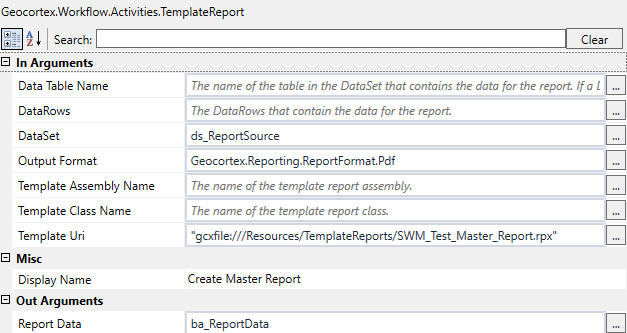
 0
0 -
Hi Brenden,
If you are using the Template Report activity, then none of your reports need to be added to the site. As long as the Template URI parameter references your master report, then it will work. From your screen shots, it looks like you have configured everything correctly; nothing looks out of place. If you paste your workflow into a post for me, then I can take a closer look at it.
Regards,
Carmen0 -
Hi Brenden,
I have taken a look at your workflow and I was not able to replicate your error when I added it to my site. However, with that being said, I did take a look at your configuration surrounding the report creation and those activities are configured correctly. So at the very least, the hyperlink should display and not flash. I have never seen this behaviour before so I'm not sure what might be causing it, but I would try adding this workflow to a new site and see if it exibits the same behaviour.
The one thing I did notice was your "Initialize Parameters" sequence. When you use the "Get Map Service Info" activity, you do not need to populate the Map Service URL parameter yourself, the activity dynamically generates that for you. So that when you assign the query urls (in the following Parallel activity), you use the notation: map service url + "/" + layer id.
Right now you have it set so that only the layer IDs are added to the url_CurrentRiskAssessmentLayerURL and url_WatershedLayerURL variables, and not the whole URL. So when I run your workflow, it automatically jumps to your CATCH in the "Query the Layer" section because the Query Service URL is set incorrectly. You can also put in some Alert activities to see what values are being passed through.
At this point, if you are still experiencing problems, I would suggest you file a case with our Support Team so one of our analysts can take a look at how you have it configured on your end.
I hope this helps.
Regards,
Carmen0 -
Hi Carmen!
I followed your advice and revised my workflow to not skip concatenating the resulting query URL and the layer ID. Thanks for pointing out that error. When I re-tried the workflow, the report appeared and was successfully populated.
Thanks, and I'll be in touch if I have any more issues. You have really been a wonderful help.
Best,
Brenden0
Du måste logga in om du vill lämna en kommentar.
Kommentarer
4 kommentarer