Is it possible to disable the Results map tip?

In the html5 viewer, is it possible to disable the Results map tip? We have quite a few users that accidently left click on the map and have the results map tip appear with showing "No results".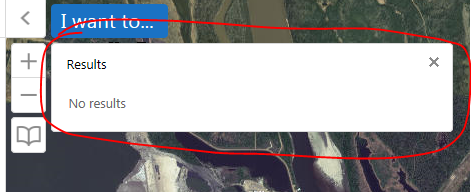
Thanks!!
0
-
I assume so. In the JSON files (e.g. Desktop.json.js), I have changed the MapOnClickBehavior to act as an Identify (see below), so instead of a map tip, you get a result in the left pane. I assume if you took out the various commands you could disable it altogether...
"defaultPointFeatureZoomScales": [],
"behaviors": [
{
"name": "MapOnClickBehavior",
"commands": [
"Identify",
"ClearDefaultHighlights"
]0 -
To add on to this, I'm doing this so that the site will behave in a consistant fassion for newbies to work a very lightweight (opens in 3-4 seconds) parcel viewer. I have instrustions in the Home panel to navigate to the parcel and then click on it:
https://maps.srcity.org/Html5Viewer/Index.html?viewer=parcel0 -
I am not sure about aediting the desktop,json.js file. I have not got that route yet, but to work around that issue I added a "fake" layer in my publised service that lie underneath all myother points and it you happend to click anywhere on teh map that is not a feature a popup (map tip) comes up say, "Please click on an icon for more information". It was just a work around that we had to use to save time. 0 -
Larisa,
That sounded like a nice work around, but don't you get multiple map tips when the user actually does click on an icon?0 -
yes, you do get the "1 of 2" at the top of the map tip, but the icon always pops up first. It works for now. 0 -

You can just uncheck 'Show Map Tips' when editing the layer details in Essentials. I think it is unchecked by default, actually. If just a single layer has it enabled, the popup will appear. Another quick check, if you don't want to go through every layer in Essentials, is looking at the Site.xml and replacing all the ShowMapTips="true" with ShowMapTips="false" (making a backup first, of course).
@Mike, replacing the onclick behavior with Identify is a cool idea0 -
If only it was that easy! I've unchecked every map tip check box in Manager AND scanned my site.xml and everything is set to false yet the "no results" map tip shows anyway. Very frustrating! My understanding was this is a known issue that hasn't been resolved yet. 0 -
Hi all, there is a post in the "Ideas" section in regards to the "No Results" message that will hopefully get upvoted enough for Latitude to put a fix through for. Here is the link: https://support.geocortex.com/essentialsGSCIdeasDetail?c=09a6000000008RsAAI&id=08760000000bpOnAAI&main-nav=essentials&page=1&sub-nav=ideas 0 -

If you want to hid it completely you could try adding this to the desktop.css file in the viewers virtual directory ie:
\Sites\yoursite\Viewers\viewername\VirtualDirectory\Resources\Styles\Custom\desktop.css
.map-tip-view {
display: none;
}
Cheers
Chris0 -
Thanks everyone! We managed to hide it for one site but then the same fix didn't work on another site. Strange.
We took this code:
"defaultPointFeatureZoomScales": [],
"behaviors": [
{
"name": "MapOnClickBehavior",
"commands": [
"Identify",
"ClearDefaultHighlights"
]
And removed "Identify" and "ClearDefaultHighlights". The new code is:
"defaultPointFeatureZoomScales": [],
"behaviors": [
{
"name": "MapOnClickBehavior",
"commands": [
]0 -

Thanks Chris, That worked for me. 0 -
Yep - Thanks Chris, that works! 0 -
Hi Chris,
When you change the css file does that affect all devices (desktop, tablelet or handheld). We only want to disable it at hand held.
Thanks0 -
Hi Yinghong
If you just want to disable it on handhelds, then just edit the handheld.css file in the same location and leave the others as is.
Cheers
Chris0
Du måste logga in om du vill lämna en kommentar.
Kommentarer
14 kommentarer