Toggle on Synchronize Maps button on default

Hi, In LinkedMap there's a Synchronized Map button which was not enabled by default, but we have modified the thirdpartymap.js to enable it. Don't why it was disable by default though that might be a differnt topic. but I'm just wondering if there's a way to make this button toggled on by default when the LinkedMap launched? thank you. 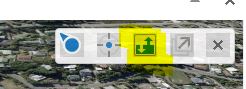
BTW we're using HTML5 2.6
0
-

I enabled sync in my build, and if you have two or more linked maps the sync function does not work as intended. hope this is fixed soon. 0 -
This is what I did to enable sync by default. In thirdpartymap.js, comment out the line if (sync === void 0) {sync = false;} and below it just add sync = true; as highlighted below. The other highlight is to show the sync button in the viewer. 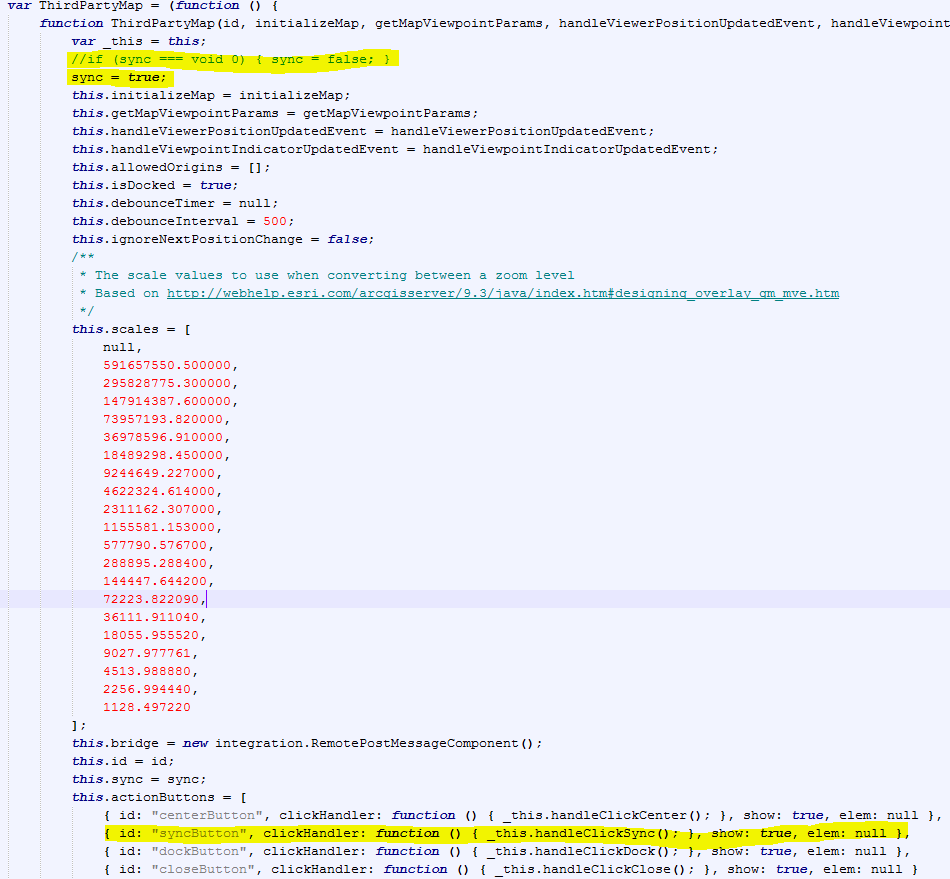
@Steffen, what issues are you having with 2 or more linked maps? I have Google Maps, Google Streetview, and Bing's Bird's Eye linked and when they are all on, it syncs just fine.
Example: https://gis.miottawa.org/ottawa/geocortex/propertymapping ->in external maps tab0 -
Hello Marshall
I did the same thing in my application develop-and indeed it works very well. I will love to know what setting you use in your button to open in separate window. I have used ShowExternalComponentView but it does not separate window like you. The address of my dev site http://devgis.cmquebec.qc.ca/GISFR5/index.html?viewer=100 The bouton is in autre application..!
Thank in advance and good job for your site i very like it...!
Gilles Lavoie0 -
So, in your desktop.json.js file, you have the externalcomponentviewmodel where you add the 3rdPartyMaps. I have 3, bingMaps,googleMaps( which is streetview),googleAerial. "viewModels": [ { "id": "ExternalComponentViewModel", "type": "geocortex.essentialsHtmlViewer.mapping.modules.integration.ExternalComponentViewModel", "configuration": { "containerRegionName": "ExternalComponentRegion", "containerRegionType": "geocortex.framework.ui.DivStackRegionAdapter", "headerIsVisible": true, "showXButton": true, "showMaximizeButton": true, "resizeY": true, "selectorIconUri": "Resources/Images/Icons/Toolbar/map-24.png", "selectorText": "@language-integration-selector-text", "statusText": "@language-integration-viewpoint-indicator-desc", "defaultComponents": [ "bingMaps", "googleMaps", "googleMapsAerial" ], "externalComponents": [ { "id": "bingMaps", "displayName": "Bing Maps", "uri": "Resources/3rdPartyMaps/BingMaps.html", "viewpointIndicatorUri": "Resources/Images/Icons/location-direction-red-32.png" }, { "id": "googleMaps", "displayName": "Google Maps", "uri": "Resources/3rdPartyMaps/GoogleMaps.html", "viewpointIndicatorUri": "Resources/Images/Icons/location-direction-green-32.png" }, { "id": "googleMapsAerial", "displayName": "Google Maps Aerial", "uri": "Resources/3rdPartyMaps/GoogleMapsAerial.html", "viewpointIndicatorUri": "Resources/Images/Icons/location-direction-purple-32.png" } ] } } ]
Then in the viewer, I create 3 toggle buttons that use the commands 'DisplayDockedExternalComponentById' and 'RemoveExternalComponentById':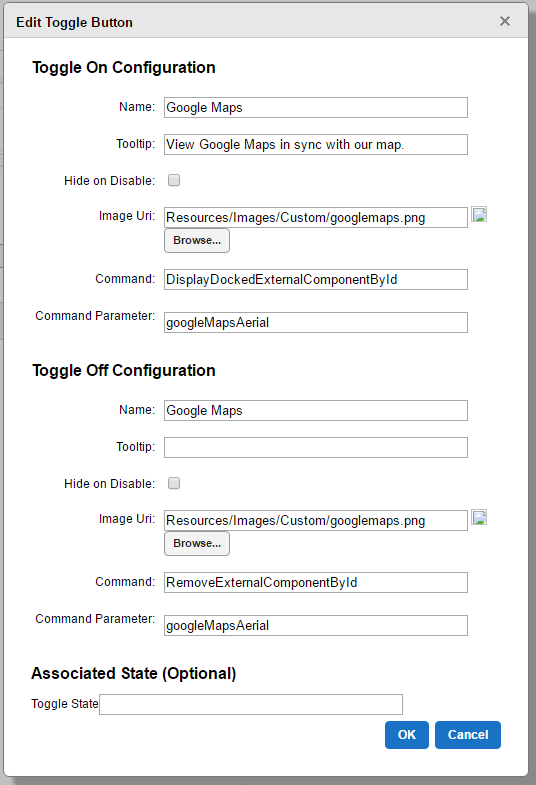 Then I just created some small icons to use for the button. You can download them here if you'd like:
https://gis.miottawa.org/ottawa/geocortex/propertymapping/Resources/Images/Custom/googlemaps.png
https://gis.miottawa.org/ottawa/geocortex/propertymapping/Resources/Images/Custom/streetview.png
https://gis.miottawa.org/ottawa/geocortex/propertymapping/Resources/Images/Custom/bing.png
Hope this helps.
Cool site as well! Took me a minute to remember to use google translate to read it. I like the weather links, I might have to play around with that windyty a little more.0 -
Hello Marshall
Great for the info, I'am edit and modify my application and the information helps a lot. For windyty application, I'm glad you like it, I really appreciate this API. Is realy cool...
Here the adresse of the site https://www.windyty.com/?46.830,-71.246,4
Another big thank you0 -
Hello Marshall
I change my GoogleMapsAerial.html page for a photo view mode, but there seems to be a change in parametre a google API.
I edit with a zoom factor of 8, but it does not work ...? Do i have to ajust something more...?
/ **
* Initializes the Street View panorama.
* /
initializePanorama function () {
var latitude = new google.maps.LatLng (0, 0);
var = {panoramaOptions
position: latitude,
zoom: 80 -
I'm using a zoom of 0 in streetview and zoom of 10 on aerial
Here is a link to my googleMaps.html if you want to download/view source on it (streetview-sorry for the poor naming convention, on list to fix) https://gis.miottawa.org/ottawa/geocortex/propertymapping/Resources/3rdPartyMaps/GoogleMaps.html
Then this is the link to googleMapsAerial.html (overhead view) https://gis.miottawa.org/ottawa/geocortex/propertymapping/Resources/3rdPartyMaps/GoogleMapsAerial.html0 -
Thank again... Everyting is fixe like your and a work very good now...!
Gilles0 -
Thanks Marshall! Not sure why this is not this way out of the box...!?
It was mentioned above that you are doing this on a separate screen, but when I go to your site, it looks just like the default split screen... I do see the separate buttons - is that all you were talking about Giles?0 -
@Marshall Boyd
Your linked maps works brilliantly! In mine only the google maps viewer updates when moving around in the main map. Street view doesnt update, however when you move the streetview around everything else moves. It must have something to do with our mapping coordindate system. We arnt using wgs84 internally, its gda94.0 -
Thanks a lot @Marshall and everyone else for disscuss on this topic. I really like this thirdpartymaps component as it opens up another door for integration and ideas.
Again seem's there's very little documenation on this external component, and still don't why the sync button was hidden out-of-box, maybe there's some bugs. Also don't forget in the .html page change the sync button class from synch-toggle-off to sync-toggle-on so the correct button icon shows up on default.
<button id="syncButton" class="sync-toggle-on" title="Synchronize Maps"></button>0 -
Thank Jack , This way is better the button work sychro when we turn off or on ...!
Gilles0 -
Jack, great call on changing the class to 'sync-toggle-on', I see now that it is off by default in the example. I better write that down in my documentation that I changed the class on that to 'on'
Steffen, Thanks and that is curious that the streetview isn't working for you. I know it stays grey for me until I pan near a road that has street view. At which point streetview snaps to the road and syncs all the other maps. Do you have a public site up that I could take a look? And yes, I'm using web-mercator as my coordinate system to utilize other maps like arcgis online basemaps and layers. But this does open the door for other issues, like printing a map to scale, without adding a lot of extra work0 -
Marshall, Unfortunately at this stage I have only built our internal instance. I will be building an external instance soon. We have only just acquired Geocortex in March/April to replace our existing ESRI Australia product Dekho. I have just implemented the toggle button, this is brilliant! From my further testing using only one linked map either google maps or streetview the sync works as expected. Once I enable both google and streetview the sync function does not work for the first added map but it does for the second (I can switch which one works in sync by enabling it as the second linked map). But this issue is localised to me it seems. 0 -
This issue turned out to be only effecting MGA94 projection, as I have created an external viewer in WGS84 and it works as expected. 0 -
Hello, when I am using both street view and web scene as linked maps, the sync button for street view is working as expected but for the web scene I have to click the synchronize map button to start the sync. It is not getting activated by default inspite of making all the necessary changes in the third party js file. Does anyone has any idea on it? 0


Du måste logga in om du vill lämna en kommentar.
Kommentarer
16 kommentarer