Arrow Markup Tool

We have pushed everyone from the Silverlight Viewer to the HTML5 viewer. One complaint about the markup tool is it doesn't have a Draw Arrow option. Is there a way to implement this type of functionality in the HTML5 viewer? The engineering group uses this all the time to markup drawings for field crews.
Thanks.
0
-

Bryan,
What I did to add the arrow markup tool to the draw multi tool is shown below: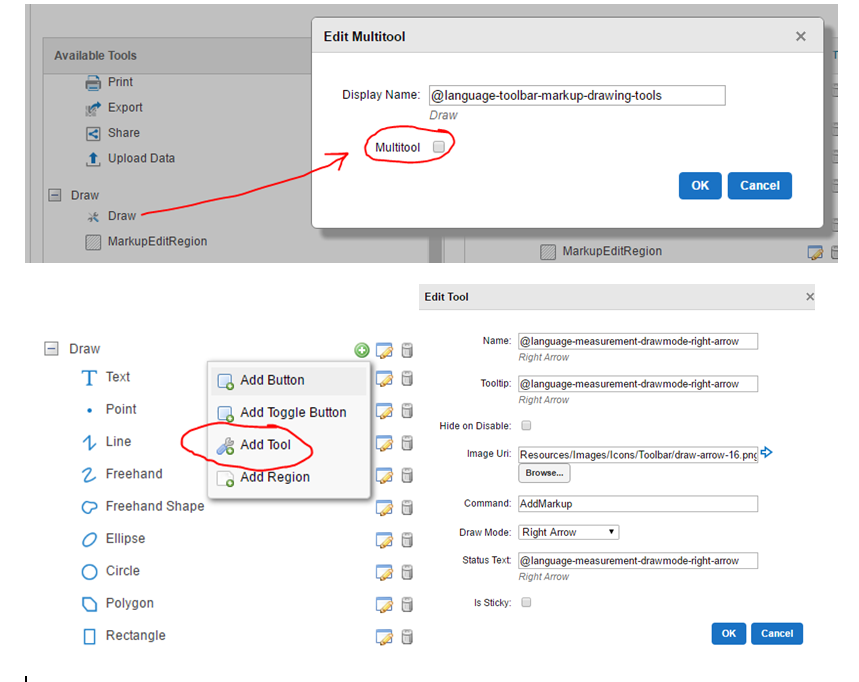
Basically convert the draw multitool to show all the tools, add a new tool with the command 'AddMarkup' and Draw Mode 'Right Arrow'. Here is the image I used (https://gis.miottawa.org/Ottawa/Geocortex/PropertyMapping/Resources/Images/Icons/Toolbar/draw-arrow-16.png) but you can make whatever you want and point your Image Uri there. Then I set it back to multi tool, back in the subfolder, applied, and saved changes.0 -

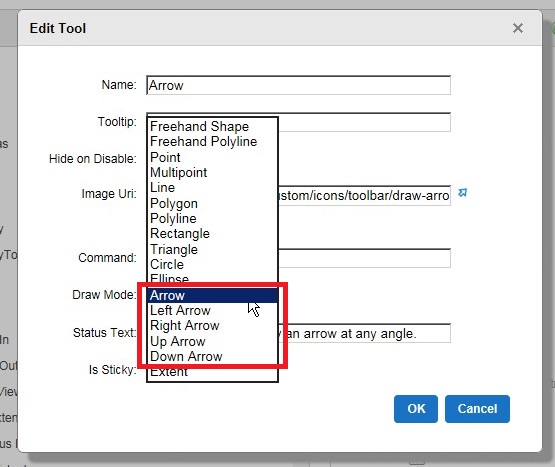
Yes, you can create a new tool in the toolbar. Just use Arrow, Left Arrow, Right Arrow, Up Arrow or Down Arrow for the Draw Mode.
Cheers,
Rick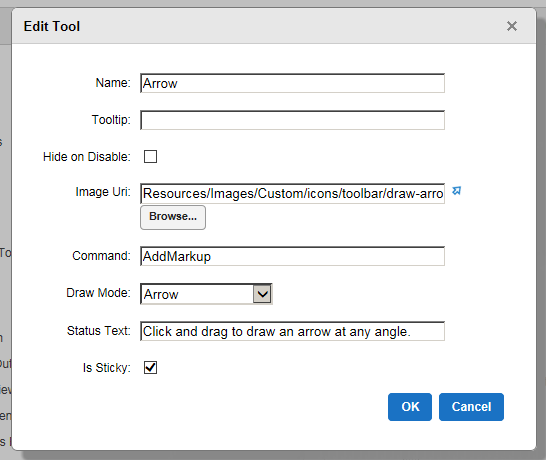
 0
0 -
Marshall,
I found a number of your suggestions useful, but I have a basic question - how much of this will stick around when we go to a new version? We had all sorts of custom work done back in the WebADF days, and it all became useless when we went to REST. Since then, I have been shying away from doing a bunch of custom stuff to keep maintenance down... I'm guessing in this case that since you are using Manager, it will be okay, but what about when you change CSS files? Thanks for your input to this forum!0 -
Oh good grief, didn't think about something that easy.
Thanks Richard0 -
I wonder why LG doesn't just include all of the tools by default - it is much easier to remove rather than add... 0

Du måste logga in om du vill lämna en kommentar.
Kommentarer
5 kommentarer