Mailing Labels Workflow - _Legend Error

I have downloaded the Mailing Labels Workflow from the code gallery and got it working fine. Currently I am trying to set up the print template but keep getting the attached error. My Print Template does a _Legend in it... so I am not sure what the issues is. I am using the Workflow uploaded by Latitude and Santa Rosa for the HTML5 Viewer. If possible if someone has access to the Santa Rosa Print Template I can troubleshoot from that as well. THANKS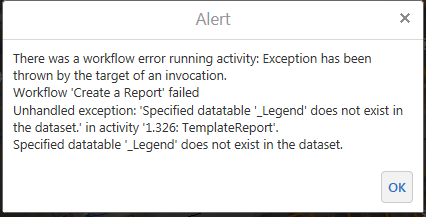
0
-

Hi Chris,
The _Legend table is only inserted by Essentials when a Print Template is run. The TemplateReport Workflow activity does not generate a _Legend table, so you will get this error.
Regards,
-Malcolm0 -
I'm having this same problem, Chris. Have you found a solution yet? 0 -
Malcom, so what do you do to fix this? Or where do you fix this? 0 -
Hey All,
Unfortunately I did not, however my work around was simply removing the legend item from the Report.. since I didn't really need it anyway.0 -
Hi Folks,
A layer template report doesn't have a legend, so the simplest fix is to remove the Legend subreport from the RPX file.
If the maps that need a legend would generally have the same layers visible, you can use a static image for the legend.
If it's important to have a dynamic legend as part of a layer template report, please post an Idea ot the Ideas section on the site!
Regards,
-Malcolm?0
Du måste logga in om du vill lämna en kommentar.
Kommentarer
5 kommentarer