Set Layer Definition Removing all Points

I have a very simple workflow that allows a user to choose a risk level from an autocomplete box, then (in theory) filters the points to only display the chosen risk level. However, when running the workflow, when a risk factor is chosen all of the points disappear from the map. Does anyone know what I am doing wrong?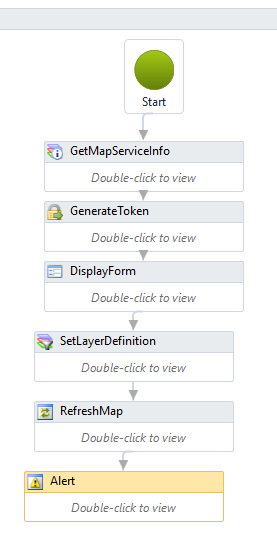
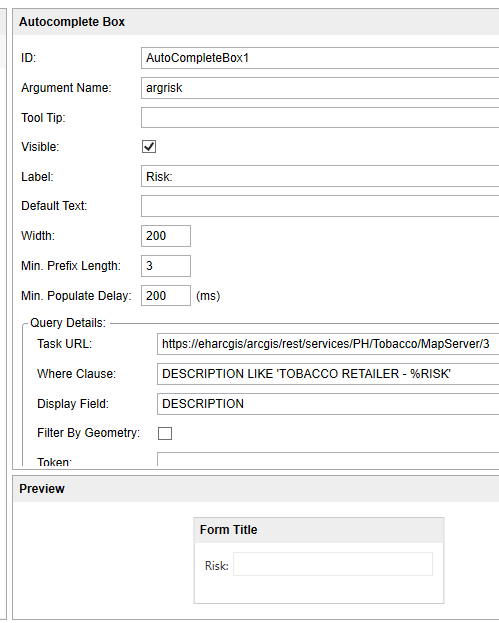
And I have "DESCRIPTION = ' & outrisk & '" in the Definition field in the Set Layer Definition Activity.
Thoughts?
0
-

Can you post the workflow? 0 -
Workflow can be found here...
https://drive.google.com/file/d/0B5rgPuFOw9yfZWYwVVMyWnV6YmM/view?usp=sharing
And yes, this is a very similiar workflow to the one in my other post. I've literally created 6 different workflows to try to accomplish the same task (one with combo boxes, one with an autocomplete box, one with radio boxes....you get the idea) I'm clearly struggling! I appreciate any help you can provide. And I'll try to not to double post as much! I'm a forum hog! Sorry!0 -
I think I found the issue. Your Definition argument in the Set Layer Definition activity is currently:
"DESCRIPTION = '&outrisk&'"
Right now that's saying the DESCRIPTION value should be the literal string "&outrisk&". That's a valid search, so you're not getting an error, but naturally none of your points have DESCRIPTION values like that.
You need some additional quotation marks:
"DESCRIPTION = '" & outrisk & "'"
which parses to, DESCRIPTION = ' + your user selected value + '
which gives you the complete Definition of DESCRIPTION = 'your user selected value'0 -
Yahoo! Thank you so much John! I ended up changing the autocomplete box back to a combo box, and just cast the output to a string, works great! Thank you Thank you Thank you!
So how did you know that it needed the extra quote marks? I dont have any sort of programming background so I'm completely in the dark when it comes to this stuff. Can you recommend any resources that might help with these workflows? I've slide by so far by reading posts, posting in the forum, and working off of other people sample workflows, but I'd like to be able to do this on my own!0 -
I'm not a programmer either, so I've just picked it up as I go too. As far as Workflow Desginer, it's my experience that many of the input arguments have to be strings, so when you want to use user input or other variables you need to do string concatenation.
The best tip I have for testing that kind of stuff out is to add an Alert to your workflow and set the text to the string you're testing. That way you can look at what's being passed to the activity and can assess whether it's in the right format or not.0 -
Hi John,
So I am actually trying to allow people to choose a date range AND a risk level to filter the points on the map. I broke it up initially so it wasn't so overwhelming trying to figure it out...I'm a little unsure of how to combine the two expressions so the map filters by date AND risk level...
https://drive.google.com/file/d/0B5rgPuFOw9yfS1dPVXAzRHJNeEU/view?usp=sharing0 -
Hi Lisa
how about a third Assign after the two that you have already:
queryExpression = "(" & queryExpression & ") AND (" & riskassign & ")"
Regards
Ralph Price0 -
Perfect! I tried just having two 'Set Layer Definition' activities, which worked, but this is much more responsive! Thank you so much John and Ralph! 0
Du måste logga in om du vill lämna en kommentar.
Kommentarer
8 kommentarer