Run javascript from workflow forms (XSS cleansing stopped this from working)

Hi, I used to be able to dynamically create html with javascript calls to workflows from the output of a form through run-time modifications. I could assign the description attribute of a group something like this:
string.format("<div style=""margin-bottom:-3em; padding:10px;""><div><div style=""min-width:235px; display:inline-block;"">High-value farmland dairy </div><div style=""display:inline-block"">{0}</div></div><div style=""margin-left:1em; font-size:.9em;""><a href=""javascript:void(0);"" onclick=""geocortex.framework.applications[0].commandRegistry.commands.RunWorkflowWithArguments.execute({{ 'workflowId': 'toggleLayer', 'MapServiceID': '{1}', 'LayerName': 'High-value Farm Dairy Soil' }});"">Turn layer on</a><span style=""margin-left:1em;""><a href=""javascript:void(0);"" onclick=""geocortex.framework.applications[0].commandRegistry.commands.RunWorkflowWithArguments.execute({{ 'workflowId': 'constraintPopUps', 'constraint': 'HVFD'}});"">Constraint Info</a></span></div></div>", hvfl_dairy_percent_area, MapServiceID)
The output let me have control over the display and trigger workflows to toggle visible layers, etc
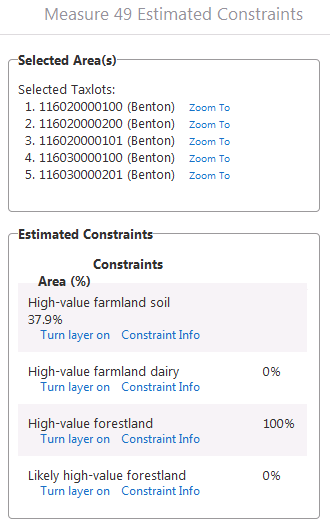
It appears that with the newer versions of Essentials, the "suspicious" html is being stripped of my code and not letting the links work due the XSS implementations. Is there anyway I can work around this issue?
Regards,
Marc
0
-

Hi Marc,
I'm not sure if this will help, but one thing you may be able to try, is allowing unsafe content in your viewer. Don't do this lightly though, as it will be disabling all the new XSS security improvements.
To do this:
1) In Manger edit your viewer
2) In the viewer management pack, go to "Application"
3) Check the box to allow unsafe content
I hope that helps!
Thanks,
Danny0 -

I solved it with a custom form. On this form I print the in the workflow created table which includes hrefs to JavaScript calls which calls a workflow.
I used an example I found in the support site. Search for an issue from Mark Rempel called "geocortex.workflow.ExternalActivityInfo" or use this link to get a working example mentioned in this issue: https://www.dropbox.com/s/8r32jbsr60spf69/UseOfDynamicExternalActivity.rar?dl=00 -
Hi Luuk,
Thanks for the response and link to the activity.
The piece I am not understanding is how the output of the custom form gets printed in the data view. Is it just the innerHTML of the userName_error dom element? And where is the view constructed?
My exisiting workflow does a bunch of processing and then I want to display an output form that allows for some interaction with the map (turn on/off layers, view addtional info specific to part of the output,etc). Do you happen to have a more fully put together example with your datagrid I could look at?
- Marc0 -
Okay, dug in more deeply to the downloaded example from Luuk S post above and got it wired up. I was missing the piece of how the html and css are encoded in base64 in the output compiled module. Decoding the base64 I could then see the html and css and recreate the module to extend and make applicable for my application.
- Marc0
Du måste logga in om du vill lämna en kommentar.
Kommentarer
4 kommentarer