Move Silverlight Google Street View to HTML5

In Silverlight, when you right click on the map, there is an option to open Google Street View for the spot clicked. Is it possible to move this same command to the HTML5 Context Menu?
0
-
Hey Mike,
It might be different if you don't have your 3rd Party maps set to sync by default, but you should just be able to run the command: "DisplayDockedExternalComponentById" with the command parameter of your google street view 3rd party map.
I haven't tested it,but another thing you could do is add the following to your json file under MapContextMenu:{ "text": "Open Google Street View Here", "description": "", "batch":[ "command": "DisplayDockedExternalComponentById", "commandParameter": "googleMaps" { "command": "ZoomToScale", "commandParameter": 2256 }, { "command": "PanToPoint", "commandParameter":"{{context}}" }, { "command": "DisplayDockedExternalComponentById", "commandParameter": "googleMaps" } ], "iconUri": "Resources/Images/Custom/streetView.png" }
This will zoom to scale 2256, pan to where you clicked, and should open the display component there as well0 -
edit, one too many copy/pastes: { "text": "Open Google Street View Here", "description": "", "batch":[ { "command": "ZoomToScale", "commandParameter": 2256 }, { "command": "PanToPoint", "commandParameter":"{{context}}" }, { "command": "DisplayDockedExternalComponentById", "commandParameter": "googleMaps" } ], "iconUri": "Resources/Images/Custom/streetView.png" }0 -
Thanks Marshall,
I have the 3rd party maps set up, but my users don't really like it, and it sounds like this would do the same thing...
In Silverlight, when you right-click and take that option, it opens a new window that says on top "External Geocortex Visualization for Google Maps" which is better. Not as good as a URL that used to work - I would feed the Lat/Long of a parcel centroid, and I was able to get Google to open looking at that parcel - but that URL stopped working a few months back.0 -
sorry, i'm in the middle of a server update so I can't test it, but try replacing 'DisplayDockedExternalComponentById' with 'DisplayUndockedExternalComponentById' and it should open in a new window 0 -
So I was able to add it in Manager under the Context Menu using the language you suggested (when I tried in the .json, it wouldn't reload)... Still doesn't control direction when it opens, but now does what Silverlight out of the box did. Thanks.
Miss having the ability to put a link on a parcel result to have Street View open looking at the selected parcel...0 -
Mike -
I'm also trying to replicate the ability to open up the Google Street View from the context menu in HTML 5. This was a nice out of the box feature in SilverLight and we were surprised it wasn't there in the latest HTML 5 viewer.
Were you able to open up the Street View in a separate window? How is it working for you? Did you have to get an API key to get it to work (SilverLight viewer didn't require one)?
Thank you!
Stephanie0 -
It's working fine, in that it opens Street View in a new window nearest to the point clicked. It does not always show the point clicked in the new window (could be turned in wrong direction), however, so there is a learning curve for users. Not as good as being able to feed it a Lat-Long and have it show the correct parcel, but workable for now.
To set up, I basically did what Marshall suggested, but did it from within Manager. Edit your HTML5 viewer, and then open the Map Context Menu tab on left. Select Add Menu Item and configure like below. It is the "Undocked" portion that causes it to open in the new window. For the Icon URI, you need to create your own icon.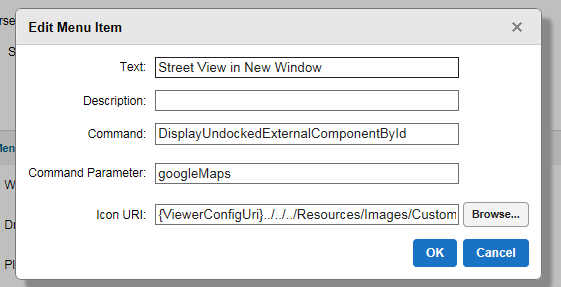 0
0 -
Hi,
I edited my json file as described above but when I tried, no new window opened up. Not sure why. I don't get any error message either. Below is portion of json file... Please help.
{
"iconUri": "Resources/Images/Icons/center-map-24.png",
"text": "Open Google Street View",
"description": "",
"batch":[
{
"command": "ZoomToScale",
"commandParameter": 2256
},
{
"command": "PanToPoint",
"commandParameter": "{{context}}"
},
{
"command": "DisplayUndockedExternalComponentById",
"commandParameter": "googleMaps"
}
],
"iconUrl": "Resources/Images/Icons/center-map-24.png"
}0 -
Thank you, Mike! This is great. I see what you mean - - not quite the same functionality we had with SilverLight, but it does open up the street view. That's all I need it to do for now. Thank you again! 0 -
Hi,
I manage to get it working after setting it up within Manager as Mike suggested. When I right click on the map and click 'Street View in New Window', a new window of Street View will open. However, if then I right click on another location on the map, I will get a message in the new window saying 'Street View data not found for this location'. I use HTML5 2.9.1 by tthe way. Does anyone have similar behaviour?0 -
Hi all,
Just an update for my post, I just got a confirmation from the technical support that the issue I described above is a bug for GXE 4.8.2.24, GVH 2.9.1 on IE 11 and Chrome. I hope Latitude Geographics will release a patch soon.0 -
Hi Hery,
Do you have a corresponding bug number to go with that issue?
Regards,
Wayne0
Du måste logga in om du vill lämna en kommentar.
Kommentarer
12 kommentarer