Using "ListSelections" in tool - unable to open saved result

Hello all,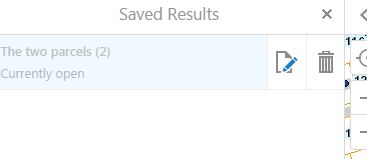
I followed the suggestion here:
https://support.geocortex.com/essentialsGSCForum?sub-nav=forum&main-nav=essentials&#!/feedtype=SINGLE_QUESTION_SEARCH_RESULT&id=90660000000XbEgAAK
to open the List of Saved Results from a button placed on toolbar (actually the I want to Menu). This is needed because users often close all the identify/results panels but want to get back to their saved selections.
However, if the user closes all identify panels and results panels and uses the tool to Open the list of saved Results, the dialog shows the list of saved selections (see image below), but shows it "greyed out" and indicates that the Saved Results is "currently open". Which it isn't currently open because all the results panels have been closed.
Any idea why or how to fix this?
Thanks,
Carmen
0
-

Hi Carmen,
The message "currently open" is referring to the saved result "The two parcels" being currently open/displayed in the viewer and therfore it is greyed out and not enabled. Can you try it with mutiple saved results?
Regards,
Wayne Richard
Latitude Geographics Group Ltd.
Head Office: 300 – 1117 Wharf Street Victoria, BC Canada V8W 1T7
Tel: (250) 381-8130 | Fax: (250) 381-8132 | wrichard@latitudegeo.com
Developers of Geocortex web-based mapping software | www.geocortex.com
An Esri Platinum Business Partner0 -
Wayne,
It *says* it is currently open, but I have closed the results panel (and all pins disappear from the map) and the user sees no way to get back to that “currently open” set of results. That is the issue.
If I shouldn’t use ListSelections, but something that would open the Results Panel that would display this “currently open set”, then please let me know what that would be. I see a ShowResultsList command, but it requires a feature set – I don’t know what I would use for that parameter for a button on the toolbar. Is there a default feature set parameter?
It just seems like if all identify/results panels are closed, then there should not be any sort of selection “currently open”.
Here are the steps where I am seeing the issue…- Create a button on the Viewer that uses the command “ListSelections”.
- Refresh the app
- User selects some parcels (through Identify or from Maptip dialog)
- Save a selection from the results panel action menu.
- Close out of all identify or results panels (using Close panel “X”)
- Click the button with the command List Selections and try to open that saved results.
- For me, I cannot open those results again because it says it is currently open. Where is it currently open? How can I get to it (without remembering tricks below)?
Yes, I could create a second saved result and then the first one would be then available, but that would be a workaround for users to remember. I can also identify another feature, then click the button to show saved results, the set that was “currently open” is now closed and is available to choose – but then another workaround to remember if they have closed the results panel (which they do all the time)
Ultimately, I need a way for the user to click a button to access the saved results when they have closed the results/identify panel. Kind of like what is in the Silverlight Viewer with View Results and View Selected.
Thanks,
Carmen0 -
Hi Carmen,
I see what you mean now, I had assumed the pushpins remained and thus the saved result was currently open and displayed. I believe you are using the command correctly but there is a bug that is showing the saved result as currently open, when it isn't. I will file this as a bug and let you know when I hear any news regarding it.
Thanks for clarifying this.
Regards,
Wayne Richard
Latitude Geographics Group Ltd.
Head Office: 300 – 1117 Wharf Street Victoria, BC Canada V8W 1T7
Tel: (250) 381-8130 | Fax: (250) 381-8132 | wrichard@latitudegeo.com
Developers of Geocortex web-based mapping software | www.geocortex.com
An Esri Platinum Business Partner0 -
Filed as GVH-11880 0 -

I have found this bug as well.
I've also found that when I use the "ShowSaveSelectionDialog" command in the toolbar, it doesn't recognize a saved collection until you've saved a list result from the context menu. Once a selection is saved from the context menu of the list results, the "ShowSaveSelectionDialog" tool in my toolbar will enable. Not sure if this is related or not?
Regardless, if I close the list, I can re-open the saved results, but it states that it's open... But I can get to the list of results, nor see the selection on the map until I perform another selection and toggle between two different sets.0 -
Thanks Erik, I have added your info to the bug ticket. 0
Du måste logga in om du vill lämna en kommentar.
Kommentarer
6 kommentarer