Google Linked Maps

Hi all,
I have Google Street View Linked Maps set up and working in an internal e4.5.1 gvh2.6.1 site. Works great.
When I try the same setup in our public-facing sites the integrated window opens and displays street view as it should for a couple of seconds, then bails and displays the error below.
_img_ alt="User-added image" src="https://latitudegeo--c.na53.content.force.com/servlet/rtaImage?eid=90660000000TSei&feoid=Body&refid=0EM60000000M147" _/_img_
I have run Fiddler on both and the external shows no errors but does not complete the same steps as the internal. It stops after:
GET https://maps.googleapis.com/maps/api/js/AuthenticationService.Authenticate
while the internal also runs:
GET https://maps.googleapis.com/maps/api/js/QuotaService.RecordEvent
Make sense to anyone??
Thanks,
Dave
0
-
Hi Dave,
That's a new one to me! Which browser are you using? Do you get the same results in all browsers?
If the site is publicly accessible, would you be able to post the URL (or you can email it to me: dbriggs@latitudegeo.com)
What do you see in the browser console (per the screenshot below)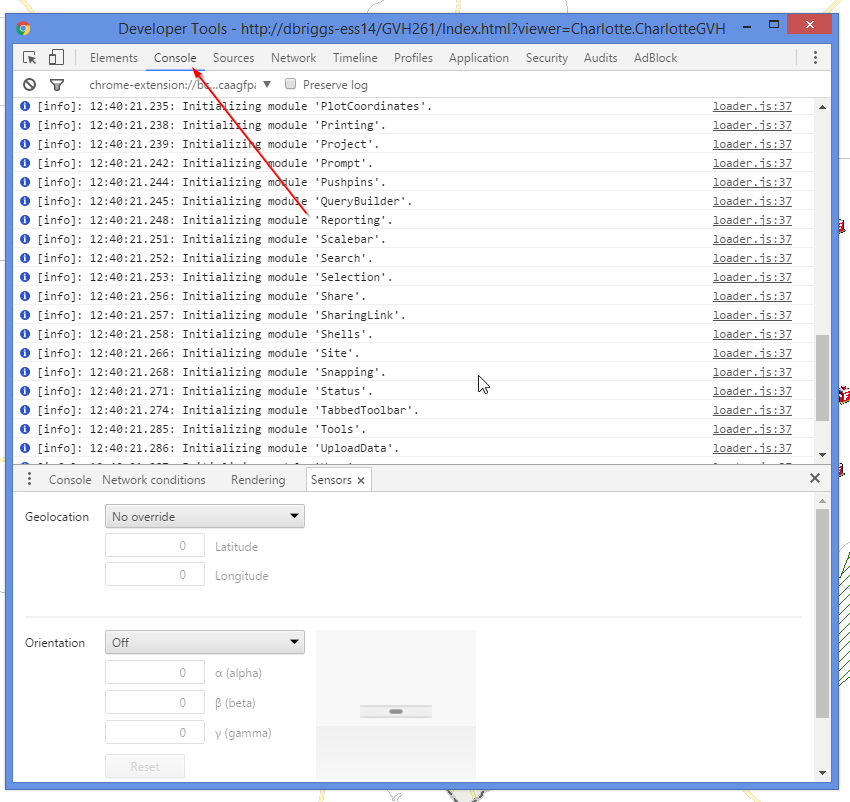
I hope this helps!
Thanks,
Danny0 -
Hi Danny,
Thanks so much,
I get the same results in IE11. Firefox & Chrome.This is the error I am getting in Chrome's Console:
Google Maps API error: MissingKeyMapError
https://developers.google.com/maps/documentation/javascript/error-messages#missing-key-map-error
This is one of our publicly available sites. There is a street view icon in the footer the opens the Linked Map.
http://gis.rvca.ca/html5/?viewer=rvcageoportal0 -
My Bad,
Didn't realize I had to get a Google Maps API key and modify the GoogleMaps.html code posted at
https://support.geocortex.com/essentialsGSCCodeGallery?sub-nav=codegall&main-nav=essentials&#!/feedtype=SINGLE_ARTICLE_SEARCH_RESULT&id=kA460000000blX2. (https://support.geocortex.com/essentialsGSCCodeGallery?sub-nav=codegall&main-nav=essentials&#!/feedtype=SINGLE_ARTICLE_SEARCH_RESULT&id=kA460000000blX2)
Working now. Thanks Danny,
Dave0 -
Thanks Dave! I did a little research, and my initial look seems to indicate that Google's previous recommendation of including an API key when accessing street view, is now less of a recommendation and more of a requirement. I was able to replicate your results exactly on my test site here. I need to do some more research on this and see if my suspicion is correct.
When I logged into my personal google account, I was able to create an API key, and add it to the GoogleMaps.html file in my third party maps folder. From there, I had to enable Google Maps Javascript API access on the Google developer console. Once I did this street view integration is working.
That being said, I don't know if this violated the TOS of street view. More research is needed.
I'll update this thread when I find out more. Thanks again for reporting it!
Cheers,
Danny0 -
Hi Dave,
It does indeed look like Google is now requiring an API key to access street view. I have updated the Code Gallery example to include instructions on adding the API key to the sample.
https://support.geocortex.com/essentialsGSCCodeGallery?sub-nav=codegall&main-nav=essentials&feedtype=SINGLE_ARTICLE_DETAIL&criteria=BESTANSWERS&id=kA460000000blX2CAI
I hope this helps! Please let me know if you have any questions or concerns.
Thanks,
Danny0 -
Hi Danny,
Do you have any more information about the TOS for Street View as mentioned above? Since this functionality was "out of the box" with the Silverlight viewer and therefore not customization by individual users, I believe this responsibility falls on the shoulders of Latitude. It would be nice to know if I can use this at the local government level for free or know if I should be paying Google for the api. Thank you very much for your help with this.
Best regards,
Grant0
Du måste logga in om du vill lämna en kommentar.
Kommentarer
6 kommentarer