How to keep AGS services secure?

I've recently been looking into the best way to ensure that our token secured AGS services cannot be breached and the spatial and tabular data accessed outside of our Essentials Site.
To that end I've created a site with one secure layer and have been testing putting permissions on that layer through Essentials Manager.
It does appear though that whether using permissions or not, it is easy to hack into the secure layer as described below.
There are two scenarios, both of which seems to be easy to hack:
1) You add a secure service to your site and enter the username/pwd into Essentials Manager so it can generate a token. You load the site in a browser and then fire up Fiddler. Zoom in to see the secure data then find the map request in Fiddler. Drag the request into the Composer tab in Fiddler. You can modify the request however you like and send it back to AGS and you can access the secure data until the token expires. You can minimize exposure by making the short-lived token very short (1-2 minutes) but there is still a security hole there.
2) ... and potentially less secure. You follow all the steps in step 1, except you enable permission for the guest account on your secure layer in Essentials Manager. Now when you find the request in Fiddler you see that there is no token and the request is being sent to Essentials, which is now acting as a proxy for the AGS service. However.... it appears that since Essentials is now generating a new token as needed, the end user has unlimited access to the secure AGS service (i.e. the token never times out because Essentials always requests a new one when needed). It doesn't seem to even use the HTTP Referrer header sent with the request since I was able to change and even remove the referrer from the request and it still worked.
This isn't a problem when someone wants to consume the service directly from AGS because they wouldn't have access to the service in the first place if they didn't give a valid username/password. But, since Essentials is managing the token on behalf of the end user and the response follows one of the two scenarios above the secure service can now be breached.
I'd love to hear people's thoughts on how to best keep services we want to use in Essentials secure. Am I missing something in the way I've gone about things so far?
Peter.
0
-

Are you running secure services on HTTP? 0 -
HTTP or HTTPS, it doesn't matter. Using Fiddler if you install Fiddler's Root Certificate - it will decrypt HTTPS traffic. I just tried it again now (switched between http and https) and the requests can still be captured by Fiddler and resent using the Composer tab. 0 -
This is for everyone not Peter, but please do not use secured services with HTTP. We consider this to be negligent in todays security environments and recommend that all environments that use ANY authentication require HTTPS and just assume that you will need authentication. Just use HTTPS.
Yes, SSL only protects the query parameters in transit but not from the endpoints. So if you have a public service that is using secured services, the user will be able to decrypt the token whether in the URL or in the header using Fiddler.
There is also the potential that the URL and token might get logged. For example, if you are using Analytics (Google or Geocortex) or any other 3rd-party logging, the URL is sent in the Referer header, so you would be sending the token to that 3rd-party also.
I don't know how much this is a Geocortex vs Esri issue. The token is being sent to authenticate against an Esri server, I don't think LG has much say in this. LG? I personally believe that the token should not be sent in the URL but rather as part of the header, but that can get messy with proxies as custom headers tend to get stripped. We went through this discussion of sending API keys in header vs url and decided that we would use the X-API-KEY and if folks are using proxies, they will need to configure them correctly.
I would ask that if a service is so sensitive, should it be available publicly? For example, we have a public map service that allows any user to create data. This is stored in a secured feature service and a second public map service. However, the web user has no direct access to the feature service. Editing is done through a Workflow on the server with credentials the end user has no access to. This was done because of data validation reasons more than security though.
Regardless, with the proposed changes to Workflows, this will become an issue as the workflows move from server- to client-side. Additionally, I have yet to see any JavaScript signing implemented yet by either Esri or LG. Web security is changing really fast and is a horrendously complex topic. LG is taking good steps with implementing CORS but I think it is a good discussion topic for next week's Partner Conference Technical Track.0 -
Good points Tom. Thanks for your feedback on this issue.
I only see this as a Geocortex issue in that if you put permissions (Guest user) on the layer it actually reduces the AGS security by eliminating the token timeout (since it's constantly renewing it behind the scenes). At least with a straight call to the AGS service the token is only good for a few minutes. Routing through Essentials and having it proxy to the AGS service allows access indefinitely.
The parcel data we show in our maps has a license agreement that only allows us to show it in map images - the raw data should not be accessible to the end user. One thing I did learn while playing around with the service - if you add it as a Feature Layer, no image requests are made - it returns the geometry in JSON and it gets rendered (I assume) by the client. If you add it as a map service it will make export requests to AGS.0 -
This is a great discussion. I definitely want to re-iterate that we recommend using SSL at all times. For token-secured services, tokens are often passed as a URL parameter, especially for short queries and image requests. As Tom has said, using SSL will protect the requests while in transit. Using Essentials' layer security in the site will prevent access to tokens on the client (i.e., viewer) by routing all requests through Essentials and ensuring that the tokens themselves are only ever passed between ArcGIS and Essentials (see the Essentials admin guide for more on this). 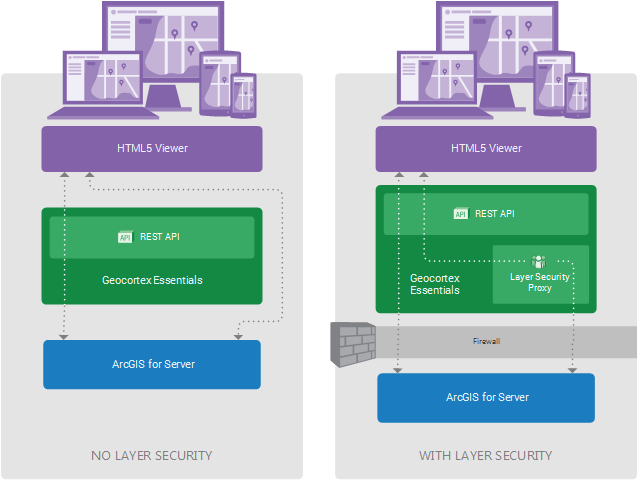
Peter, your point about Essentials effectively being a proxy for a secured map service is a valid concern. It is possible to use Essentials to make map services less secure, or even bypass their security entirely. This is something that we ultimately leave in the hands of the Essentials administrator. Like the philosopher Stan Lee once wrote, with great power comes great responsibility.0 -
Jordan, you last comment gets my Spidey senses tingling ;)
I'll say that that classic Stan Lee quote should be directed to Latitude, not the users of Essentials. I don't see how Latitude can wash their hands completely on this issue and say it's up to the administrator to take responsibility - we can only work within the confines of what the software was made to do - Latitude drives what Essentials is capable of doing. What that says to me is that Latitude is okay with 1) the fact that their product can effectively allow AGS security to be bypassed, and 2) allowing people to think that they are increasing security by using layer permissions (and hiding tokens) without highlighting the fact (I don't see any mention of this issue in the admin guide) that they may actually be reducing security of that layer.
I know security is a tough issue and trying to keep services accessible while still being able to control access is a tricky thing. I'd love to see this topic get addressed in greater detail at a User Conference or at least addressed in one of the monthly update webinars so we know what Latitude's stand is on the issue and where they might be headed.
Keep the feedback coming!
Peter.0 -
If you have a computer running a webserver, and you have credentials for a secured map service, you don't need to install Essentials to completely obviate the security on that service; a simple proxy will do quite nicely. Given that a server admin has the ability to do Very Bad Things, either intentionally or unwittingly, with or without our help, it falls to the admin to ensure that they aren't, say, exposing private data publicly, before Essentials even enters the picture.
With that said, once our products are installed, I agree that we bear the responsibility to ensure that our software doesn't provide additional holes that can be used to compromise data or systems. I also think it's on us to provide documentation that provides clear instructions, recommendations, and best practices, and identifies potential pitfalls or less-than-ideal configurations to avoid. To your second point, it sounds like we should review our security documentation. I'll follow that up with our support and Essentials teams. As always, I'm very happy -- and grateful -- for any feedback that you (or others) could offer.0 -
Absolutely, it is up to the sys admin to ensure that they aren't exposing secure services (AGS or any other service) through general web server configuration. I'm wondering whether Essentials could use something like a hashed session id and/or timestamp that couldn't be easily unencrypted and updated that could be sent with every request (for services that have layer permissions set, thus sending the requests through Essentials rather than direct to AGS). By incorporating a short-lived hashed timestamp and/or other unique value along with the request it might be easier to detect a spoofed request. Or..... could requests be handled more like a workflow request which seems to send the entire request as a hashed packet of data so the user never really sees what parameters were sent in the request. Just a couple thoughts off the top of my head, since you don't mind the feedback :) 0
Du måste logga in om du vill lämna en kommentar.
Kommentarer
8 kommentarer