Transparency and labels: symbolization in HTML5 2.7

Using the HTML5 2.7 viewer in Firefox, I am noticing that the transparency slider seems to be odd for a layer's user-defined symbolization options. The slider will reduce the intensity of the color with higher transparency, but you cannot see beneath it (for a solid fill style). Is this a bug? I am also having an issue with some layers/services not allowing labels to be toggled or customized. Is this something I need to set in the mxd behind the service? I can't find a setting for it in essentials manager nor in my server manager.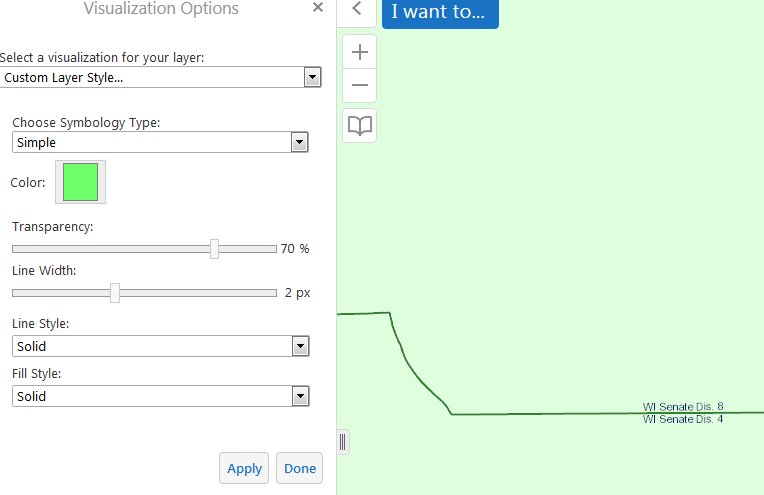
0
-
The 4.6 Administrator Guide page 232 says "If you want to be able to change the default visibility of a layer's labels, or you want the end user to be able to turn the layer's labels on and off, the default visibility of the layer's labels must be turned on when you publish the map service. In addition, the layer must have label data" - however, I have layers for which the labels are turned on in the mxd/service, but still don't have options to toggle customize in the viewer. 0 -

Nicole I had this issue this morning after installing the new version. I closed and cleared browser history several times, then when that didn't work I turned a layers' label off in essentials manager. Suddenly the toggle and config options were available in the map. No idea why or if my unticking that box was coincidental, but it has been working since.
re layer transparency: My transparency only works within the map service. So the whole service needs to be semi-transparent to be able to see data in the underlying services.0
Du måste logga in om du vill lämna en kommentar.
Kommentarer
2 kommentarer