List reprojected coodinate XYs

We have a workflow that allows the user to select survey points on a map and export the selected points to a choice of three different output file types: .txt, .coordtxt, .xlsx.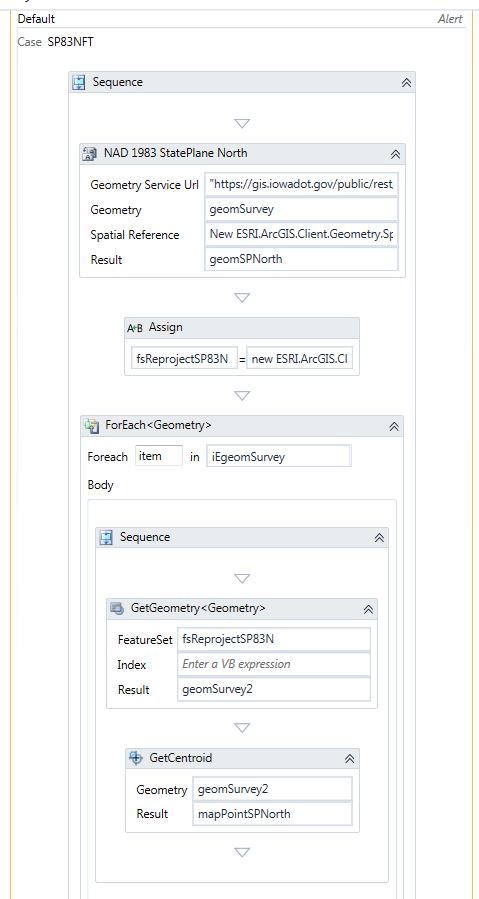
We have been asked to include the ability to reproject the exported points and list their new X and Y coordinates in the output file. I have added a data column to the output file and I tested the X coordinate. However, all of the points end up the same X coordinate listed in the newly created column.
The user selection is converted to a featureset, then I get the geometries of the featureset and convert it to a IEnumberable Geometry. I then created a Switch that has a separate case for Coordinate Systems the user is interested in reprojecting their selecting points to. I use the Project Task and create a new geometry. I assign the result to a new reprojected FeatureSet. I created a ForEach loop using the IEnumerable Geometry and utilize the Get Centroid task to generate map points based on the newly reprojected geometry.
Please advise.
Thanks!
Cody
0
-

1) You don't need to convert anything to iterate over a featureset like you want to: use forEach <Graphic> in featureSet.Features(). The Features() property is a collection of graphics, where each feature has its .geometry property, from which you can access the .extent property that has the .getCenter method. Using an assignment to access this data will be, I suspect, a bit more manageable for you than using those actitivies.
2) You are getting the same geometry each time the GetGeometry task is run, I would presume that it is the first feature's geometry of the set, because you have nothing set for the index parameter. So you are telling the workflow to get the exact same feature's data over and over: this is most likely your issue.
3) You haven't shown how (or what) you arrive at your output spreadsheet. I assume that you are turning the first featureset into a datatable, appending a column to that, and then adding data as you iterate over your enumerable collection of geometries. This assumes that both your original and reporjected featuresets' features have the same order and I honestly do not know whether this will be the case. You can try to find that information yourself, or test it by adding more columns and reprojecting your new xy's back into the original projection and ensuring that these values match your user selected geometries and are not mismatched.
If they don't match, I would iterate over the original featureset after you've created the datatable and added your column, project each geometry individually (which will slow things down), and then add it. You could use linq instead to make sure that objectid's match, this would be faster than running lots of projections, but sufice it to say that I'm not the right dude to give that advice.0 -
Thanks for the response Zack. We've decided to update the columns using an ETL process. 0
Du måste logga in om du vill lämna en kommentar.
Kommentarer
2 kommentarer