Identity Tool not working with Layer Catalogs

Hello all,
I've been experiencing a curious issue with my Layer Catalogs and I can't see what I may be doing incorrectly. I create a Layer Catalog which is being called upon by a Production Site and everything about the Layer Catalog seems to be working correctly. However, I can't get the Identify Tool to work on any Layer within the Layer Catalog. I have double checked all of the settings on the individual layer within the Catalog (Feature Label, Feature Description, Fields available for Identifying) and I have made sure the layer Allows Identify Operations. Has anyone else seen this issue? Is this a known bug?
Thanks,
Andrew
0
-

If your map layers are tiled services, you might look at this thread: (https://support.geocortex.com/essentialsGSCForum?sub-nav=forum&main-nav=essentials&#!/feedtype=SINGLE_QUESTION_DETAIL&id=90660000000PDevAAG) Layer Catalog Identify . There is a known bug with identify on tiled map layers added through the Layer Catalog (bug GVH-12157). Both myself and the other respondent and not seeing any problems with identifying regular feature layers added through the Catalog.
Regards,
Melissa0 -
Hi Melissa,
I did see that issue and I did comment at the bottom of it as well. I am not using Tiled Services (they are dynamic)so my case is a bit different. Thats why I submitted this as a seperate post. Have you ever seen this issue on non-tiled services?
Andrew0 -
I am seeing the same issue and just created a support request for it. 0 -
I did too Chris. Just earlier today. 0 -
Did you ever get this figured out? I'm running into the same problem. Thanks, 0 -
Hello Jennifer,
Unfortunately no, it hasnt been resolved. After investigating the REST endpoint for the services Im using in my Layer Catalog sit(s), Geocortex staff determined that layers are being created from a KML file (I truthfully have no idea how this is happening). At any rate, there is a known issue (GVH-12305) in GVH5 where Identify does not work with KML based services. I was told to sit tight until theyreolve the issue.
Im still at a loss on how the layers in my services are being based on KML. I have turned off all KML enabled portions of the service. Can you verify for me if you have done the same thing? If both of us are not using any type of KML based services, then I think there might be a different cause.
Let me know what you think. Thanks!
Andrew0 -
No I do not have anything in my services that are KML and it's an issue. I have an open case and they are looking into it. I'm hoping to hear something soon. 0 -
Please contact me when you hear something back. I was disappointed that I was given this cause of the problem which clearly did not seem to be the case here. If you find out anything different, it would really help me (and my users!) out quite a bit. Thanks! 0 -
You bet! 0 -
Hi Andrew,
The issue you and Jennifer are seeing is being tracked as GVH-12157. The other issue, GVH-12305, was originally reported as being specific to KML layers. Until a developer looks into them both and determines the cause, they may be the same issue. You are a stakeholder on both issues so I will let you know when I see any news on either issue.
Regards,
Wayne Richard
Latitude Geographics Group Ltd.
Head Office: 300 – 1117 Wharf Street Victoria, BC Canada V8W 1T7
Tel: (250) 381-8130 | Fax: (250) 381-8132 | wrichard@latitudegeo.com
Developers of Geocortex web-based mapping software | www.geocortex.com
An Esri Platinum Business Partner0 -
Andrew,
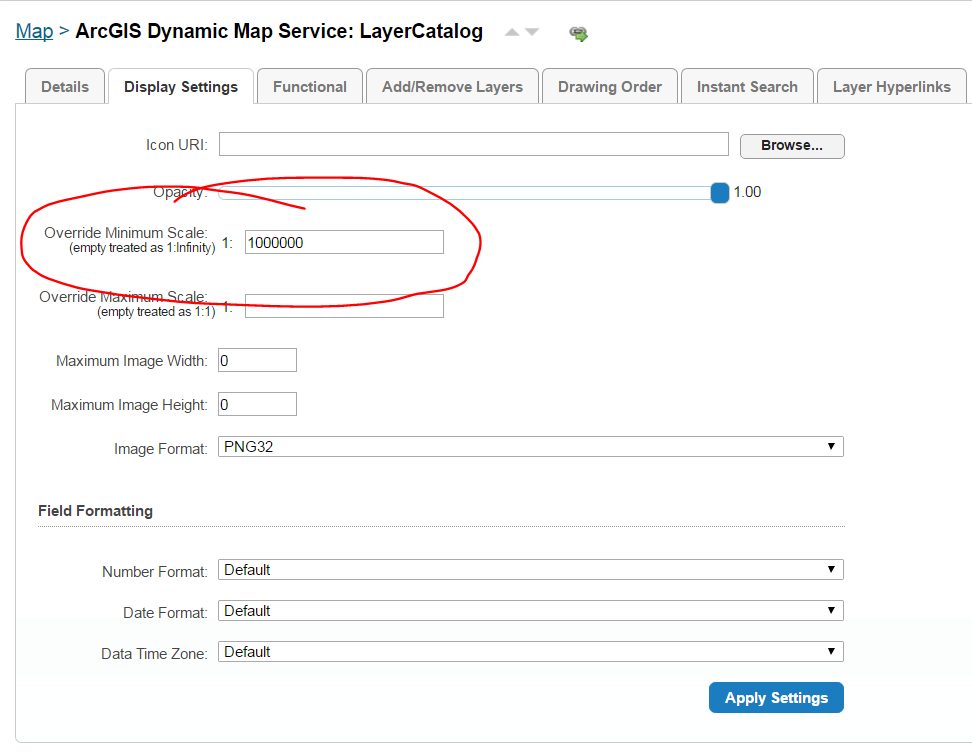
Try setting the display setting "override minimum scale" to 1,000,000 (or something like this so you will see the layer when you are zoomed out really far) for the map service.
Initially I set the visible scale for all layers with a minimum of 1,000,000 but it did not work, so then I tried the first thing I mentioned and it now allows me to identify all the layers. I'm still testing and hope this has fixed the issue.
Thanks
Jen0 -
 0
0
Du måste logga in om du vill lämna en kommentar.
Kommentarer
12 kommentarer